


SAP n8n Agentic Workflows
Enterprise AI is moving from helpful chat to governed action.
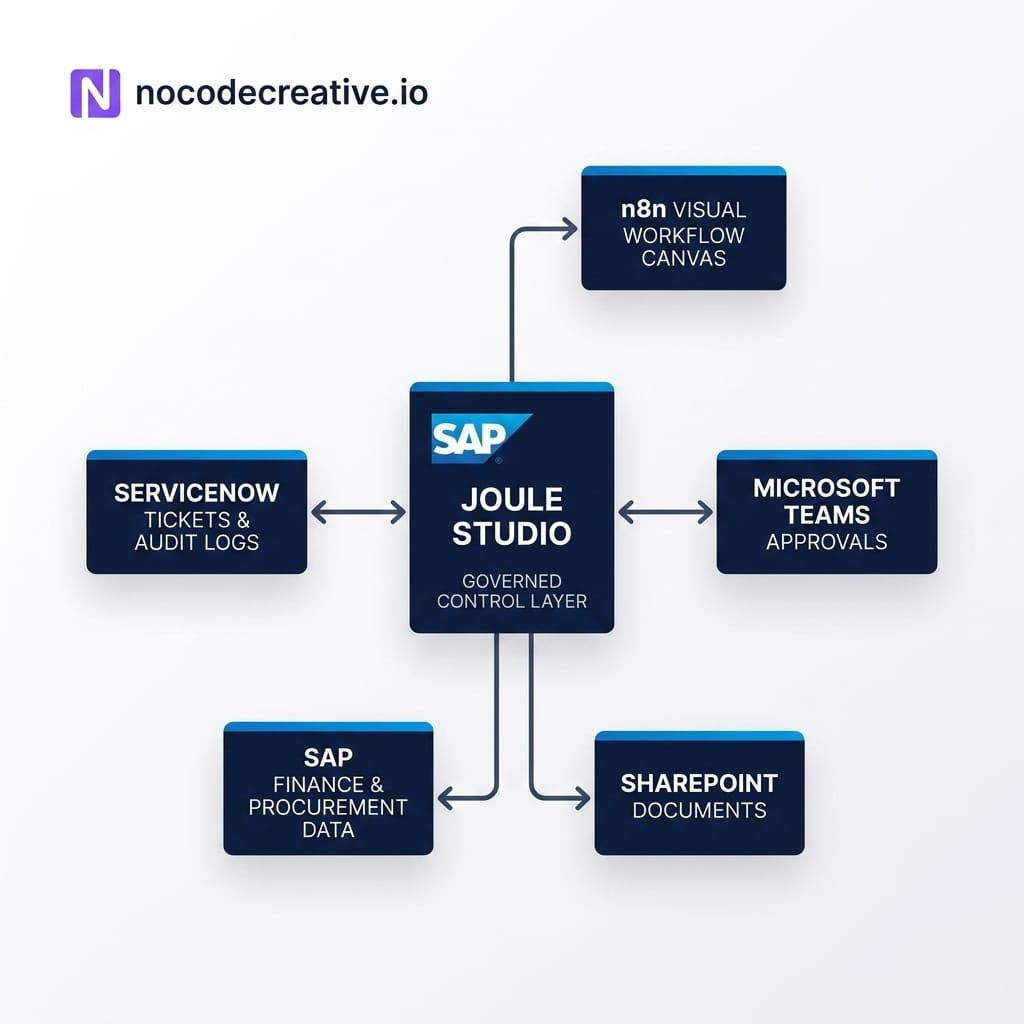
SAP’s Sapphire 2026 announcements point to a clear direction: AI agents that can work inside real business processes, not just answer questions beside them. The SAP n8n partnership matters because it brings visual workflow orchestration into Joule Studio, giving developers and technical business teams a way to connect agents, approvals, APIs, deterministic logic and audit trails without starting from a blank codebase.
At nocodecreative.io, this is exactly the kind of practical AI and automation layer we help teams design: n8n workflows, Microsoft 365 approvals, application interfaces, Azure integration patterns and secure AI agents that support people rather than surprise them.
The shift from AI copilots that answer to AI workflows that act
The first wave of enterprise AI was mostly about conversation. Users asked a model to summarise a document, draft an email, explain a report or retrieve a policy. Useful, yes. Transformative in the day-to-day mess of operations, not always.
The next wave is more interesting because it moves closer to execution. Instead of asking an AI assistant what to do about an invoice mismatch, a team can design a supervised workflow that detects the mismatch, gathers SAP context, checks policy thresholds, drafts a recommendation, routes the decision to the right person in Microsoft Teams and records the final outcome.
That is a very different design problem. It is not enough for the agent to be clever. It must be grounded in the right business data, restricted by permissions, observable when things go wrong and boringly reliable around approvals.
Boring is a compliment here. Finance, procurement and asset management teams rarely wake up hoping for more surprises.
This is where SAP n8n agentic workflows become worth watching. SAP brings the enterprise system of record, business semantics, governance and runtime direction. n8n brings the visual workflow canvas, integration style and orchestration layer that many automation teams already understand.
What SAP announced at Sapphire 2026
At SAP Sapphire 2026, SAP introduced its broader Autonomous Enterprise direction, including SAP Business AI Platform, SAP Autonomous Suite, Joule Work and Joule Studio. The important point is not that every business process suddenly becomes autonomous overnight. It is that SAP is packaging AI agents, workflows and applications into a more governed enterprise development model.
Joule Studio is positioned as SAP’s AI-first environment for building custom AI agents, applications and workflows. SAP describes it as supporting no-code, low-code and pro-code development, with managed runtime, identity, access control, observability and governance built into the platform. SAP also highlights business grounding through SAP Knowledge Graph, SAP domain models and SAP process context.
The n8n partnership sits inside this picture. n8n says it will be available as a fully managed environment inside Joule Studio on SAP Business AI Platform, allowing SAP developers to build AI workflows and orchestrate agents visually across SAP and non-SAP systems. n8n also says SAP-specific nodes are in development, with general availability planned for Q3 2026.
Strategic Timing: As of 30 June 2026, this should be treated as an architecture direction and implementation planning opportunity, not a reason to rip out your integration layer tomorrow morning. The practical move is to identify the SAP-adjacent workflows that are already leaking into email, spreadsheets, Teams chats, ServiceNow tickets and SharePoint folders, then prototype safe, supervised versions.
Where n8n fits inside Joule Studio
n8n’s role is orchestration. It gives teams a visual way to join triggers, conditions, approvals, API calls, AI steps, error handling and retries into an executable flow.
That matters because agentic systems need more than a prompt. They need deterministic rails around probabilistic reasoning. A sensible n8n workflow might include an AI step to classify an exception, but still use fixed business logic to check approval thresholds, route high-risk items to a named approver, stop unsafe actions and write structured logs.
In the SAP context, n8n’s value is likely to sit around the edges of core enterprise processes. Think procurement exceptions, finance close triage, maintenance work order drafting, analyst self-service and cross-system approvals. These are areas where teams need SAP context but also need to interact with Microsoft 365, ServiceNow, data warehouses, ticketing systems and internal applications.
There will still be a place for SAP Integration Suite, Azure Logic Apps, Power Automate and existing middleware. In many organisations, the right answer will be a hybrid architecture rather than a single tool. For example, Azure Logic Apps already has SAP connector patterns for workflows that need to communicate with SAP systems, while Power Automate Approvals can handle familiar approval experiences across Microsoft tools.
The real question is not “Power Automate vs n8n” in the abstract. It is which layer should own which part of the workflow. Power Automate may be the right front door for a Microsoft-native approval. n8n may be the right orchestration canvas for multi-step agentic logic. SAP may remain the system of record and governance anchor.
Why governance matters more than the chatbot interface
A chatbot interface is easy to demo. Governance is what decides whether the system survives contact with audit, security and real users.
Four Core Controls for SAP-Heavy Organizations
1. Identity and Permissions
The workflow should only retrieve and act on data the user or service account is allowed to access. This is especially important for finance, HR, procurement and commercially sensitive data.
2. Human Approval
High-impact actions should not be posted automatically just because an AI model produced a confident paragraph. Human-in-the-loop automation means the system can prepare, summarise and recommend, while a responsible person approves, rejects or edits before the action is committed.
3. Observability
Teams need to know what triggered the workflow, what data was used, which model or agent produced a recommendation, who approved it and what was written back to SAP or another system.
4. Failure Handling
A good workflow has retries, fallbacks, dead-letter queues or ticket creation when something goes wrong. “The agent got stuck” is not an operational process.
This is why SAP n8n agentic workflows are more useful when framed as supervised automation rather than full autonomy. Start with guardrails. Earn trust. Then gradually reduce manual handling where the data supports it.
A practical architecture pattern for SAP and Microsoft teams
For many SMEs, mid-market organisations and enterprises, the first useful pattern will look something like this:
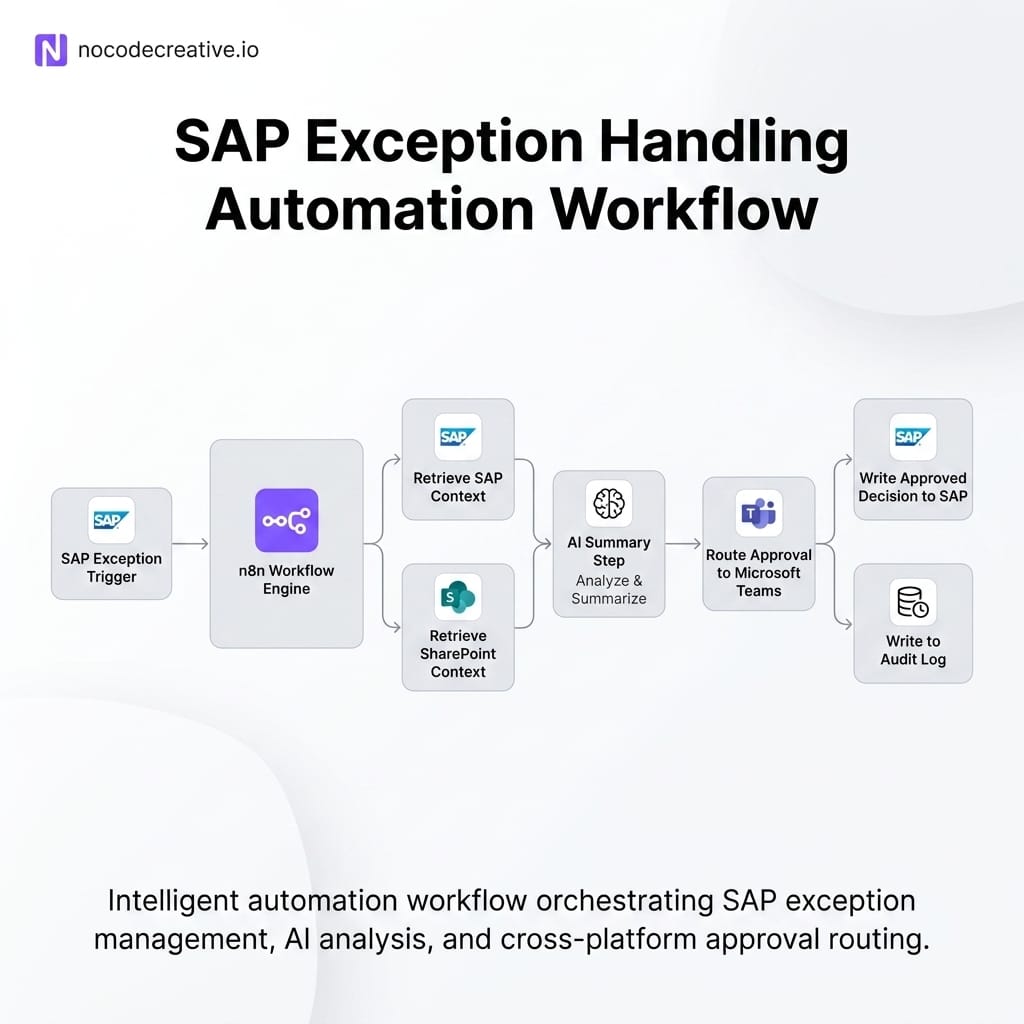
An event happens in or near SAP. It may be a purchase requisition exception, invoice mismatch, reconciliation issue, service ticket or asset alert. A workflow is triggered through SAP-native capability, Azure Logic Apps, n8n, a webhook, scheduled polling or an integration layer.
The workflow retrieves context from SAP, approved data stores or documents in SharePoint. An AI step summarises the issue and proposes a next action. Deterministic rules check thresholds, risk flags and routing logic. The result is sent to Microsoft Teams, Outlook, Power Automate Approvals or a custom app for human review. Once approved, the workflow writes the outcome back to SAP, SharePoint, a reporting table or a ticketing system.
That gives users a familiar Microsoft front door, while keeping SAP as the business context and system of record. It also gives automation teams a clean place to add audit logging, exception handling and process metrics.
If your team wants help designing this kind of architecture, our AI and automation consulting services cover n8n, Microsoft 365, application development, Azure and secure workflow design for real operational processes.
Procurement exception approvals in Teams
Procurement is a strong starting point because it is full of structured rules and messy exceptions.
A purchase requisition might exceed a threshold, involve a supplier risk flag, miss a budget code or conflict with a policy. Today, that exception may be copied into an email thread, discussed in Teams and resolved by someone who has to jump between SAP Ariba, spreadsheets and old approvals.
A supervised agentic workflow could make this much cleaner. The workflow retrieves the requisition context, supplier information, policy rules and previous similar decisions. The AI step summarises the issue in plain English and drafts a recommendation. The deterministic layer checks whether the request is above a value threshold, whether procurement or finance needs to approve and whether legal review is required.
The approver then receives a Teams approval card with the key facts, source links, suggested decision and risk flags. Once they approve, reject or request more information, the workflow writes the decision back to SAP, logs the rationale and updates a reporting dashboard.
This is a good first n8n workflow because it is valuable, visible and controllable. It does not require giving an agent free rein over procurement. It simply removes the copy-and-paste admin around decisions humans already make.
Finance close exception triage
Month-end close is another excellent candidate, mostly because finance teams have already developed a heroic tolerance for spreadsheets.
During close, reconciliation issues, journal entry errors, intercompany mismatches and missing approvals create queues of exceptions. The work is often repetitive, but the risk of getting it wrong is high. That makes it a good fit for AI-assisted triage with human approval.
An SAP n8n agentic workflow could collect close exceptions, group them by type, retrieve historical resolutions and draft recommended next actions. Low-risk informational items could become tasks. Higher-risk corrections could be routed to a finance approver. Power BI or another reporting layer could track exception volumes, cycle times, recurring root causes and bottlenecks.
The important design choice is to separate recommendation from posting. The AI can explain what it thinks is happening. The workflow can prepare the next step. A finance owner should still approve anything that affects financial records until the organisation has enough evidence, governance and confidence to automate further.
This is where our property management automation case study is relevant. Although it is not an SAP project, the pattern is familiar: disconnected systems, accounting-related manual work and avoidable data entry errors reduced through practical automation.
Maintenance work order drafting from asset history
SAP’s own Sapphire materials referenced asset management scenarios where agents analyse past incidents, identify likely root causes and generate pre-filled work orders. That pattern is highly relevant for manufacturers, utilities, logistics operators, facilities teams and asset-heavy organisations.
A realistic implementation should start with drafting, not dispatching.
The workflow might ingest an equipment incident, IoT alert, inspection note or ServiceNow ticket. It then retrieves asset history from SAP, searches relevant maintenance documents and checks known failure patterns. The AI step drafts a work order with likely root cause, recommended tools, parts, safety notes and suggested priority.
A supervisor reviews the draft in Teams or a maintenance dashboard. They can approve it, edit it or send it back for more information. The final approved work order is then created in SAP, with the AI recommendation and human decision stored for audit and future improvement.
This is more complex than procurement approval because asset data, safety requirements and operational impact can vary widely. It is still a powerful place to start if the workflow is designed with human review, clear confidence thresholds and robust fallback paths.
Governed SAP data self-service for analysts
Analysts often need SAP data, but the official route can be slow. The unofficial route can be worse: exports, shared spreadsheets, stale files and mystery numbers that somehow become board reports.
A governed self-service workflow can help. A user asks for a KPI pack, variance explanation or extract through Teams, SharePoint or an internal app. The workflow validates who they are, checks permissions, asks clarifying questions if needed and queries approved SAP or warehouse sources. It then creates a summary, saves supporting files to SharePoint and logs the request.
For ambiguous or sensitive requests, the workflow routes to a data owner. For standard requests, it returns the answer with lineage and caveats.
This is not about bypassing IT. It is about giving business users a faster route through IT-approved paths. Done well, it reduces shadow reporting rather than encouraging it.
What to prototype now and what to wait for
The best immediate opportunities are not the most autonomous ones. They are supervised workflows with clear business value, contained risk and visible handoffs.
✅ Prototype now where:
- The workflow already exists informally in email, Teams, spreadsheets or tickets
- The decision rules are mostly known
- The AI step can summarise, classify or draft rather than directly commit
- Human approval is easy to insert
- The audit trail is valuable
⚠️ Wait, or proceed carefully, where:
The workflow requires deep SAP-native nodes that are not yet generally available, touches high-risk financial posting, affects safety-critical operations or needs complex identity and data residency design that has not been agreed.
This is also the right time to map integration ownership. Some organisations will use n8n as the orchestration layer. Others will keep Azure Logic Apps or SAP Integration Suite for core integration and use n8n for agentic workflow composition. Microsoft Copilot for SMEs and Power Platform may still be the preferred user-facing layer where teams live in Teams, Outlook and SharePoint.
A calm architecture beats a fashionable one.
Implementation checklist for enterprise teams
Before building, align the workflow around business risk rather than tool excitement. A simple checklist helps:
- ✓ Define the business event that starts the workflow
- ✓ Identify the SAP and non-SAP data needed
- ✓ Decide which actions are AI-assisted and which are deterministic
- ✓ Place human approval before irreversible or high-risk steps
- ✓ Design audit logging before the pilot goes live
- ✓ Confirm identity, access and data retention rules
- ✓ Test failure paths, retries and escalation
- ✓ Measure cycle time, exception volume and manual touches removed
This is also where an implementation partner can save time. The difficult work is rarely drawing the first workflow. It is choosing the right first workflow, designing the approval matrix, connecting SAP and Microsoft systems safely, keeping the user experience simple and ensuring the pilot does not become yet another impressive demo that nobody trusts.
At nocodecreative.io, our intelligent workflow automation services are designed for exactly this middle layer: practical AI agents for operations, n8n automation, application interfaces, Azure integration and governance patterns that real teams can maintain. Our festival operations app case study shows the same principle in a different setting: digitise the messy handoffs first, then build better visibility and control on top.
How to de-risk SAP, n8n and Azure adoption
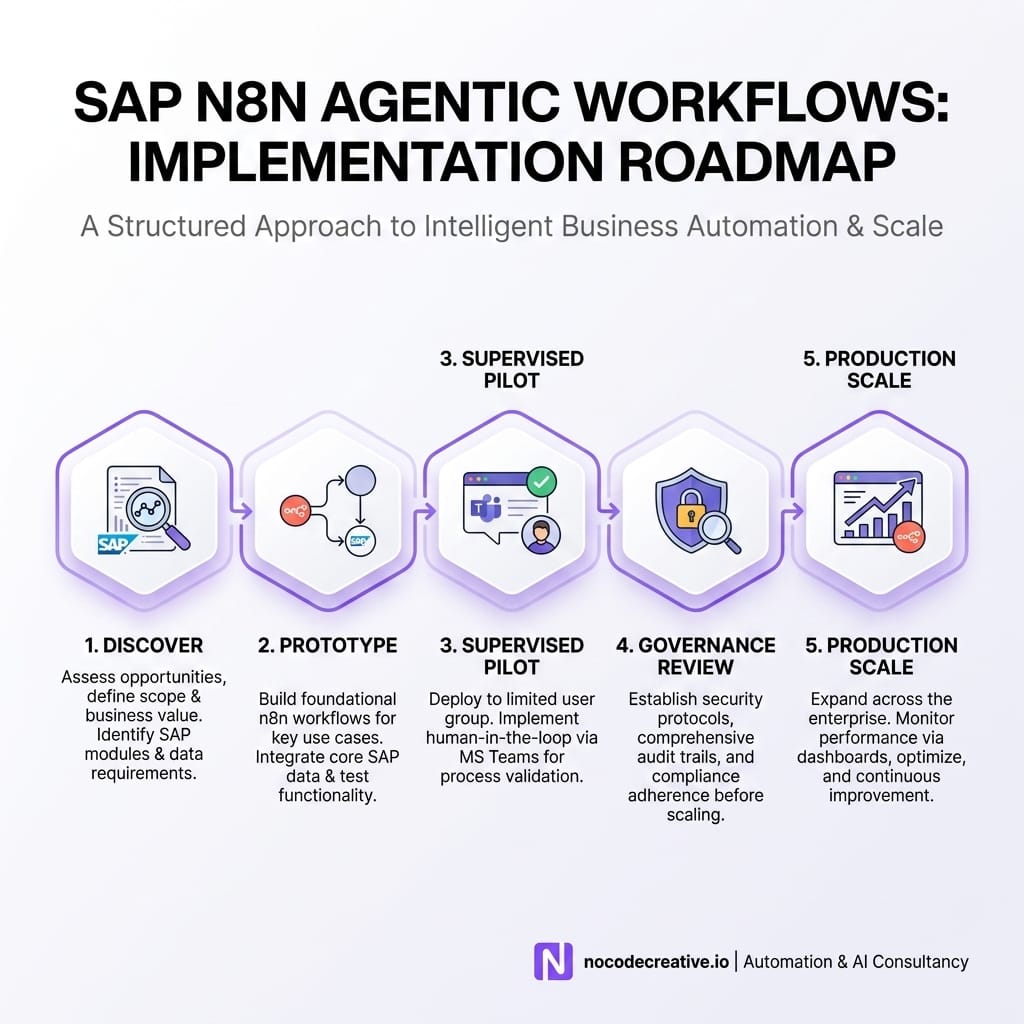
The safest route is to treat SAP n8n agentic workflows as a staged capability.
Start with one process. Keep the scope narrow. Use existing Microsoft surfaces where users already work. Make the workflow explainable. Log every decision. Give humans an easy way to approve, reject or correct outputs. Review the data after a few weeks and decide what can be automated further.
For many organisations, this will become a reference architecture: SAP context, n8n orchestration, Microsoft front door, Azure integration where needed and human approval at the points of risk. Once that pattern is proven, it can be reused across procurement, finance, operations, HR, customer service and asset management.
The SAP and n8n partnership is a useful signal because it validates what many automation teams have already learned: enterprise AI needs orchestration, not just conversation. The organisations that benefit most will be the ones that start with practical, governed workflows and scale from there.
Our expert AI consultants can help you implement these governed workflows.
References
- SAP Unveils the Autonomous Enterprise
- n8n Partners with SAP to Bring Visual AI Workflow Orchestration to Enterprise
- n8n SAP Partnership
- Announcing New Joule Studio for Enterprise Scale Agentic Development
- Joule Studio Product Page
- Joule Studio Reference Architecture
- SAP Sapphire 2026 Innovation News Guide
- n8n Docs
- n8n Human-in-the-Loop Automation Guide
- Microsoft Learn: Connect to SAP from Workflows in Azure Logic Apps
- Microsoft Learn: Approvals Connector



Discussion