
n8n Skills: Faster Builds, Safer Delivery
AI coding agents can now help build n8n workflows without treating the platform like an unfamiliar JSON puzzle.
Official n8n Skills gives agents such as Claude Code and Codex focused guidance for designing, editing and validating workflows through n8n’s Model Context Protocol (MCP) server. At nocodecreative.io, this fits a practical delivery model we increasingly see: let AI accelerate the build, while people retain control over architecture, credentials, testing and production releases.
The result is not fully autonomous automation development. It is a faster way to produce visible, inspectable workflows without falling back to a collection of standalone scripts that only one person understands.
The old trade-off between fast code and visible automation
A custom application programming interface (API) script can be quick to write. A developer connects two services, adds a few transformations and deploys it somewhere. For a small task, that may be entirely sensible.
The maintenance work arrives later. The team needs to know where the script runs, how credentials are stored, what happens when an API request fails, where logs live and who can safely change the business rules. A script that saved four hours of initial development can quietly create many more hours of operational detective work.
An n8n workflow takes a different approach. The integration remains visible on a shared canvas, with node configuration, credentials, execution history, error paths and reusable sub-workflows managed inside the automation platform. Custom JavaScript or Python can still be used where needed, but it sits within an observable process rather than becoming the whole process.
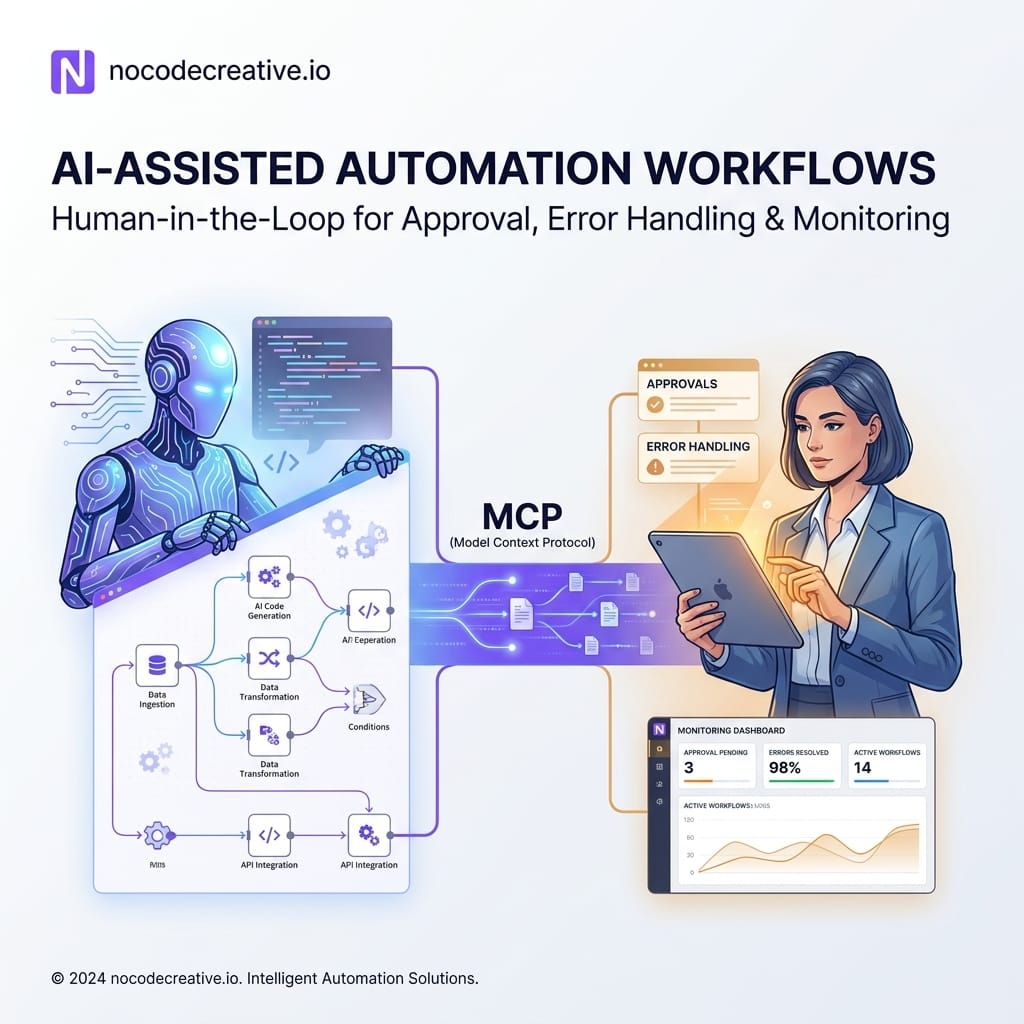
Official n8n Skills narrows the speed gap. A coding agent can draft or modify the workflow through MCP, while the final automation remains available for human review and ongoing operation in n8n.
This is particularly relevant for small and medium-sized enterprises that need technical flexibility without creating a large internal software maintenance burden.
What Official n8n Skills adds to Claude Code, Codex and MCP
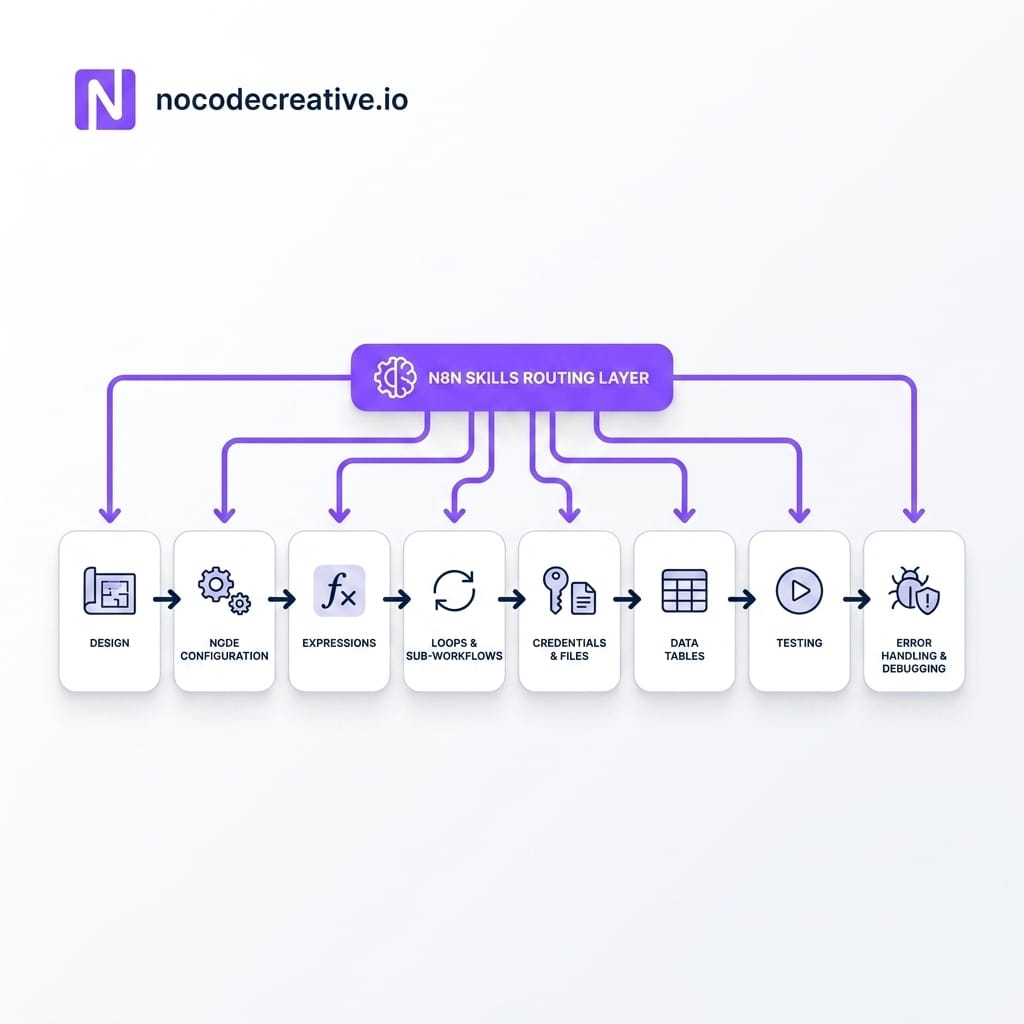
The official repository currently contains 13 task-specific capability skills, more than 50 reference documents and worked examples, plus a fourteenth meta-skill that routes the coding agent towards the right guidance. The repository also provides installation paths for Claude Code, Codex and other compatible coding-agent platforms. (github.com)
The instance-level MCP server is the connection layer
MCP provides a standard way for an AI application to interact with external tools and systems. In this case, n8n’s instance-level MCP server connects a coding agent to an n8n instance.
The server can expose tools for finding, creating, editing, testing and executing workflows. It also includes capabilities for working with Data Tables, projects and workflow validation. Building and editing workflows through the instance-level MCP server is documented for n8n version 2.13 onwards. (docs.n8n.io)
That connection is powerful, so access should be deliberate. n8n requires instance-level MCP access to be enabled, followed by explicit access for individual workflows. The search_workflows tool is an exception because it can surface previews of workflows available to the connected user, although it cannot retrieve their full contents without access being enabled. (docs.n8n.io)
Authentication is available through OAuth 2.0 or a personal access token. OAuth 2.0 is generally the cleaner choice for managed client access because administrators can review and revoke connected clients from n8n. (docs.n8n.io)
Skills replace generic prompting with task-specific guidance
Connecting an agent to MCP gives it tools. It does not automatically give the agent a reliable understanding of n8n expressions, node configuration, pagination, binary files or production error handling.
The skills fill that gap with focused Markdown instructions. Instead of placing every possible rule inside one enormous system prompt, the agent loads the relevant guidance when it reaches a particular task.
For example, an agent working on a paginated API can load the looping guidance. When handling an attachment, it can use the binary-data skill. If it needs to update a production-style webhook workflow, it can consult the error-handling and credential guidance first.
Key Insight: The aim is not to make mistakes impossible. It is to reduce avoidable errors caused by generic model knowledge, guessed node settings or incorrect expression syntax.
SessionStart and PreToolUse hooks add lightweight guardrails
The plugin includes a SessionStart hook that loads the entry protocol when a coding session begins. PreToolUse hooks then remind the agent to consult the appropriate skill before consequential MCP calls. Codex installation also uses post-tool reminders after its hooks have been reviewed and trusted. (github.com)
These hooks are useful, but they are guidance rather than security controls. They do not replace user permissions, credential restrictions, environment separation or human approval. A well-reminded agent with excessive production access is still an agent with excessive production access.
Installing the skills
For Claude Code, the repository currently provides these commands:
/plugin marketplace add n8n-io/skills
/plugin install n8n-skills@n8n-io
For Codex:
codex plugin marketplace add n8n-io/skills
codex plugin add n8n-skills@n8n-io
After restarting the coding agent, the plugin loads the skills automatically. Other platforms can use a standard skills installation, although compatibility varies and additional project instructions may be needed to load the routing meta-skill consistently. (github.com)
Installation is the easy part. Deciding what the agent can access, how changes are tested and how approved workflows reach production is the real implementation work.
What the skills cover across the workflow lifecycle
The 13 capability skills span workflow design, reusable sub-workflows, expressions, node configuration, Code nodes, loops, AI agents, error handling, credentials, binary data, Data Tables and debugging. There is also guidance for extending workflows when the existing MCP tools do not cover a required capability. (github.com)
Design, expressions, nodes and sub-workflows
A useful n8n workflow needs more than nodes connected in roughly the right order. It needs clear boundaries, predictable data structures and reusable components.
The workflow lifecycle and sub-workflow skills encourage the agent to separate common activities such as data validation, customer lookup, notification delivery and audit logging. This matters when several automations share the same business logic.
Expressions and node configuration receive their own guidance because small mistakes can be surprisingly disruptive. A misplaced reference to $json, an incorrect node name or a field mapped from the wrong item can produce a workflow that looks complete but fails with real data.
Credentials, files, Data Tables and AI agents
Credential guidance helps the coding agent work with n8n’s credential model rather than embedding secrets inside prompts, Code nodes or workflow JSON. The implementation team must still decide which service accounts exist, which users can select them and whether development credentials can access production data.
Binary-data guidance covers files, images and attachments. That is useful for document-heavy processes such as invoice intake, contract processing and support email automation.
Data Tables can provide workflow-accessible persistent state for deduplication, configuration or operational queues. The MCP toolset includes operations for searching and creating Data Tables, with table-creation support documented from n8n version 2.16. (docs.n8n.io)
The AI-agent skill covers areas such as tools, system instructions and structured output. It should still be paired with confidence thresholds, deterministic validation and human escalation when an automated decision could affect a customer, supplier or employee.
Debugging and validation before release
The MCP tools reference includes workflow testing, workflow validation and node-configuration validation capabilities. It also documents targeted workflow updates rather than requiring every change to rewrite the entire workflow. (docs.n8n.io)
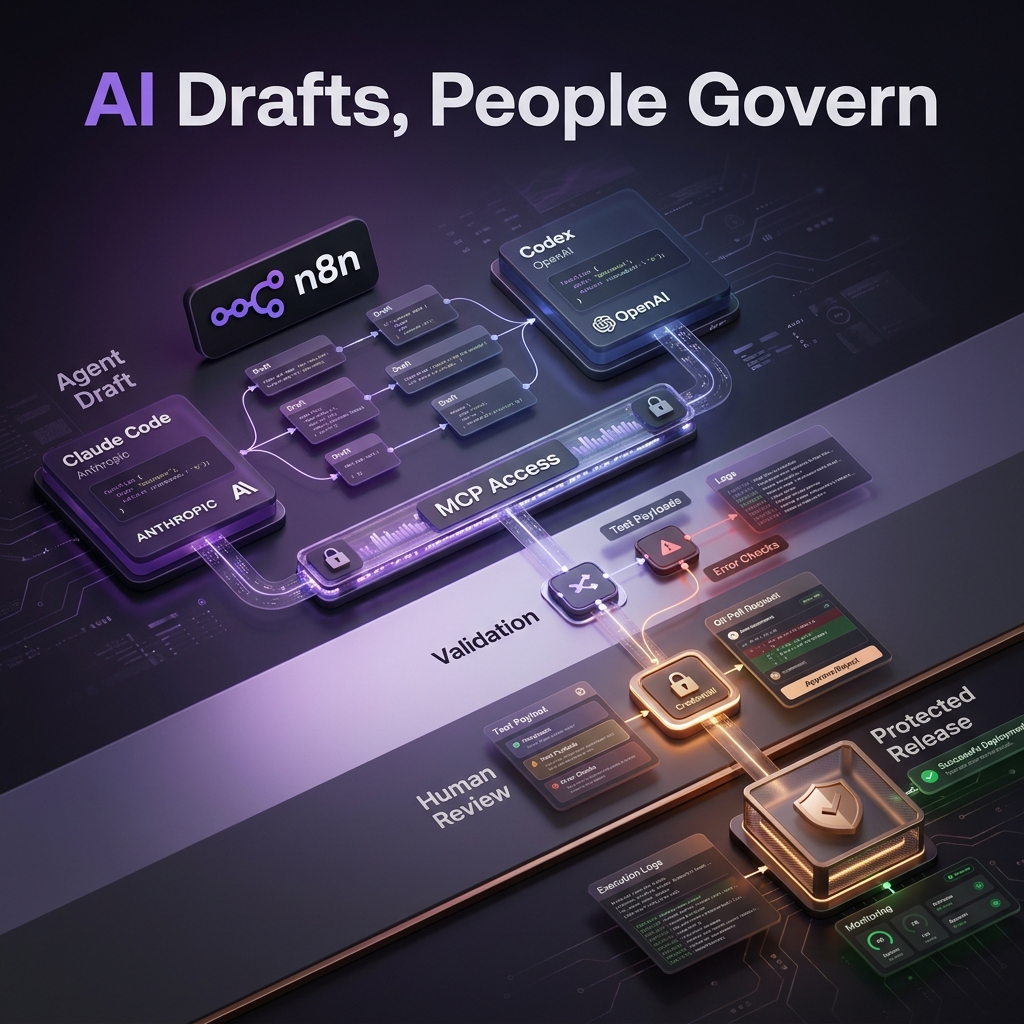
This creates a highly efficient, iterative development loop:
- Draft & Update: The agent drafts or updates the workflow based on requirements.
- Validate: Validation tools identify structural or node-level problems instantly.
- Test: Test payloads exercise both expected and unexpected inputs.
- Review: A person reviews the business logic and real execution results.
- Release: Approved changes move confidently through the structured release process.
The agent can accelerate each loop, but it should not approve its own interpretation of the business requirements.
A practical model: the agent drafts, people govern, n8n operates
The safest operating model is straightforward.
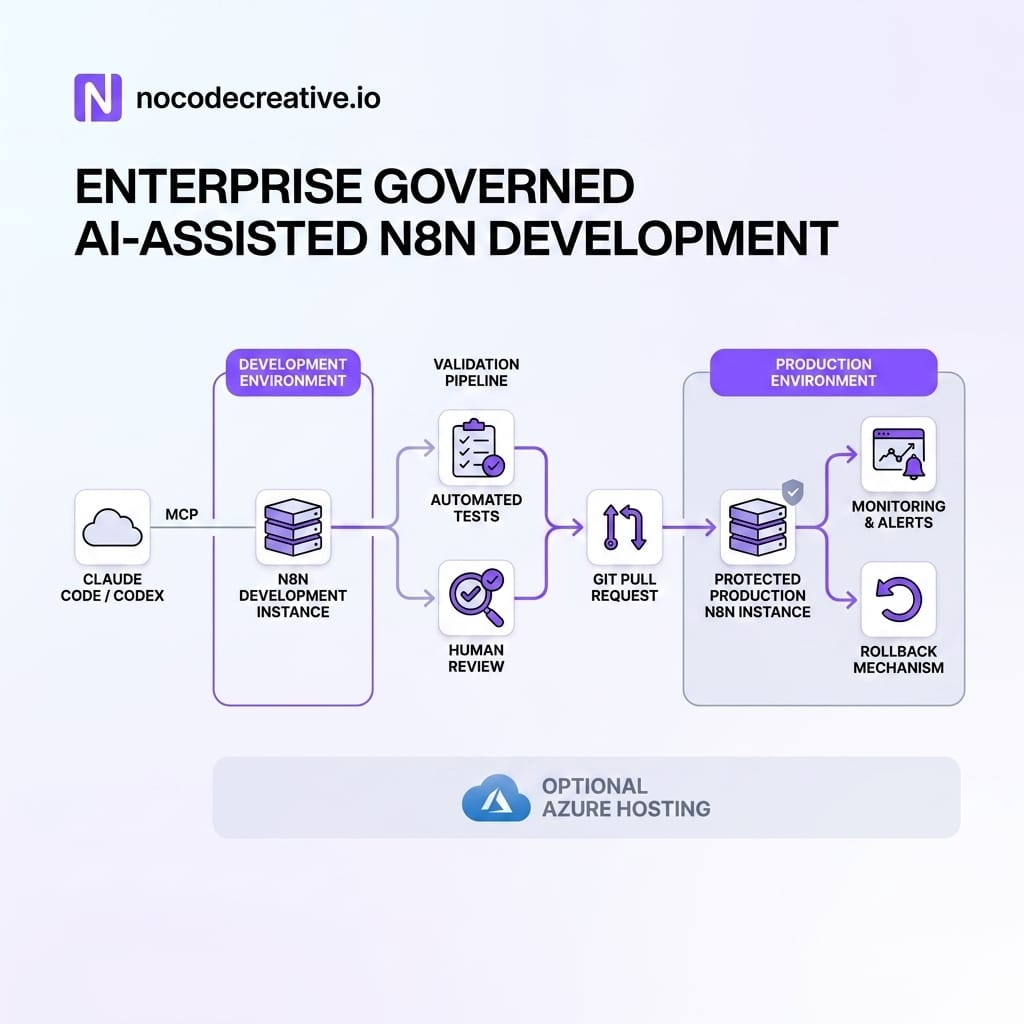
The coding agent works against a development n8n instance. It receives access only to workflows relevant to the project, using a dedicated user identity where possible. It drafts the workflow, adds documentation and runs validation or controlled tests.
A human reviewer checks field mappings, decisions, credentials, external actions, error paths and expected outputs. Production changes then move through a separate release process.
This separation is especially important because instance-level MCP access is not configured independently for every connected client. n8n’s documentation states that connected clients can see workflows enabled for MCP access, subject to the permissions of the underlying user. A dedicated development instance and tightly scoped account therefore provide a stronger boundary than relying on prompts alone. (docs.n8n.io)
Teams that want help designing this operating model can explore nocodecreative.io’s n8n and intelligent workflow automation services. We can help structure the MCP connection, reusable workflow standards, credential model, testing approach and controlled deployment path without giving an agent the keys to every process in the building.
Four workflows worth implementing first
Operations intake to fulfilment
A strong first use case is converting an approved proposal, order or request into an operational delivery process.
The coding agent can draft an n8n workflow that validates the incoming data, creates records in a customer relationship management system, opens a delivery project, notifies the responsible team and writes an audit record to a Data Table.
The implementation team should provide a reusable intake schema, naming conventions, standard error workflow and approved sub-workflows for common actions. This turns the agent into a builder working within established patterns rather than an enthusiastic intern inventing a new architecture every afternoon.
Our property management automation case study shows the broader value of connecting previously disconnected operational and accounting processes while reducing manual data entry. (blog.nocodecreative.io)
Support triage and escalation
A support workflow can classify inbound messages, retrieve customer information, check a knowledge base and route urgent cases.
The important design decision is not the classification model. It is what happens when the model is uncertain, an integration fails or the customer meets an escalation rule.
The n8n workflow should use structured outputs, confidence thresholds and a visible human-review branch. Retries should be limited, and repeatedly failing items should move to a separate exception queue rather than disappearing into execution history.
Agent-assisted changes can make iteration faster, but customer-facing routing rules should still require review before publication.
Finance document and exception processing
Finance automation often combines email, files, data extraction, supplier records and approval rules. It is a useful fit for the skills covering binary data, expressions, credentials, loops, Data Tables and error handling.
A reusable n8n workflow might receive an invoice, extract key fields, validate the supplier and amount, compare the document with purchasing data and route exceptions to an approver.
The AI component should assist with extraction or classification. Deterministic checks should handle totals, tax fields, duplicates and approval limits. In the UK, this may include Value Added Tax requirements, while US implementations may need state-specific sales tax or accounting controls.
The AI and n8n nutrition case study demonstrates a related implementation pattern: AI interprets complex input, while n8n coordinates the wider data and application workflow. (blog.nocodecreative.io)
Git-governed automation delivery
The fourth workflow is the delivery process itself.
n8n’s source-control environments can connect development and production instances to Git branches. In a multi-branch model, changes are pushed from development, reviewed through a pull request and then pulled into a protected production instance. This capability is currently documented for Business and Enterprise plans. (docs.n8n.io)
A coding agent can prepare workflow changes and supporting documentation in development. It should not merge the pull request, publish the workflow and declare its own work excellent.
That final separation gives operations and information technology teams a traceable path from requested change to reviewed release.
A reference implementation for real teams
A practical architecture begins with a development n8n instance connected to Claude Code or Codex through MCP. The official skills are installed in the coding-agent workspace, and only selected development workflows are made available.
Reusable sub-workflows provide standard validation, notifications, audit logging and error handling. Test payloads cover normal transactions, missing fields, duplicate events, API failures and unexpectedly large files.
Credentials are separated by environment. The development instance uses test accounts or restricted service identities. Production credentials remain inside the production n8n environment and are not copied into prompts, repositories or agent configuration files.
Approved workflows move through Git where n8n’s source-control feature is available. Production can be configured as a protected instance to reduce accidental editing. Monitoring then covers workflow failures, unusually long executions, repeated retries and growing exception queues. (docs.n8n.io)
n8n also provides a security audit that reports potential risks across credentials, database queries, file-system access, nodes and instance configuration. It can be run through the command-line interface, public API or an n8n node. This is a useful operational check, although it should complement rather than replace a wider security review. (docs.n8n.io)
Where an implementation partner adds value
The official skills help an agent understand how to build. They do not decide how your organisation should operate automation safely.
That requires decisions about hosting, identity, networking, credential ownership, reusable workflow standards, test coverage, monitoring, backups and release responsibilities. For Azure-based organisations, it may also involve designing container hosting, storage, logging and private network access around the n8n deployment.
An implementation partner can turn the repository into a repeatable delivery system rather than another interesting tool installed on a developer’s laptop.
This is the approach behind nocodecreative.io’s AI, automation and application development work, including operational systems such as the ScranQR festival management platform, where visible workflows, applications and reporting replaced manual administration. (blog.nocodecreative.io)
Start with one governed process
The best starting point is not an agent that can modify every workflow in the organisation.
Choose one high-volume process with clear inputs, measurable outputs and a named business owner. Build it in development, define the reusable standards, test the awkward cases and document how changes reach production.
Once that delivery model works, the team can expand agent-assisted workflow development with greater confidence. The real advantage of n8n Skills is not merely faster workflow generation. It is the opportunity to combine coding-agent speed with automation that remains visible, reviewable and maintainable.
Our expert AI consultants can help you implement these workflows.
Get in touch to discuss your automation needs.
References
- Official n8n Skills repository
- Set up and use the n8n instance-level MCP server
- n8n MCP server tools reference
- Create n8n environments with source control
- n8n security audit documentation
- Community template for using skills in an n8n Agent node
- Community video guide to using GitHub skills in an n8n AI agent



Discussion