

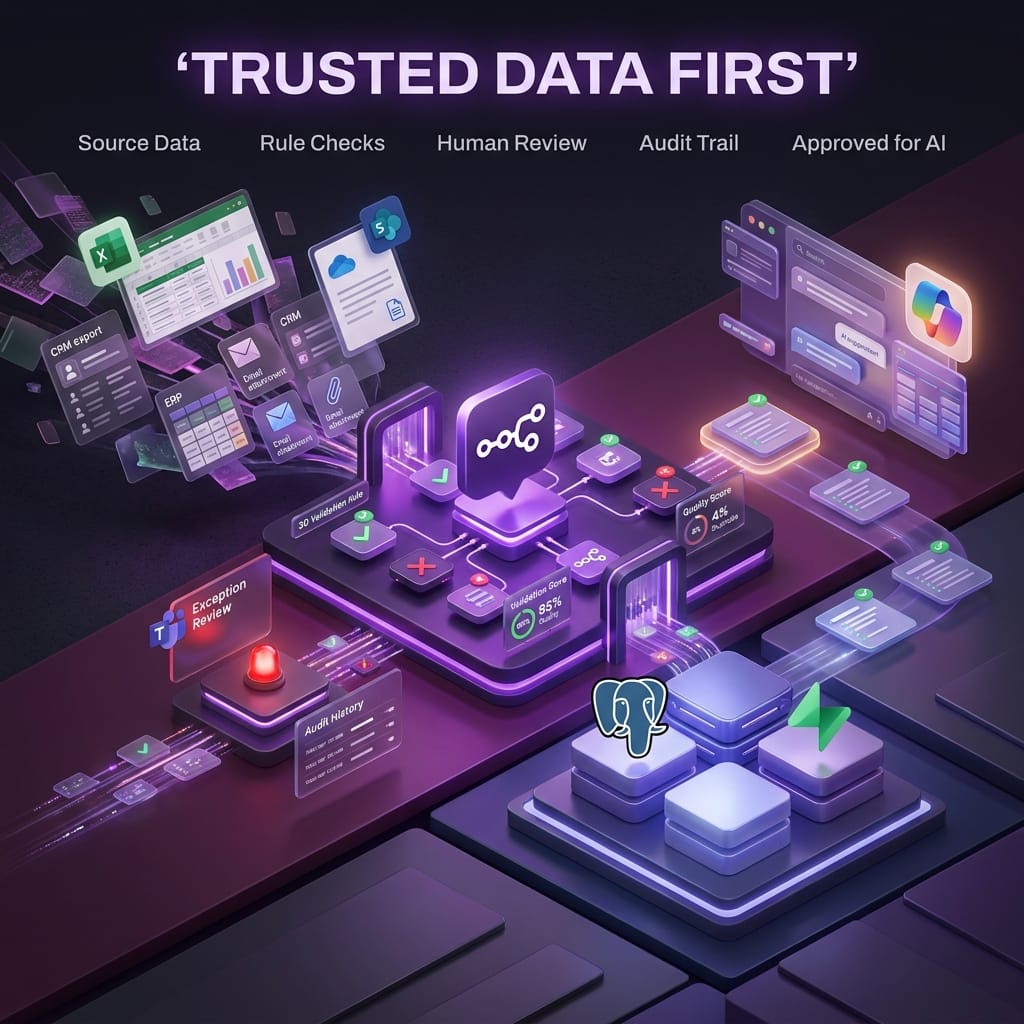
Build AI-Ready Data First
AI-ready data is the quiet bit of automation that makes the impressive bit work.
At nocodecreative.io, we see this pattern repeatedly with clients preparing for AI agents, reporting automation, Microsoft Copilot, and n8n workflow rollouts. The temptation is to start with the assistant, chatbot, or dashboard. The better first move is often simpler: build a data readiness workflow that checks whether the information going into those tools can actually be trusted.
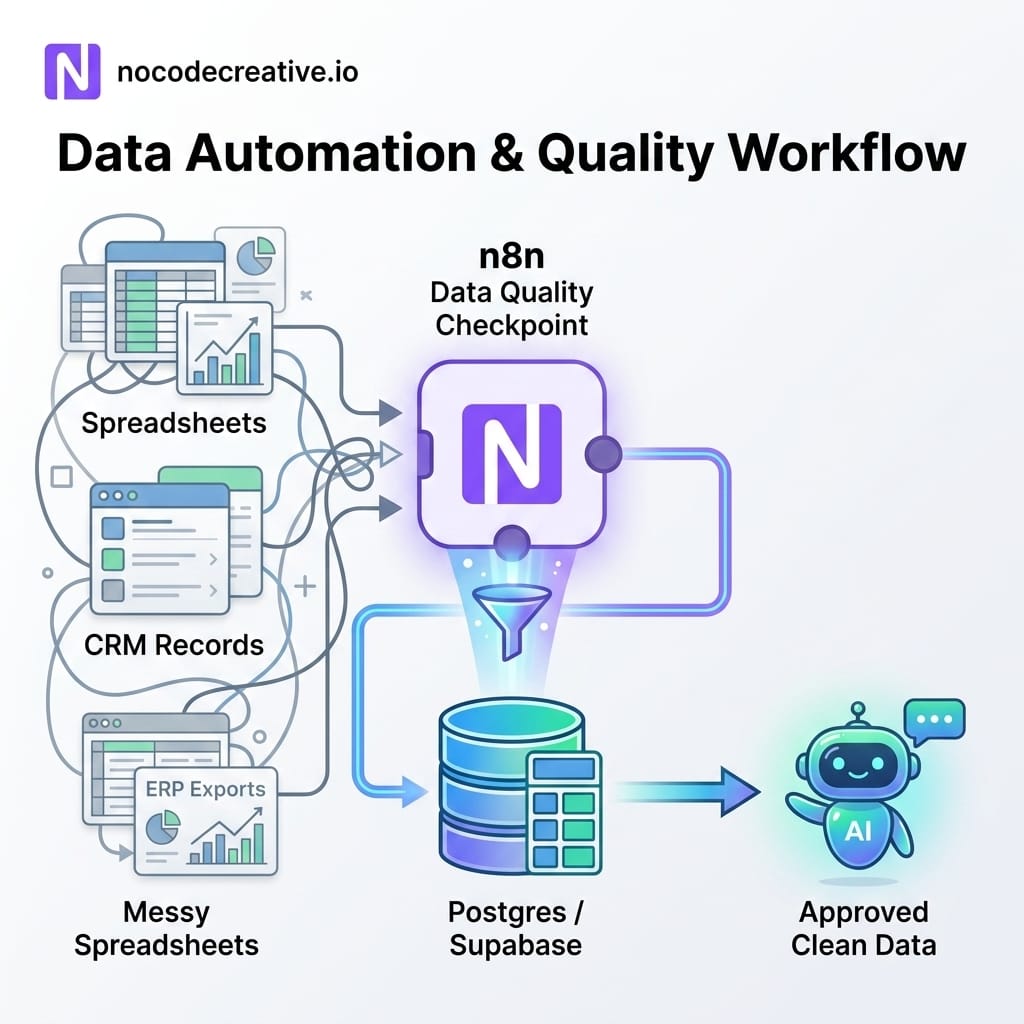
Messy data makes AI automation risky
Artificial intelligence, or AI, has become much easier to add to business workflows. Large language models, often shortened to LLMs, can summarise documents, draft replies, classify support tickets, interpret invoices, and answer questions from internal knowledge bases.
The Awkward Truth: AI can make bad data look more polished. A confident answer based on flawed data is still a wrong answer.
If a spreadsheet contains duplicate customers, missing invoice numbers, stale product records, inconsistent supplier names, or broken account identifiers, an AI tool may still produce a confident answer. It might write a lovely email to the wrong contact. It might summarise a finance report using incomplete figures. It might suggest a stock decision based on outdated inventory data. The output can look clean while the underlying data is quietly waving a red flag from the corner.
The Manufacturer recently made the same point for manufacturing businesses: AI projects depend on high-quality data, governance, and human oversight, not technology alone. That applies well beyond manufacturing. Whether you are running a customer relationship management system (CRM), an enterprise resource planning platform (ERP), Microsoft 365, SharePoint lists, Excel workbooks, finance exports, or a mixture of all of the above, your first AI project should often be a practical inspection layer.
This is not as glamorous as launching an AI agent on day one. It is, however, much less likely to make your finance team wince.
What AI-ready data actually means
AI-ready data does not mean perfect data. Perfect data is a mythical beast, usually spotted just after a workshop and never again in production.
A more practical definition is data that is good enough for a specific workflow, with known rules, known exceptions, and a clear owner when something looks wrong. Common data quality dimensions include accuracy, completeness, consistency, timeliness, uniqueness, and validity. In plain English, that means records should be correct, contain the required fields, follow the same naming and formatting rules, be current enough for the task, avoid unnecessary duplication, and conform to expected formats.
For example, a sales follow-up workflow might require every active customer record to have a valid email address, a company name, a contact owner, a last-contact date, and a single canonical account ID. A finance reconciliation workflow might require invoice number uniqueness, valid supplier IDs, correct value added tax (VAT) fields, dates within an acceptable range, and matching purchase order references.
These checks should not start with an LLM. They should start with deterministic rules. A deterministic rule is a fixed check that gives the same result every time, such as “invoice number must not be blank”, “currency must be GBP, USD, or EUR”, or “supplier ID must exist in the approved supplier table”. LLMs are useful later for explanation, triage, and assisting humans, but they should not be your first line of truth checking.
The reference architecture for an AI-ready data workflow
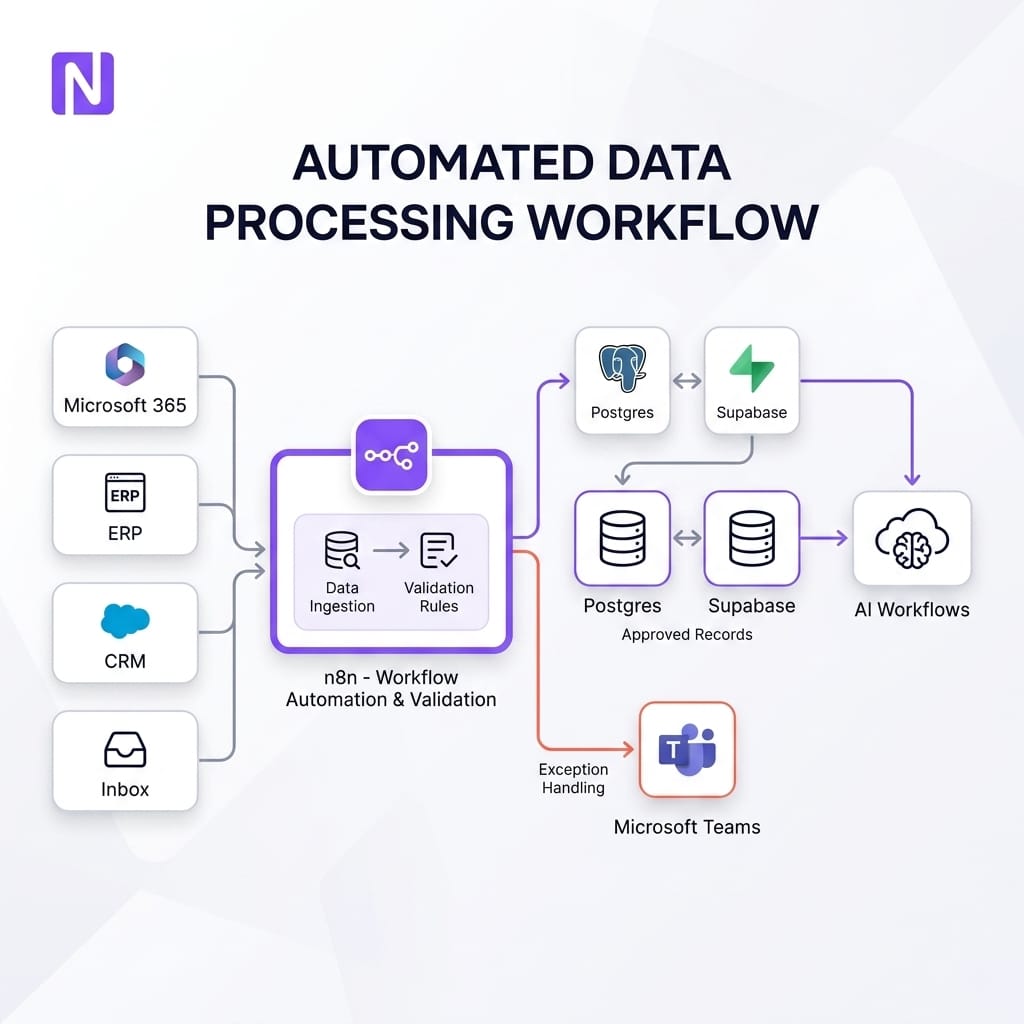
A practical architecture can be refreshingly straightforward. Here are the core components:
- ✦ Sources: Excel, SharePoint, email attachments, CRM exports, ERP exports, forms, databases, and knowledge base documents.
- ✦ Orchestration: n8n to ingest, transform, route, and schedule workflows.
- ✦ Validation store: Postgres or Supabase to hold canonical records, validation results, quality scores, and audit history.
- ✦ Exception queue: Microsoft Teams, email, Asana, or another work management tool for human review.
- ✦ AI layer: AI agents, reporting bots, Microsoft Copilot-style experiences, or retrieval systems that only use approved data.
n8n is a strong fit here because it can connect business systems, run scheduled workflows, call application programming interfaces (APIs), execute custom JavaScript or Python in the Code node, read Microsoft Excel data, work with Postgres, and send human review prompts through Microsoft Teams.
Postgres is useful because database constraints such as primary keys, foreign keys, unique constraints, not-null constraints, and check constraints can enforce rules close to the data. Supabase provides a managed application backend built around Postgres, with tables, APIs, and useful developer tooling.
This is also where Power Automate vs n8n becomes a practical decision rather than a tribal debate. Power Automate is often a natural choice for simple Microsoft 365 flows. n8n becomes especially useful when the workflow crosses multiple systems, needs custom logic, uses Postgres or Supabase heavily, or forms part of a broader AI agents for operations architecture.
Pick one process before inspecting everything
The worst version of data readiness is a company-wide data clean-up programme with no immediate business outcome. Everyone agrees it matters, nobody knows where to start, and by the third steering group meeting the spreadsheet has developed its own folklore.
Start with one business process where bad data clearly creates risk or wasted time. Good candidates include customer follow-up, invoice reconciliation, supplier onboarding, stock reporting, compliance tracking, support knowledge management, and management reporting.
The question to answer internally is simple in spirit: which AI or automation workflow would create value if the data were trustworthy enough to use confidently? Once that process is chosen, define the minimum data standard for that workflow. Not the perfect standard. The minimum standard.
Setting Minimum Standards:
Customer follow-up: Email address, consent status, account owner, company name, lifecycle stage, and last-contact date.
Finance: Supplier ID, invoice number, invoice date, amount, VAT treatment, purchase order reference, and approval status.
Knowledge base assistant: Document owner, review date, policy category, audience, and approval status.
Inventory the sources and define minimum standards
Most businesses do not have one source of truth. They have a source of truth, three exports of truth, a spreadsheet of almost truth, and someone’s desktop file called FINAL_final_v7.xlsx. No judgement. This is how real operations evolve.
Inventory the sources involved in the chosen process. For each source, capture where it lives, who owns it, how often it changes, how it can be accessed, and what fields matter. In Microsoft 365, that might mean Excel workbooks, SharePoint document libraries, SharePoint lists, Outlook inboxes, or Teams files. In operations, it might mean an ERP export, a SQL database, a form submission, or a supplier portal report.
Then create a data rules table. This can live in Postgres, Supabase, Notion, Airtable, SharePoint, or even a controlled spreadsheet at first. The important part is that rules are explicit. A useful rule includes the field name, the check, the severity, the owner, the action, and whether it can be auto-fixed.
For example, "customer email is missing" might be a high-severity exception routed to Sales Operations. "Company name has trailing spaces" might be a low-risk normalisation that n8n can fix automatically. "Possible duplicate account" might need human review because merging records can have consequences.
Use n8n to ingest and profile the records
An n8n workflow can start on a schedule, from a webhook, from a file arrival, or from a manual trigger. It can pull rows from Microsoft Excel 365, retrieve records from Postgres, receive attachments from email, call a CRM API, or read data already staged in Supabase.
The first version should avoid cleverness. Ingest the raw record. Assign a batch ID. Store the original input. Record the source system and timestamp. Then profile the data before changing it. Count records, blank fields, invalid formats, duplicate candidates, unexpected categories, and stale dates.
This gives teams a baseline. It also avoids a common automation problem: silently "fixing" records without being able to explain what happened later. Auditability matters, especially for finance, compliance, customer data, and regulated processes.
If you are planning a larger automation estate, our AI and automation implementation services are designed around this sort of foundation: source mapping, workflow orchestration, validation, exception handling, and operational handover, rather than one-off scripts that nobody wants to touch six months later.
Run deterministic validation before using an LLM
Once records are ingested, run deterministic checks. These can happen in n8n, in a Code node, in SQL, or directly in Postgres constraints depending on the case.
Good early checks include required fields, valid dates, valid currencies, valid email format, allowed category lists, duplicate identifiers, uniqueness of invoice numbers, foreign key lookups, and stale record thresholds. For example, an invoice with a missing supplier ID should not be passed to an AI finance assistant for reconciliation. A knowledge base article with no owner and a review date from three years ago should not be published into a support bot retrieval layer.
Postgres constraints are particularly useful for rules that must never be broken in the canonical table. Workflow-level checks are useful for profiling, scoring, and creating readable exception messages before the data reaches the canonical table.
Critical Rule: Use LLMs after this stage, not before it. An LLM can help explain why a record was flagged or suggest a likely duplicate. It should not be the only thing deciding whether a VAT field is valid or an invoice number is unique.
Store quality scores, results, and audit history
A good AI-ready data workflow needs memory. Postgres or Supabase can store the canonical records, raw input, validation outcomes, quality scores, exception status, owner assignments, timestamps, and approval decisions.
A simple schema might include a raw ingestion table, a validation results table, a canonical approved table, and an exception table. The validation result should capture which rule ran, what it checked, whether it passed, the severity, the message shown to the user, and any remediation action.
Quality scores can be simple at first. A customer record might receive points for valid email, populated owner, current last-contact date, no duplicate match, and valid lifecycle stage. The score is not the goal. The score is a practical way to prioritise human attention.
Microsoft Purview takes a similar governance view at enterprise scale, with data quality rules, profiling, dimensions, thresholds, alerts, and health management. Smaller teams do not need to copy a full enterprise governance programme to benefit from the same principle: define what good looks like, measure against it, and route issues to accountable owners.
Route exceptions to humans through Teams or email
Human review is not a failure of automation. It is what keeps automation safe when the data is ambiguous.
In n8n, exceptions can be routed to Microsoft Teams, email, Asana, Jira, or another work queue. The Teams node is especially useful for approval-style workflows because messages can pause execution while a person approves, rejects, or provides more information.
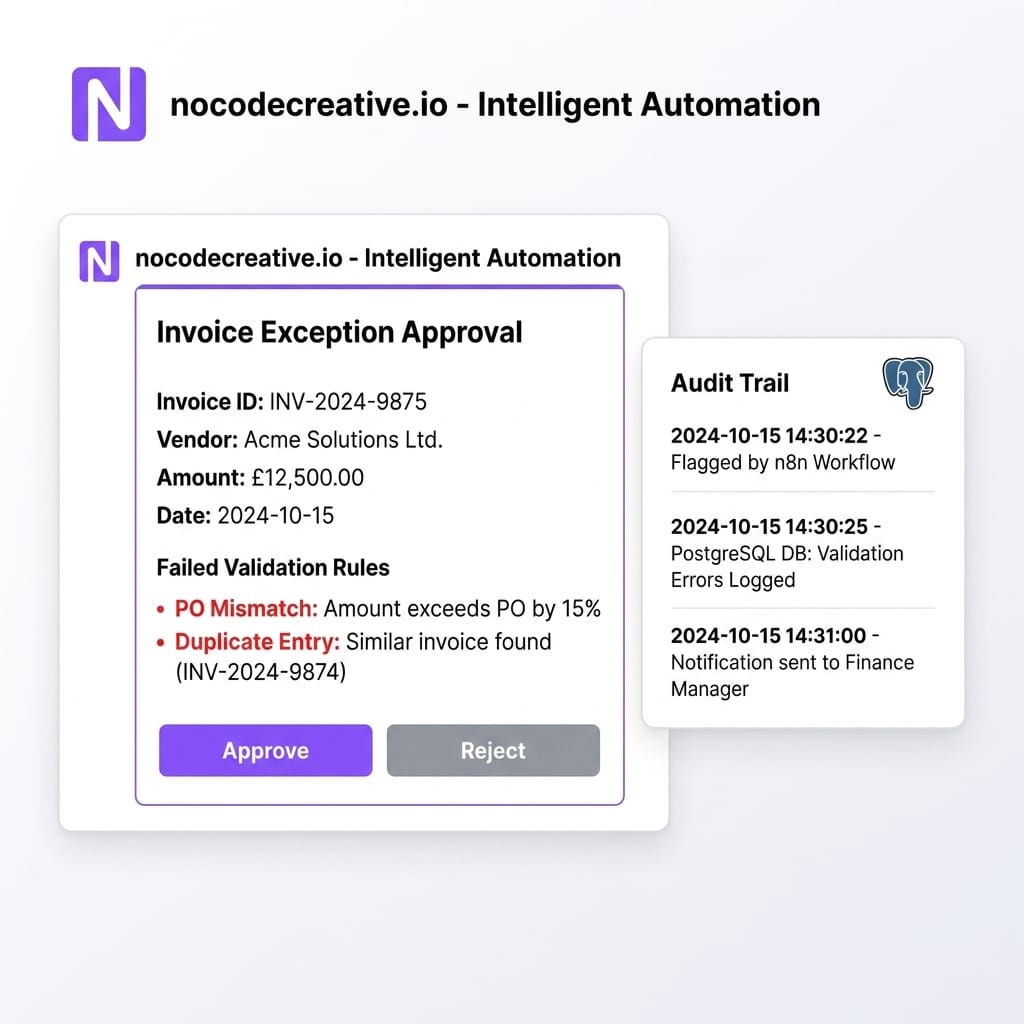
A practical exception message should include the record, the failed rule, the suspected cause, the suggested action, and a link to the source system if available. Avoid dumping a wall of JSON into a Teams channel unless you are trying to make friends in exactly the wrong way.
For example, a duplicate customer exception might show two company names, account IDs, owners, recent activity dates, and a suggested merge decision. A finance exception might show the invoice number, supplier, VAT amount, purchase order reference, and reason the record failed validation.
Normalise, enrich, approve, then publish to AI
Once exceptions are reviewed, the workflow can normalise and approve records. Normalisation might include trimming whitespace, standardising casing, mapping categories, converting date formats, splitting names, matching supplier aliases, or assigning canonical IDs.
Enrichment might include adding metadata, linking records to an owner, attaching document review dates, or mapping a customer to a territory. Approved records can then be published to a clean table, synchronised back to a business system, or made available to AI workflows.
This final publishing step matters. AI tools should not read from every messy source by default. They should read from approved datasets, approved document indexes, or governed retrieval layers. That separation gives you a clear control point and a better answer when someone asks, "Where did the AI get that from?"
Example: Customer data audit before AI sales follow-up
A sales team wants an AI assistant to draft follow-up emails and suggest next actions. Before that assistant touches live accounts, an n8n workflow pulls records from Excel, SharePoint, CRM exports, or a database.
The workflow checks for missing emails, invalid domains, duplicate company names, conflicting account owners, stale last-contact dates, missing consent fields, and inconsistent lifecycle stages. Low-risk fixes, such as trimming spaces or standardising country names, are applied automatically. Ambiguous duplicates are sent to Sales Operations through Teams for review.
Clean records are written to Postgres or Supabase with a quality score. Only records above the agreed threshold are made available to the AI follow-up workflow. The sales team gets better automation, and fewer awkward moments beginning with "Dear {{first_name}}".
Example: Invoice and supplier audit before finance automation
A finance team wants to automate invoice reconciliation. The readiness workflow ingests invoices from inbox attachments, SharePoint folders, accounting exports, or CSV files (comma-separated values).
The workflow checks required fields, invoice number uniqueness, supplier ID validity, date ranges, currency format, VAT fields, purchase order references, and suspicious amount outliers. Exceptions are logged with a full audit trail and routed to Finance for approval.
This pattern is close to work we have delivered in property management, where our automation and AI case study with Western Lettings used n8n, Supabase, custom code, and AI-assisted parsing to reduce manual invoice handling and improve validation. The useful lesson is not simply "add AI to invoices". It is "build the checks, approvals, and data layer around the AI so the workflow can be trusted".
Example: Knowledge base inspection before an AI support bot
Support bots and internal knowledge assistants depend on clean content. An n8n workflow can scan SharePoint documents, helpdesk exports, frequently asked question spreadsheets, and internal wiki pages before anything is embedded into a retrieval system.
The checks might include missing document owners, outdated review dates, duplicate answers, conflicting policy names, unsupported file types, and risky content categories. Approved documents are marked as ready and synchronised into the AI retrieval layer. Unapproved documents stay out.
This is especially relevant for businesses considering Microsoft Copilot for SMEs, custom retrieval bots, or internal AI agents. The assistant is only as useful as the material it can safely access.
How we implement this for clients
A sensible engagement starts small. We usually begin by selecting one workflow, mapping its data sources, defining the minimum data standard, and designing the exception process. From there, we build an n8n workflow that ingests records, runs deterministic checks, stores results in Postgres or Supabase, and routes exceptions to the right people.
The first useful version can often be built in days or weeks, depending on the number of systems and the complexity of the rules. The goal is not to boil the data ocean. It is to prove the pattern, create trust, and give the team a reusable foundation for the next AI or automation use case.
For organisations comparing tools, we can also help decide where Power Automate vs n8n makes sense, where Microsoft Purview or Fabric governance belongs, and where custom-coded JavaScript or Python should sit alongside low-code automation. You can explore more examples in our AI and automation case studies or review the nocodecreative.io technology stack we commonly use for client builds.
Trusted data first, AI second
The most useful AI systems are rarely just a model with a prompt wrapped around it. They are pipelines, rules, review loops, databases, permissions, and clear ownership, with AI added where it genuinely helps.
Build the inspection layer first. Let n8n move the data, let Postgres or Supabase preserve the audit trail, let Teams or email bring humans into the right decisions, and let AI work only from records that have earned a little trust.
Our expert AI consultants can help you implement these workflows. Get in touch to discuss your automation needs.
References
- AI is here – but first you need to get your data in order
- n8n Postgres node documentation
- n8n Microsoft Excel 365 node documentation
- n8n Microsoft Teams node documentation
- n8n Code node documentation
- PostgreSQL documentation: Constraints
- Supabase documentation: Tables and data
- Microsoft Learn: Get started with data governance in Microsoft Purview
- Microsoft Learn: Data quality thresholds in Microsoft Purview Data Governance




Discussion