
Build an n8n AI Website Chatbot
A branded AI website chatbot is one of the most practical first AI automations for a growing business.
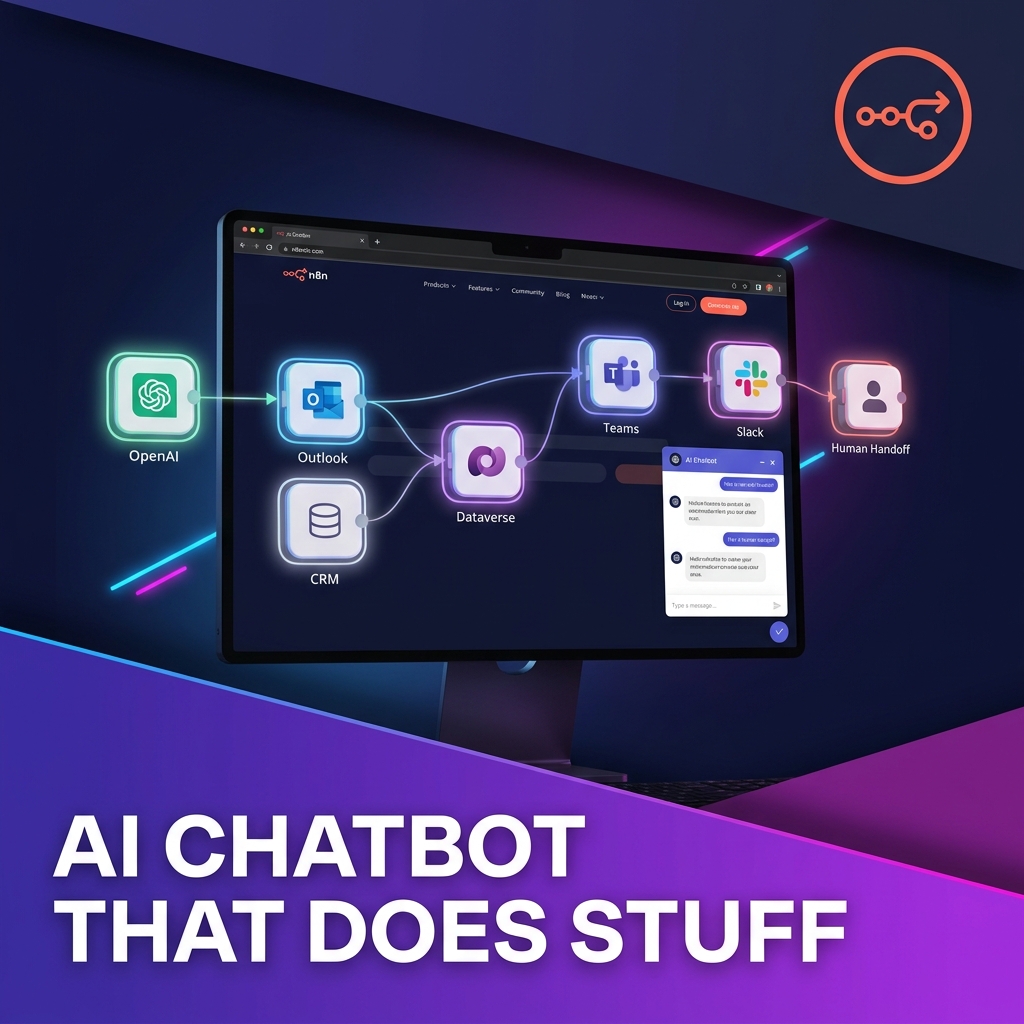
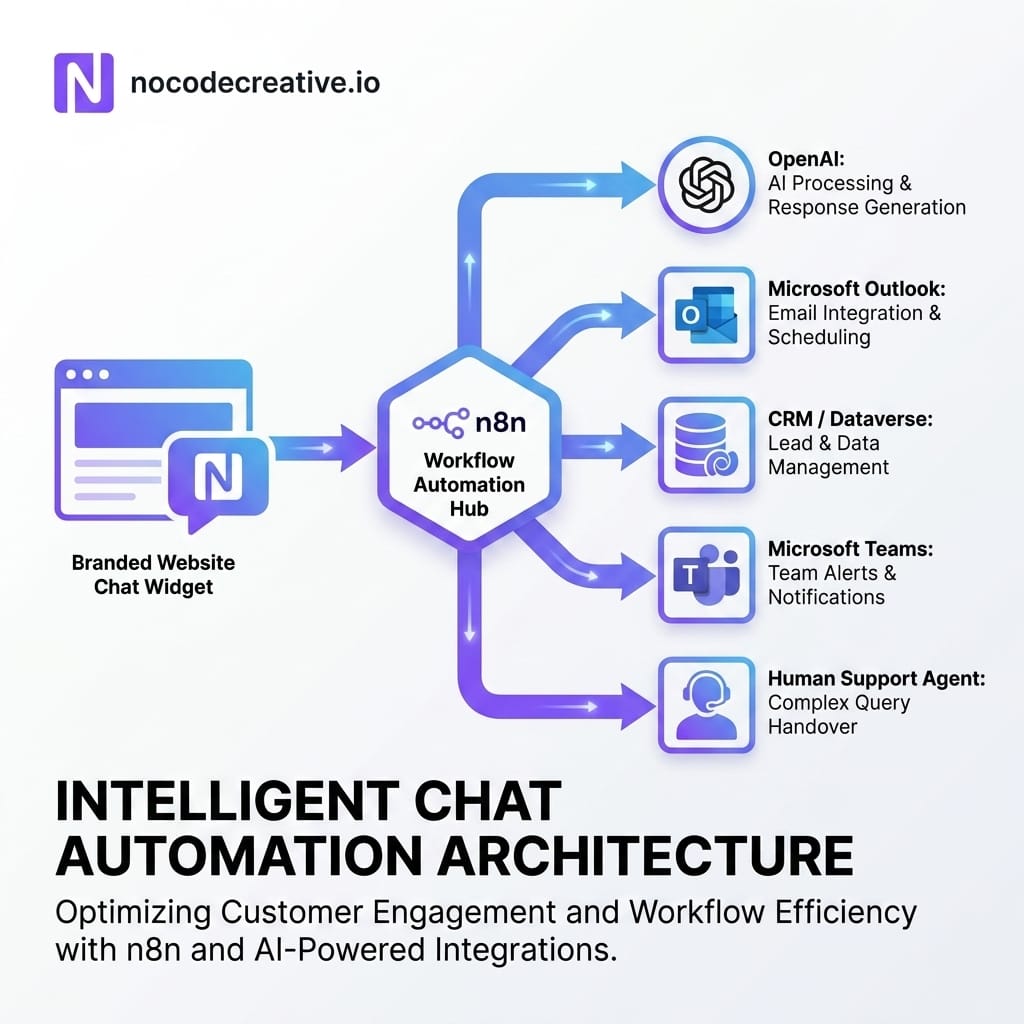
At nocodecreative.io, this is the kind of workflow we like because it is not just a chat bubble bolted onto a website. With n8n behind it, the conversation can become part of a controlled business process, connecting OpenAI, Microsoft Outlook, customer relationship management systems, Microsoft Dataverse, Teams, Slack, support tickets and human approval steps.
The real value is not the chatbot saying hello. It is what happens after the visitor replies.
Why website chatbots are a strong first AI automation for SMEs
Small and medium-sized enterprises often start their AI journey with internal productivity experiments. Someone tests ChatGPT for drafting emails, another team tries Microsoft Copilot for summarising meetings, and an operations lead starts wondering whether any of this can touch a real customer process.
A website chatbot is a useful bridge between experimentation and operational value. It sits at a clear entry point, your website, and handles work that is easy to understand: answer common questions, collect enquiry details, qualify leads, book appointments and pass complex conversations to a human.
That makes it easier to measure than a vague “AI transformation” initiative. You can track leads captured, bookings created, support questions answered, response times improved and escalations handled cleanly.
It is also a good fit for n8n because the chatbot is only the front end. n8n acts as the workflow engine behind the scenes, controlling prompts, data routing, approvals, CRM updates and follow-up actions. For teams comparing Power Automate vs n8n, this is a useful pattern: use n8n for flexible orchestration across many systems, and use Microsoft-native tools such as Power Automate and Dataverse where governance, records and approvals need to sit inside the Microsoft ecosystem.
If you want help designing that kind of system, our AI automation and chatbot implementation services cover exactly this mix of customer-facing AI, n8n workflow design and Microsoft 365 integration.
What the n8n branded chatbot template does
The n8n workflow template, “Create a branded AI-powered website chatbot”, provides a starting point for adding an AI chat widget to a business website. The public template describes a JavaScript snippet that can be added to a site, with n8n handling conversation logic, OpenAI-powered responses, Microsoft Outlook calendar integration, lead capture and human handoff capabilities.
That is a sensible base, but it should be treated as a starter architecture rather than a finished business system. The template gives you the front door. Your implementation work is to decide what that door leads to.
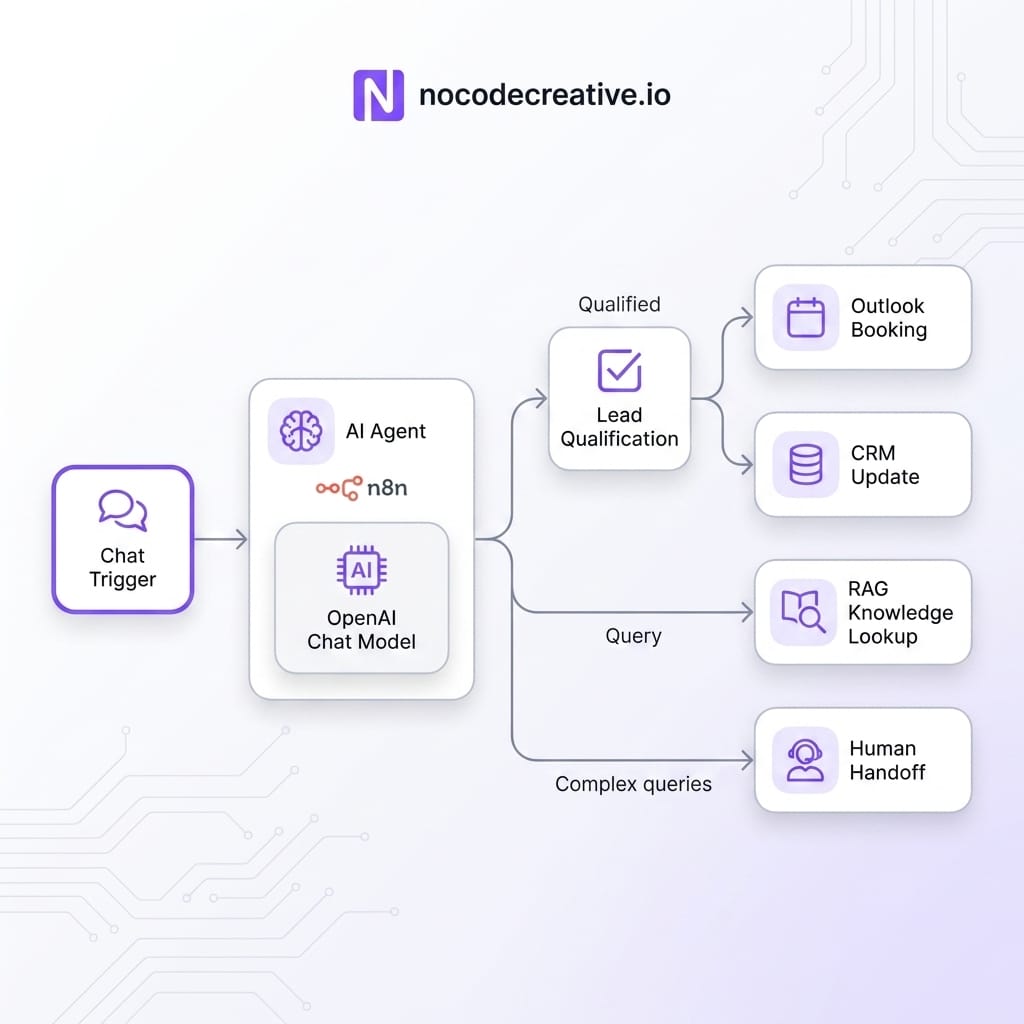
For a sales team, the chatbot might qualify enquiries and create CRM records. For a support team, it might answer frequently asked questions from approved documents using Retrieval Augmented Generation, usually shortened to RAG, which means retrieving relevant information from a trusted knowledge base before asking the Large Language Model, or LLM, to answer. For operations, it might become a triage layer that creates tasks, routes requests and alerts the right team.
A useful rule of thumb: If the chatbot only produces a transcript, it is still mostly a conversation tool. If it creates structured data, starts workflows and knows when to stop, it becomes business automation.
The reference architecture behind a useful chatbot
A robust n8n AI website chatbot usually has five layers:
1. The website widget: This is the small branded chat interface visitors see on your website. It can be based on n8n’s hosted or embedded chat options, or a custom JavaScript widget calling a webhook.
2. The n8n Chat Trigger: n8n’s Chat Trigger node is designed for chatbot and chat interface workflows. It can be configured for hosted chat, embedded chat, authentication, Cross-Origin Resource Sharing (CORS), and public availability. Importantly, each message sent executes the workflow, meaning usage and cost planning matter once traffic grows.
3. The AI Agent and model: n8n’s AI Agent node can use external tools and APIs to retrieve information and perform actions. The OpenAI Chat Model node connects workflows to OpenAI models, with options for token limits, temperature, retries and timeouts.
4. Business systems: This is where the chatbot becomes useful. n8n can send qualified leads to HubSpot, Salesforce, Dynamics 365 or Dataverse, create calendar events, alert Teams or Slack, generate support tickets, or call Power Automate flows.
5. Governance: Less glamorous than the interface, this includes data retention, consent capture, escalation rules, content filtering, human approval for risky actions and audit logging. It is the part that keeps the system trustworthy.
Define the chatbot’s business goal before writing prompts
The most common mistake is starting with prompts. The better starting point is the business outcome. A lead qualification chatbot needs different logic from a support assistant. A booking assistant needs different safeguards from a pricing enquiry bot. An internal request assistant needs different permissions from a public-facing website chatbot.
Before configuring the AI Agent, define the primary goal in plain English. For example:
- Qualify website enquiries and create clean CRM records
- Answer common service questions from approved website content
- Book discovery calls into Microsoft Outlook
- Escalate urgent or sensitive enquiries to a human
- Triage customer requests and create support tickets
Once the goal is clear, define what the chatbot is allowed to do and what it must not do. A chatbot for a legal, financial, property or healthcare-adjacent business should be especially careful. It can collect information, explain standard processes and route requests, but it should not invent policy, provide unapproved advice or make commitments that your team has not agreed.
This is where a workflow-first tool like n8n helps. Instead of giving the AI broad freedom, you can surround it with deterministic steps: validate the email, classify the enquiry, check confidence, create a record, request approval, send a message.
The AI handles language. The workflow handles control.
Install the chat widget and connect it to n8n
The front-end setup depends on whether you use n8n’s hosted chat interface, n8n’s embedded chat option, or a fully custom widget.
For many teams, embedded chat is the right balance. It lets you add a branded website chat experience while still sending messages to the n8n Chat Trigger. The n8n documentation notes that embedded chat requires your chat interface to call the Chat URL shown in the node. You can use n8n’s chat widget package or build your own interface if your site needs specific styling or behaviour.
In production, pay attention to CORS settings. CORS stands for Cross-Origin Resource Sharing, and it controls which website origins can access the chat URL. Leaving this too open may be acceptable for a quick test, but a live website should restrict origins to the domains you actually use.
You should also decide whether the chat is public, authenticated or limited to internal users. Public website chat is appropriate for lead capture and support intake. Authenticated chat is better for customer portals or internal agents that can access sensitive information.
Configure the AI Agent, model and response rules
The AI Agent should be configured around a clear system prompt. A system prompt is the instruction layer that tells the model how to behave, what role it is playing, what sources it may use and when it should escalate.
A practical system prompt for a website chatbot should explicitly establish the company’s tone of voice, define the chatbot’s core purpose, and specify the exact information it may collect. To maintain brand safety, it must also clearly outline topics the bot must avoid and list the approved sources it is permitted to use. Finally, defining precise conditions for a human handoff and detailing the required output format for structured fields ensures predictable, business-ready outcomes.
For lead capture, avoid asking the model to return a beautiful paragraph and hoping you can parse it later. Ask for structured fields such as name, email, company, enquiry type, budget range, timescale, urgency and preferred contact method. Where possible, use non-AI nodes to validate and clean that data.
Model settings matter too. A support or sales intake bot usually benefits from a lower temperature, sensible token limits, retries and timeouts. In n8n’s OpenAI Chat Model node, these settings help shape how consistent, lengthy and resilient the response process is.
This is also where cost control begins. Every message can trigger a workflow execution and model call. Keep prompts concise, retrieve only the knowledge needed, summarise long transcripts and avoid sending unnecessary data back to the model.
Capture structured lead data instead of only storing transcripts
A transcript is useful for context, but it is not enough for sales operations. Sales teams need structured, searchable, reportable data.
A good n8n workflow can turn a conversation into a clean lead record. The chatbot can ask for basic details, then n8n can validate the email, check for duplicates, score the lead and create or update a record in your CRM or Dataverse. For example, the chatbot might collect the visitor’s company size, problem area, urgency and preferred contact method. n8n can then map those answers into CRM fields, add a summary of the conversation and notify the right sales channel in Microsoft Teams or Slack.
This is where AI agents for operations become more than a novelty. The AI can interpret messy human language, but n8n should be responsible for field mapping, routing and error handling. If a required field is missing, the workflow can ask a follow-up question. If the email is invalid, it can request clarification. If the lead already exists, it can update the existing record rather than creating another duplicate.
For a real-world sense of how structured automation reduces manual work, our property compliance automation case study shows the same underlying principle applied to operations: capture better data, route it consistently and reduce avoidable admin.
Add Outlook booking or a sales handoff
The n8n Microsoft Outlook node supports calendar, contact, message and event operations, including creating and updating events. That makes it suitable for appointment booking workflows, provided you design the guardrails properly.
A basic booking workflow might collect the visitor’s name, email, enquiry type and preferred times. n8n can then create a draft booking, check availability rules, send a confirmation email and notify the assigned consultant. For higher-value enquiries, it is safer to add human approval before anything is confirmed. The workflow can send a Teams or Outlook message asking a person to approve the booking, assign the right team member or request more information.
n8n also supports human-in-the-loop patterns for AI tool calls, where an AI Agent can pause before executing actions that require oversight. This matters because calendar booking sounds simple until it meets real business life. People have part-time schedules, regional holidays, sales territories, service categories and meetings that should not be booked automatically. The chatbot should make the customer experience smoother, not create diary confetti.
Extend the chatbot with FAQ and RAG knowledge retrieval
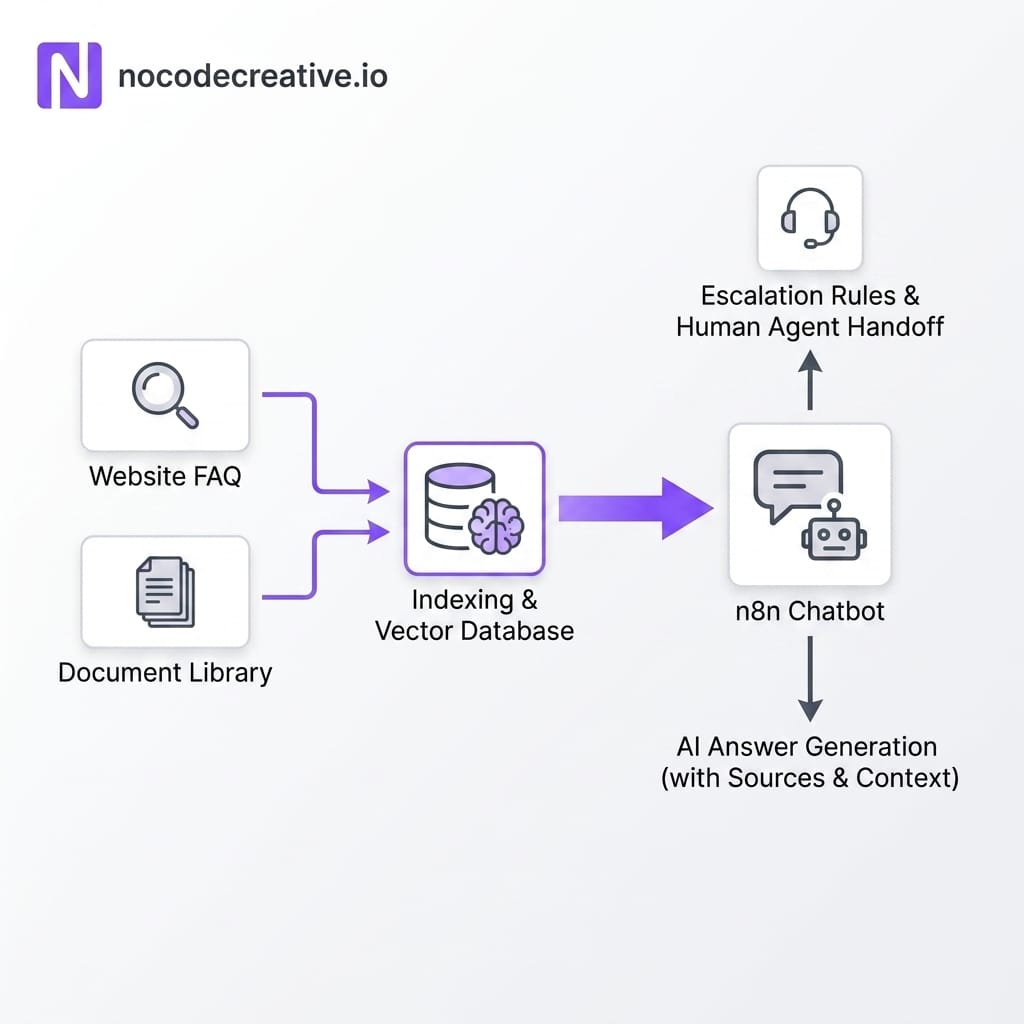
For support use cases, Retrieval Augmented Generation is usually better than relying on the model’s general knowledge. RAG means the workflow retrieves relevant snippets from approved sources before the model answers.
In n8n, this can be implemented by ingesting website pages, frequently asked questions, product PDFs, service guides or SharePoint documents, splitting the content into chunks, creating embeddings and storing them in a vector database. A vector database stores numerical representations of text so similar meanings can be retrieved later.
When a visitor asks a question, n8n retrieves the most relevant content and passes it to the AI Agent with strict instructions to answer only from those approved sources. If the workflow cannot retrieve enough reliable context, the chatbot should say so and offer a handoff.
This is the difference between a helpful support assistant and a confident nonsense generator. The RAG layer gives the AI a controlled knowledge source, while the workflow decides what happens when confidence is low.
Add guardrails, escalation and human approval
Every public-facing AI chatbot needs boundaries. This does not mean making it timid. It means making it reliable.
Escalation rules should be designed before launch. A visitor should be handed to a human if they ask for one, if the enquiry is high value, if the topic is sensitive, if the model has low confidence, if the user is frustrated, or if the requested action has real-world consequences.
n8n’s human fallback examples show how an AI workflow can use a Chat Trigger, Agent and tool workflows to provide fallback behaviour. In practical terms, that might mean creating a ticket, sending a Teams alert, emailing the transcript, summarising the conversation and returning a clear handoff message to the visitor.
For Microsoft-heavy environments, Azure AI Foundry content filtering is also worth considering when using Azure OpenAI. Microsoft’s content filtering system is designed to detect categories of potentially harmful content in prompts and completions. It is not a complete governance strategy, but it is a useful part of a layered approach.
The strongest guardrail is still workflow design. Let the AI write, classify and summarise. Let n8n decide when to act, when to ask for approval and when to stop.
Connect to CRM, Dataverse, Power Automate, Teams or Slack
Most businesses already have a messy but important stack. The chatbot should fit into that stack rather than creating another isolated inbox.
For Microsoft-centric organisations, Dataverse is often a strong place to store structured records. Microsoft’s Dataverse connector for Power Automate supports triggers and actions for creating, updating, listing and retrieving rows. Power Automate’s HTTP connectors can also help connect web services through REST-based requests, which is useful when n8n needs to trigger a Microsoft-native approval or business process.
A common architecture is to let n8n manage the website conversation, AI orchestration and cross-platform integrations, while Power Automate handles Microsoft-native approvals, Dataverse record updates or downstream processes inside Microsoft 365.
That pattern gives you flexibility without fighting the Microsoft ecosystem. It is also a practical answer to Power Automate vs n8n: in many real projects, the answer is not one or the other. It is n8n plus Power Automate, each used where it is strongest. Our Microsoft and n8n automation stack is built around this kind of blended architecture, especially for teams that want customer-facing AI without losing control of data, identity and approvals.
Measure success beyond “the bot works”
A chatbot working technically is not the same as a chatbot working commercially. The useful metrics are operational. Track how many qualified leads were captured, how many meetings were booked, how many support questions were resolved without escalation, how quickly humans responded to handoffs and how often the chatbot failed to collect required data.
It is also worth reviewing conversation quality. Look for points where visitors drop off, ask the same question repeatedly or request a human. These are not failures. They are design signals.
A good measurement setup might include:
- Lead capture rate
- Booking conversion rate
- Escalation rate
- Average response time
- Missing field rate
- Support deflection rate
- Human handoff satisfaction
- Cost per useful conversation
Review these weekly at first. Adjust prompts, qualification logic, knowledge sources and routing rules based on real behaviour.
Common pitfalls to avoid
1. The General-Purpose Trap: The first pitfall is treating the chatbot as a general-purpose assistant. General-purpose AI sounds impressive in demos, but business users need clear outcomes. Keep the first version focused.
2. Weak Handoff Design: The second pitfall is weak handoff design. If the chatbot says “someone will contact you” but no ticket, alert or CRM task is created, the workflow has failed politely. Polite failure is still failure, just with nicer wording.
3. Unstructured Data: The third pitfall is unstructured data capture. Free-text transcripts are hard to report on and easy to ignore. Capture fields, validate them and push them into the systems your teams already use.
4. Unmanaged Cost: The fourth pitfall is unmanaged cost. Every message, retrieval step and model call can add cost. Keep prompts lean, avoid unnecessary context and monitor execution volume.
5. AI Overconfidence: The fifth pitfall is overconfidence. AI responses should be constrained by approved knowledge and escalation rules. If the chatbot does not know, it should say so clearly and hand off cleanly.
A practical implementation roadmap
The fastest useful version can be shipped in days. Start with the branded widget, n8n Chat Trigger, AI Agent, OpenAI model, basic qualification questions, transcript summary and a Teams or email handoff. This gives your team a working front door without overcomplicating the first release.
The next phase usually takes a few weeks. Add CRM or Dataverse integration, duplicate handling, Outlook booking, consent capture, better analytics and human approval for higher-value actions. A later phase can add RAG over approved documents, support ticket creation, customer portal authentication, Power Automate approvals, content filtering, environment separation and more detailed observability.
If you are already running n8n in production, it is worth thinking about deployment architecture as well. Our guide to scaling n8n for production automation covers the kind of environment separation and operational thinking that becomes important once chatbots move from experiment to business infrastructure.
A branded n8n AI website chatbot is a sensible first step because it starts small and expands naturally. Begin with one clear goal, one controlled workflow and one measurable outcome. Then add booking, RAG, CRM updates and human approval once the basics are reliable.
Our expert AI consultants can help you implement these workflows.
References
- n8n workflow template: Create a branded AI-powered website chatbot
- NoCodeCreative setup guide: Create a Branded AI-Powered Website Chatbot with n8n
- n8n Docs: Chat Trigger node
- n8n Docs: AI Agent node
- n8n Docs: OpenAI Chat Model node
- n8n Docs: Microsoft Outlook node
- n8n Blog: Build a custom knowledge RAG chatbot using n8n
- n8n Docs: Set a human fallback for AI workflows
- Microsoft Learn: Integrate Power Automate flows with Dataverse
- Microsoft Learn: Overview of HTTP connectors in Power Automate
- Microsoft Learn: Azure AI Foundry content filtering



Discussion