

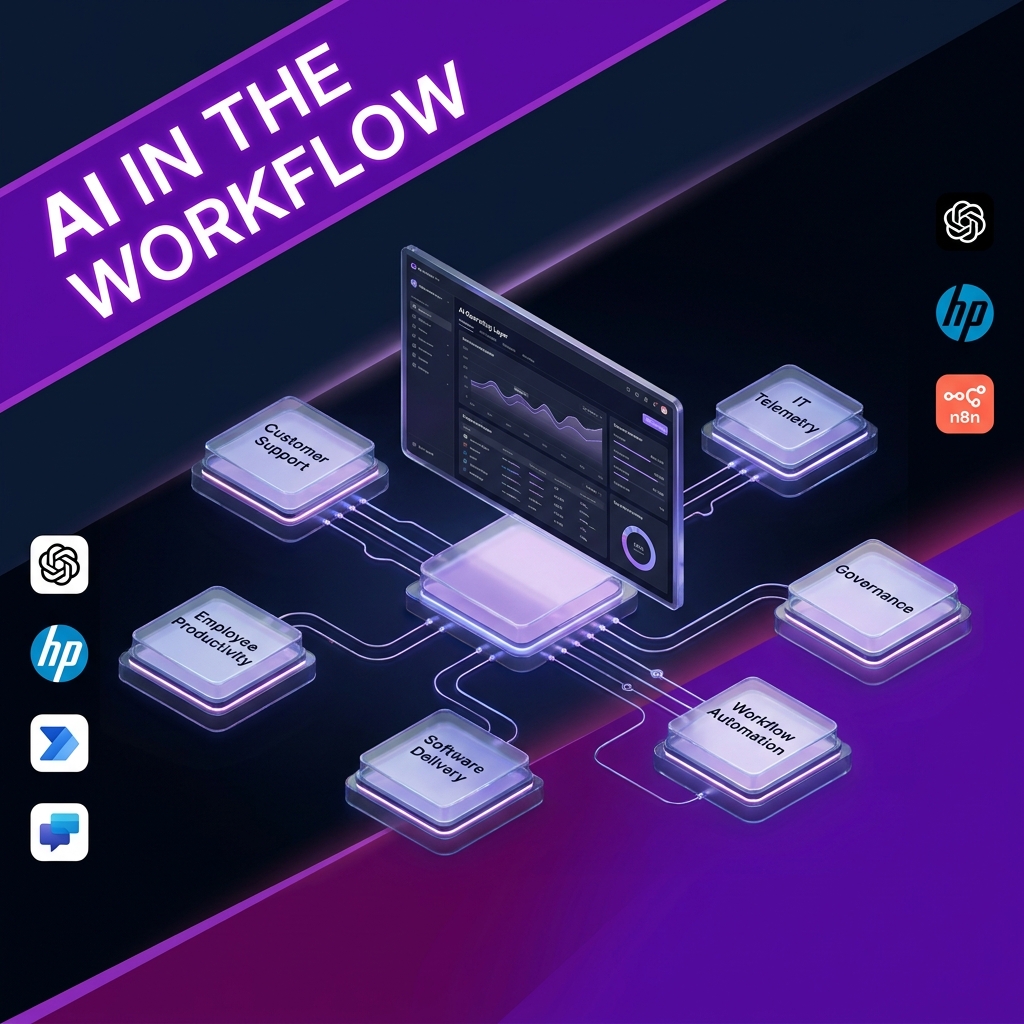
AI as an Operating Layer
HP’s OpenAI partnership is a useful signal for where enterprise AI is heading next: away from isolated chatbots, and towards AI connected to the systems, data, permissions and workflows where work already happens.
At nocodecreative.io, this is the shift we are seeing with clients too. The real value is rarely “give everyone another AI tool”. It is designing an AI operating layer that helps teams resolve customer requests, act on operational signals, improve internal productivity and support software delivery, all with governance built in from the start.
The shift from AI pilots to AI infrastructure
On 28 June 2026, HP announced a strategic partnership with OpenAI to integrate the OpenAI Frontier platform into customer-facing experiences and internal operations. The announcement references customer and partner experiences, customer telemetry insights through HP’s Workforce Experience Platform, employee productivity and software development.
The important part is not simply that HP is using OpenAI. Large companies announce partnerships all the time, and not all of them turn into meaningful operational change. The interesting part is the shape of the approach.
HP describes a move from early pilots towards repeatable systems across real business functions. OpenAI’s Frontier positioning also emphasises agents that are integrated with systems of record, governed by enterprise security, supported by business context, and measured through evaluation and optimisation loops.
Key Insight: Most organisations do not need to copy HP’s exact stack. They do need to copy the pattern: start with a painful workflow, connect trusted data, add sensible permissions, automate the next action, and measure whether the process actually improves.
This is where the AI conversation becomes far more practical. Instead of asking whether the model is clever, leaders can ask whether a support case was resolved faster, whether an invoice was processed with fewer errors, whether an information technology, or IT, issue was detected earlier, or whether a software change moved through review more cleanly.
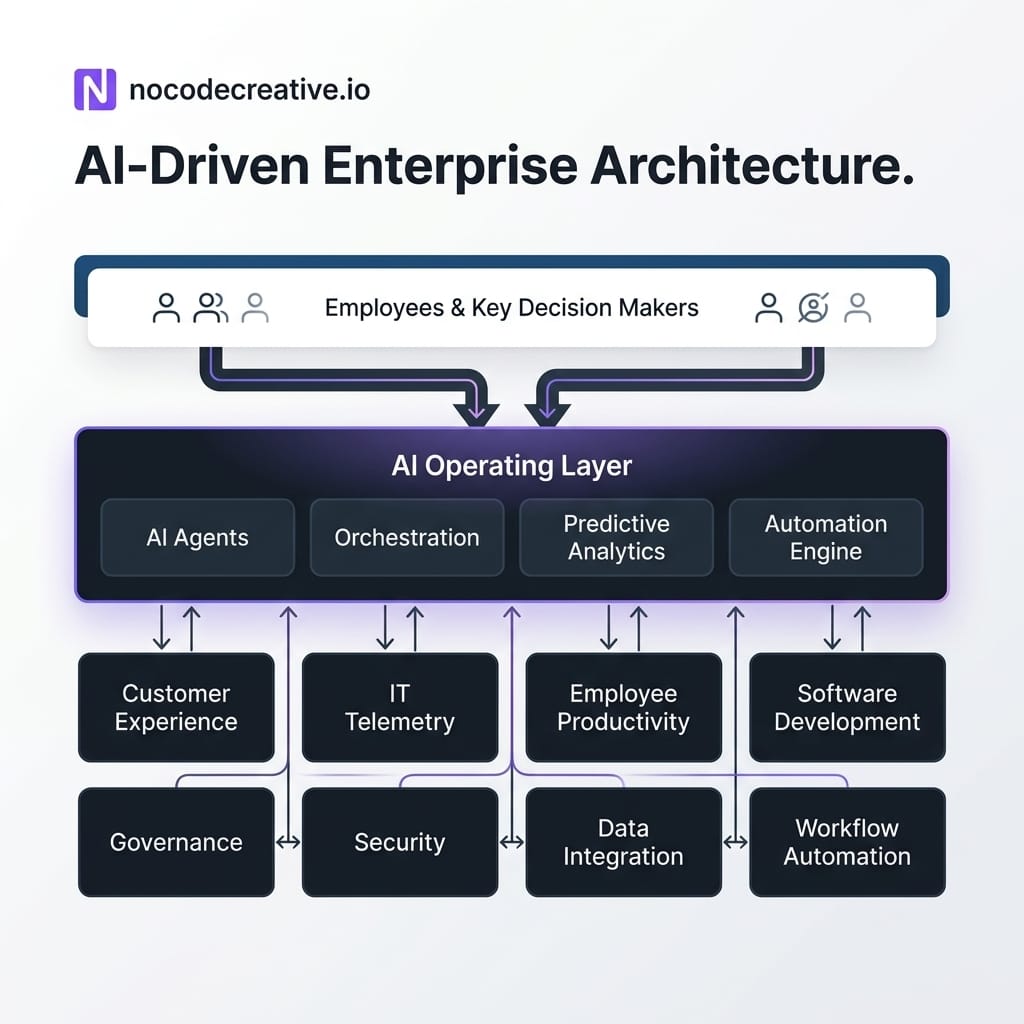
What an AI operating layer actually means
An AI operating layer is not one product. It is a design pattern.
It sits between your people and your business systems. It reads context from approved sources, helps interpret that context, recommends or drafts the next step, and triggers controlled actions through workflow automation.
In a Microsoft-centred environment, that layer might include Microsoft Copilot Studio, Microsoft 365 Copilot, Power Automate, Azure OpenAI, SharePoint, Teams, Dynamics 365 and Microsoft Purview. In a more flexible or mixed software-as-a-service estate, n8n can act as the orchestration layer, connecting tools such as HubSpot, Zendesk, ServiceNow, Google Workspace, Slack, Jira, GitHub, Airtable, Postgres, Supabase and internal application programming interfaces, or APIs.
The model is only one part of the system. The surrounding layer includes data retrieval, tool calling, identity, permissions, approval steps, audit logs, evaluation, monitoring and ownership.
Without those pieces, an AI assistant is just a clever text box with a worrying amount of confidence.
OpenAI’s own agents guidance describes agents as applications that can plan, call tools, collaborate across specialist roles and maintain enough state to complete multi-step work. Its business guide frames agents as being built from a model, tools and guardrails. n8n’s AI Agent node documentation uses a similar practical idea: an agent receives data, makes decisions and uses tools or APIs to act in its environment.
That is the difference between “ask a chatbot” and “run an AI-connected workflow”. One produces an answer. The other moves work forward.
The transferable pattern for real businesses
The HP and OpenAI announcement gives leaders a useful pattern to borrow, even if they operate on a much smaller scale.
Start with use cases rather than models. Customer support, finance operations, employee helpdesks, IT service management and sales operations are usually better starting points than abstract AI strategy. They contain repeatable work, clear hand-offs and measurable outcomes.
Then map the data. The AI layer needs access to approved knowledge, such as policies, customer records, tickets, orders, device telemetry, contracts or project data. This does not mean letting an agent rummage through every system like an overenthusiastic intern. It means giving it scoped access to the right sources, with role-based permissions and logging.
Next, define the action boundary. Some workflows should be read-only. Others can draft responses, create tickets, update records or trigger downstream automations. Higher-risk actions should pause for human approval. Lower-risk actions can be automated once tested.
Finally, measure the workflow. Useful metrics include cycle time, resolution time, first-contact resolution, error reduction, rework, user satisfaction, adoption, exception rate and cost per transaction. If the workflow is in software delivery, track lead time, review cycle time, test coverage and escaped defects.
This is also where the choice of orchestration platform matters. Power Automate is often a strong fit inside Microsoft 365 and Power Platform environments. n8n is often stronger when teams need deeper control, custom logic, self-hosting options, API-heavy workflows or integrations across many non-Microsoft systems. In practice, Power Automate vs n8n should not be treated as a tribal debate. Many organisations use both, with clear boundaries for governance and support.
If you are already exploring this kind of architecture, our AI automation and low-code development services cover the workflow mapping, integration design and implementation work needed to turn isolated AI experiments into production-ready systems.
Four workflows businesses can implement now
The quickest way to make this practical is to pick a workflow where AI can reduce friction without removing accountability. These four patterns are good starting points for SMEs, mid-market teams and enterprise departments.
Customer and partner resolution agents
A customer and partner resolution agent helps support teams answer questions, summarise context and route requests. The conversational layer might be built in Copilot Studio, Azure OpenAI or another approved model provider. The workflow layer might use Power Automate or n8n. The data layer might include a customer relationship management system, known as a CRM, plus order records, ticket history, product documentation, SharePoint knowledge bases and internal APIs.
A typical workflow would read the incoming request, retrieve relevant knowledge, check customer or partner context, draft a response, classify the issue and decide whether to resolve, escalate or request more information. The agent should not be given unlimited authority. It should operate within permissions, escalation rules and audit trails.
This is especially useful where support teams handle repetitive questions but still need judgement for exceptions. The goal is not to hide humans from customers. It is to stop humans doing the same copy-and-paste triage fifty times a day.
Telemetry-to-action IT operations
HP’s announcement references customer telemetry insights and WXP, its Workforce Experience Platform. HP’s WXP documentation describes a cloud-based platform that helps IT administrators monitor, manage and improve digital employee experiences across devices and applications, including visibility into device performance, application usage, system health, alerts, automated remediations and integrations.
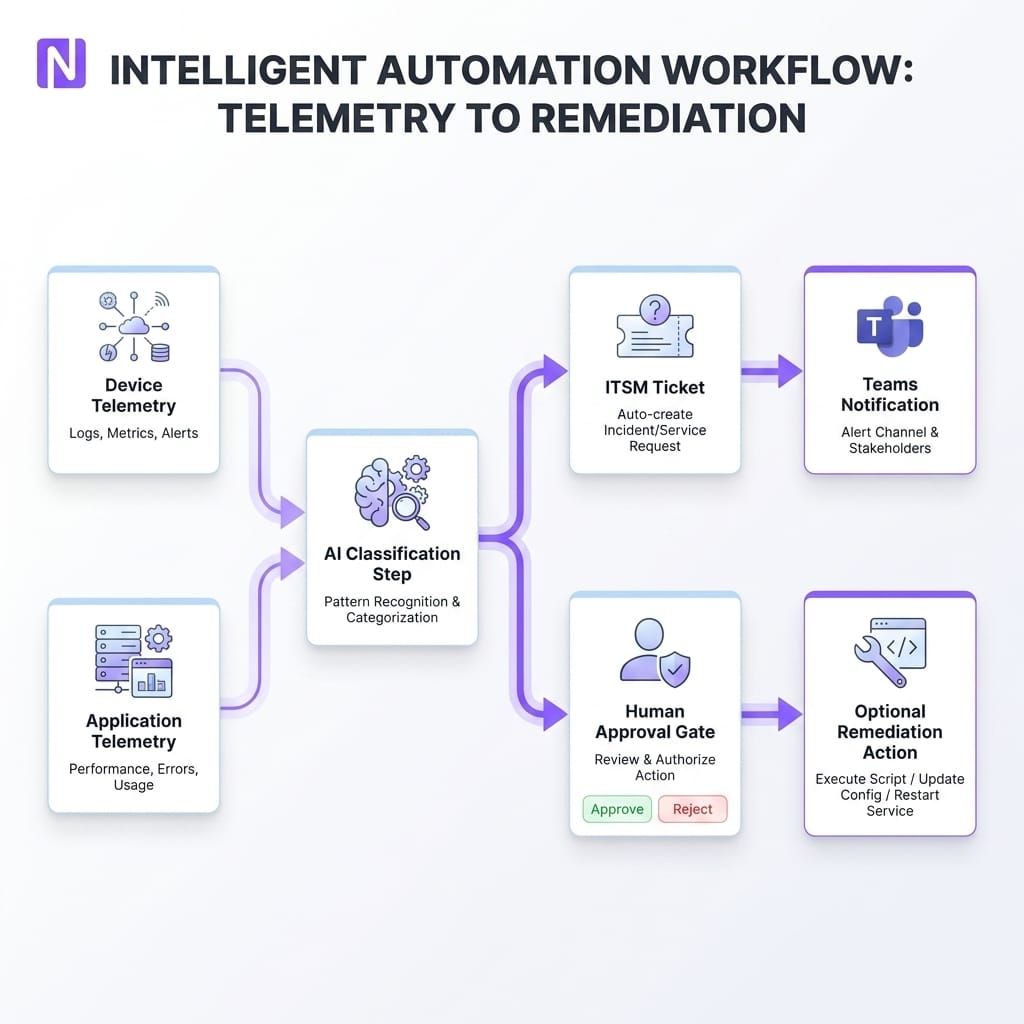
The transferable pattern is straightforward. Your organisation can connect device, application or employee-experience signals to an AI-assisted workflow that classifies issues, summarises likely causes and opens or updates tickets in an IT service management, or ITSM, platform.
For Microsoft environments, this might involve Intune, Azure Monitor, Power BI, Power Automate and ServiceNow. For mixed environments, an n8n workflow can listen for alerts, enrich them with device or user context, post a summary into Teams or Slack, create the ticket and request approval before remediation.
The key is separating insight from action. AI can summarise and recommend quickly. Remediation should be permissioned, logged and reviewed, especially where scripts, device policies or account changes are involved.
Employee productivity workflow hubs
An employee productivity hub gives staff a controlled internal front door for routine work. This might include policy lookup, meeting follow-ups, invoice status checks, internal request triage, onboarding tasks, document drafting or project updates. Instead of employees copying confidential information into public tools, the assistant connects to approved repositories such as SharePoint, OneDrive, Teams, Confluence, Google Drive, Notion or internal databases.
The valuable part is not just the chat interface. It is the workflow behind it. A user asks for a policy summary, and the assistant retrieves the latest approved document. A manager asks for outstanding onboarding actions, and the workflow checks the human resources system, project board and email trail. An operations user asks about an invoice, and the workflow checks the finance system before drafting a reply.
This is a natural area for Microsoft Copilot for SMEs, especially where Microsoft 365 is already the main productivity environment. It is also a strong fit for n8n where employees need to trigger actions across multiple systems from one governed interaction.
Governed AI software delivery
AI coding assistants are already changing how development teams work, but the safest gains come when they are embedded into the delivery process rather than left as individual preference.
A governed software delivery assistant can help triage backlog items, draft implementation plans, generate tests, summarise pull requests, produce documentation and flag risky changes before review. It might connect GitHub, Azure DevOps, Jira, Slack or Teams with OpenAI Codex-style development support and deterministic workflow automation in n8n, Azure Logic Apps or Power Automate.
The governance layer matters. Repository access should be scoped. Coding standards should be explicit. Pull requests still need human review. Test generation should support the team rather than replace engineering judgement. Application lifecycle management, often shortened to ALM, should remain visible and traceable.
The best engineering teams will not be the ones that blindly automate everything. They will be the ones that use AI to remove low-value friction while making review, testing and documentation more consistent.
Why the model is only one part of the advantage
It is tempting to treat enterprise AI as a model selection problem. Choose the “best” model, buy licences, announce adoption, done. That misses most of the work.
Models are increasingly powerful, but business advantage comes from the operating layer around them. That means integrations, context, permissions, workflow design, evaluation, adoption support and ownership. A weaker model connected to the right data and governed workflow can outperform a stronger model trapped in a browser tab.
Microsoft’s Copilot Studio guidance is useful here. Its connector documentation explains how agents can be extended with tools, knowledge sources and connectors to Microsoft 365, Dynamics 365, Microsoft Fabric and non-Microsoft enterprise data sources. Its governance guidance describes segmenting environments by purpose and risk level, with different controls for personal productivity agents, department-level agents and mission-critical enterprise agents.
That is exactly the kind of thinking businesses need. Not every AI workflow deserves the same level of control. A private assistant that summarises documents a user can already access is very different from an agent that updates customer records, sends emails or triggers refunds. The operating layer lets you make those distinctions clearly.
How to start in days or weeks without overbuilding
The worst way to start is by creating a twelve-month AI platform programme before anyone has improved a real workflow. The second worst way is letting every department improvise with no governance. There is a sensible middle ground.
Choose one workflow with visible pain and a clear owner. Support triage, invoice processing, employee helpdesk requests, sales follow-up, IT ticket enrichment and meeting follow-ups are all strong candidates. Keep the first version narrow. The first n8n workflow or Copilot Studio agent does not need to run the business. It needs to prove that the pattern works safely.
Map the process as it works today. Identify where information is copied, where decisions stall, where errors happen and where humans genuinely add judgement. Then design the AI-assisted version around those moments.
A good first build usually includes a knowledge source, a trigger, a summarisation or classification step, a business rule, an approval path and a final action. For example, an incoming support email can trigger an n8n workflow, retrieve customer context, classify urgency, draft a reply, create a CRM note and ask a human to approve before sending.
From there, improve in short cycles. Review failed cases. Capture user feedback. Add better retrieval. Tighten permissions. Introduce monitoring. Only then should you scale to adjacent workflows. This is the same mindset behind our property management automation and AI case study, where the value came from connecting real operational systems, reducing manual entry and designing approvals around the way the business actually worked.
A practical governance checklist for AI-connected workflows
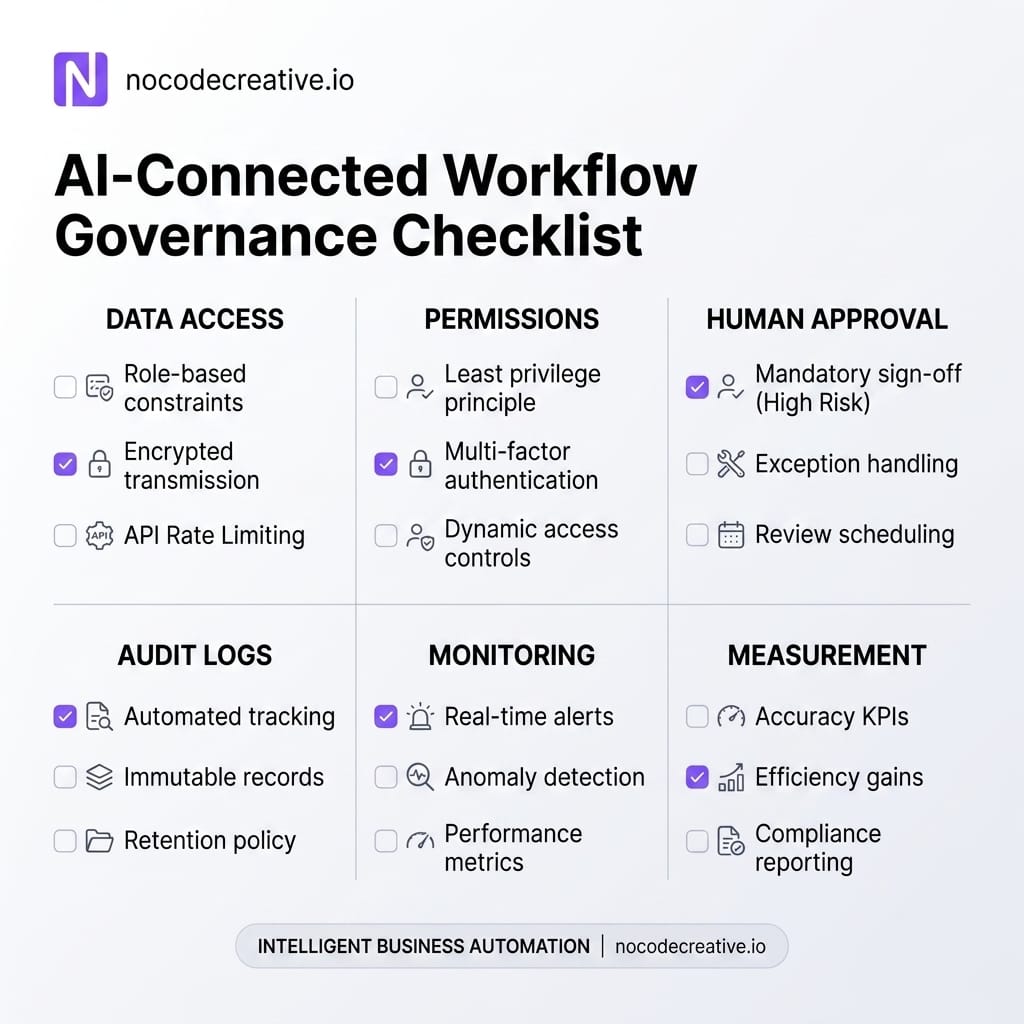
Governance does not need to be theatrical. It needs to be clear enough that people can build without accidentally creating risk. Instead of viewing governance as a rigid set of rules, treat it as a blueprint for safe, repeatable progress. For each AI-connected workflow, you must clearly define several critical parameters.
Start by identifying the business owner responsible for outcomes and exceptions, alongside the specific approved data sources the agent is permitted to access. It is equally important to clarify which systems it can update (if any at all) and precisely map out the boundaries for actions that require human approval.
To maintain security and accountability, establish a thorough audit trail covering all prompts, outputs, and tool calls. You should also tightly define the environment where it runs—such as development, testing, or production—and strict guidelines on the access model for both human users and automated service accounts.
Finally, ensure continuous improvement by agreeing on the specific metrics used to evaluate whether the workflow is succeeding, supported by a regular review cycle to assess prompt effectiveness, data retrieval quality, and any failed cases.
This is where n8n is often useful as an automation fabric. It makes the workflow visible, allows deterministic logic around AI steps, supports API integrations, and can route approvals through tools people already use. Microsoft Power Platform can play a similar role inside Microsoft estates, especially where data policies, environments and administrator controls are already mature.
Where implementation partners add value
The difference between a promising demo and a reliable workflow usually appears in the boring details. Those details are also where the value is.
An implementation partner helps translate business pain into workflow architecture. That means choosing the right automation platform, designing the data access model, integrating APIs, setting approval rules, handling edge cases, building observability and helping teams adopt the new process.
For operations leaders, that might mean turning manual spreadsheet chasing into a controlled n8n workflow. For IT leaders, it might mean connecting telemetry to ticket enrichment and remediation approvals. For customer experience teams, it might mean building a support agent that drafts high-quality responses but escalates anything sensitive. For software teams, it might mean embedding AI into backlog, testing and documentation workflows without weakening review discipline.
At nocodecreative.io, we regularly work across n8n, Microsoft 365, Power Platform, Azure and custom APIs to build this connective layer. Our intelligent workflow automation services are designed for exactly this kind of practical implementation, where AI is useful because it is embedded into the process, not sprinkled on top at the end.
Competitive advantage comes from embedded execution
The lesson from HP and OpenAI is not that every business should buy the same enterprise platform. The lesson is that AI is moving from isolated productivity experiments into operational infrastructure.
For SMEs, the opportunity is very real. You can start with a single workflow, use tools you already own, add n8n or Power Automate where orchestration is needed, and build governance around actual risk rather than abstract fear. The result is not a flashy AI showcase. It is a business process that moves faster, produces fewer errors and gives leaders better visibility.
The organisations that benefit most will be the ones that treat AI as part of how work gets done. They will connect it to trusted data, wrap it in permissions, measure it properly and keep humans in the loop where judgement matters.
Our expert AI consultants can help you implement these workflows. Get in touch to discuss your automation needs.
References
- → HP Inc. launches strategic partnership with OpenAI
- → OpenAI Frontier enterprise platform
- → OpenAI Agents SDK guide
- → A business leader’s guide to working with agents
- → HP Workforce Experience Platform overview
- → n8n Advanced AI documentation
- → n8n AI Agent node documentation
- → Microsoft Copilot Studio connectors documentation
- → Microsoft Copilot Studio zoned governance strategy



Discussion