
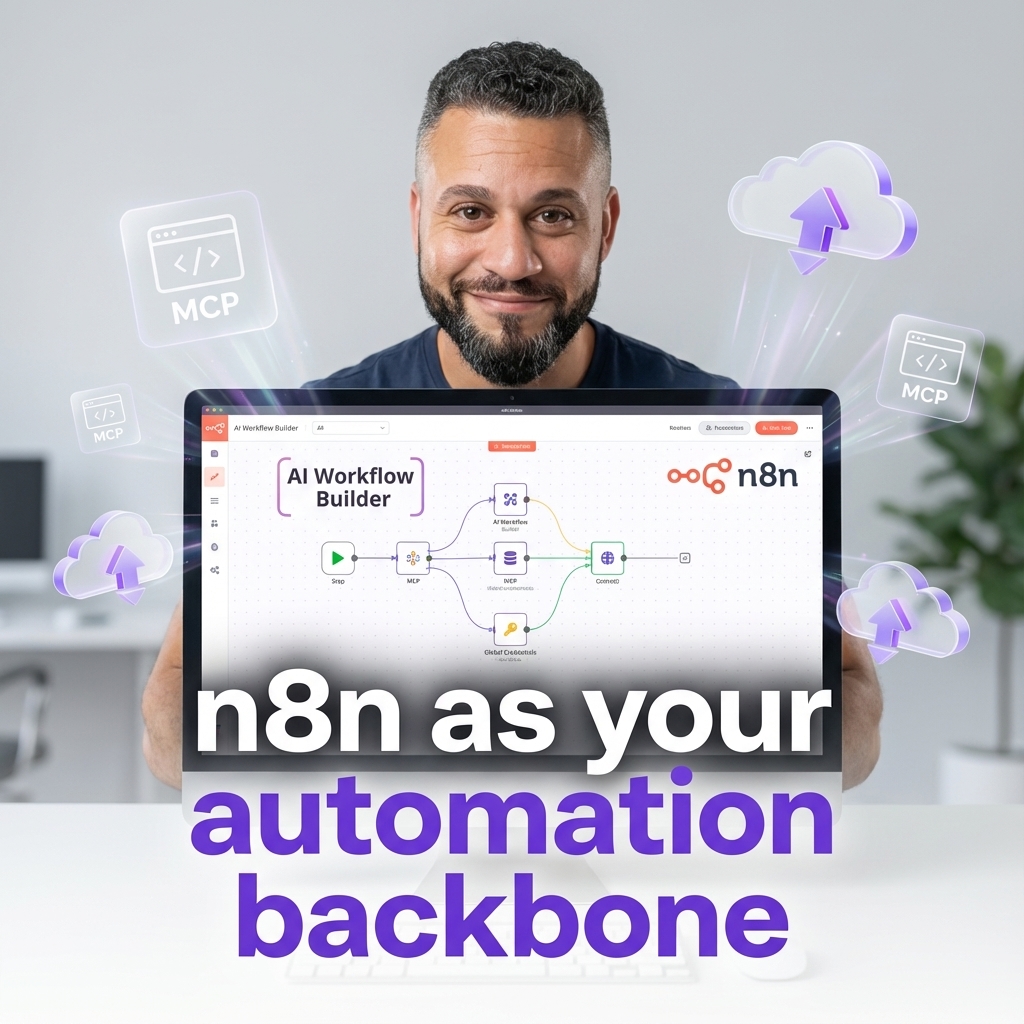
n8n's new enterprise AI features
n8n has quietly grown up over the last few releases.
Across the autumn 2025 updates, it picked up the kind of features that security teams, platform engineers, and AI leads expect from serious automation infrastructure: centralised credentials, enterprise SSO, safer environments, AI Workflow Builder, and deep Model Context Protocol (MCP) support. (docs.n8n.io)
At nocodecreative.io, this is exactly the kind of shift we look for when we decide whether to recommend a tool as a long term backbone for AI and automation. We already build and run production n8n estates for clients, and these changes make it far easier to do that safely and at scale. (nocodecreative.io)
In this guide, we will look at what actually changed, why it matters for SMEs and mid‑market enterprises, and how you can turn these features into a concrete architecture in a few weeks, not months.
Why this release wave matters for SMEs and enterprises
If you looked at n8n even a year ago, it felt like a power user tool that lived somewhere between Zapier and a Python script. Great for scrappy teams, slightly awkward to justify to a CISO.
The recent 1.11x–1.12x releases change that picture in three important ways:
Governance is now central. Global credentials tied to external secret stores, project‑level variables, better SSO provisioning, scoped API keys, and enforceable 2FA move n8n closer to how you already manage access to line‑of‑business systems. (docs.n8n.io)
AI‑first features are native. The AI Workflow Builder, guardrails, evaluations, and MCP support mean AI agents can call real tools inside your stack, with proper observability and policy controls around them. (docs.n8n.io)
Operational maturity is built-in. Git‑backed environments, workflow diff, insights, and hardened read‑only production instances give you a genuine dev–test–prod story instead of “hope no one edits the live workflow”. (docs.n8n.io)
Put together, this makes it realistic to treat n8n as a strategic automation platform that can sit alongside Microsoft Power Platform, Logic Apps, and low‑code applications, instead of a side project server under someone’s desk.
n8n vs classic iPaaS and why self hosting still matters
Classic integration platforms as a service (iPaaS) such as Zapier, Make, and Workato are excellent for quick connections and long tail automations. However, larger organizations often encounter friction in specific areas:
- Data residency and governance: It is harder to keep data inside your existing cloud boundary or match UK/EU compliance expectations when every execution runs in a vendor’s SaaS layer.
- Cost scaling: Per‑workflow or per‑step pricing feels fine at ten workflows, less fine when you are at a few hundred.
- Deep customisation and AI agents: Agentic AI patterns tend to need non‑trivial orchestration, multi‑step decision flows, and mixed on‑prem/cloud connectivity that can be awkward in hosted iPaaS tools.
A self‑hosted or dedicated n8n instance can sit inside your own Azure subscription, VPC, or Kubernetes cluster. That lets you bring the tool to your data, rather than the other way round, while still giving operations teams a visual environment and a managed set of best‑practice nodes.
The November 2025 changes do not remove the need for other platforms. What they do is push n8n comfortably into the “core automation fabric” tier, rather than “shadow IT glue”.
Global credentials and centralised secrets: n8n as shared infrastructure
The most meaningful change for teams running dozens of workflows is the introduction of global credentials and deeper external secrets integration. (docs.n8n.io)
Until now, many n8n estates suffered from fragmentation: slightly different API keys scattered across credentials, per‑workflow secrets that no one felt confident rotating, and very limited visibility for security teams.
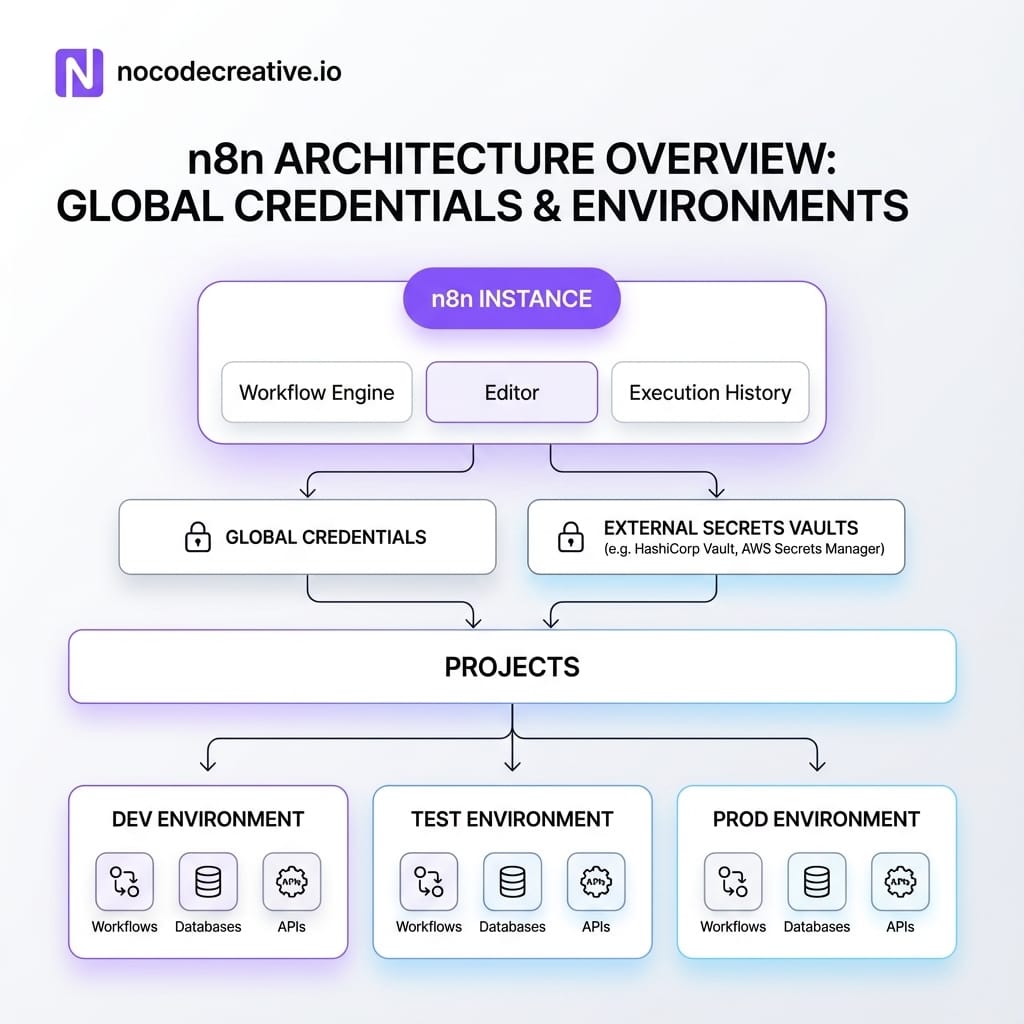
Global credentials and external secret stores let you design a proper credentials architecture.
How global credentials and external secret stores fit together
In the latest releases you can define credentials once and reuse them across workflows as global credentials. Crucially, you can back sensitive fields with an external secrets vault such as Azure Key Vault, AWS Secrets Manager, GCP Secret Manager, HashiCorp Vault, or Infisical. (docs.n8n.io)
A common enterprise pattern looks like this:
- Security or platform engineers provision secrets in Azure Key Vault or AWS Secrets Manager under a consistent naming scheme.
- n8n connects to that store using the External secrets feature and exposes them via expressions such as
{{$secrets.awsSecretsManager.MY_SERVICE_API_KEY}}. (docs.n8n.io) - Builders reference global credentials in workflows without ever seeing the raw values.
- Rotations happen centrally in the vault, and n8n reads the new value automatically.
Identity and roles via SAML and OIDC
Credentials are only half of the story. The same cluster of releases also improved SSO‑aware role provisioning, so that enterprise customers using SAML or OIDC can map instance and project roles directly from the identity provider. (docs.n8n.io)
In practice, this means you define groups and role mappings once in Azure AD (Microsoft Entra ID) or Okta. n8n automatically assigns instance and project roles based on those group memberships when users sign in. The result is a much more sensible governance model, where “Support automations” and “Finance automations” can live in separate projects, with appropriately scoped access.
Example: A shared Salesforce or HubSpot credential
Imagine a sales operations team syncing leads, enriching data, and reporting metrics across 20+ workflows.
Instead of: Managing 20 slightly different API keys and per-workflow credentials that no one wants to touch...
You can: Store a single HubSpot API key in Azure Key Vault, exposed to n8n as a global credential. Use project-level variables for environment-specific IDs, and reference that credential from every workflow. When the key rotates, you update it once in the vault—no frantic search through JSON exports required.
AI Workflow Builder: prompt to workflow for real
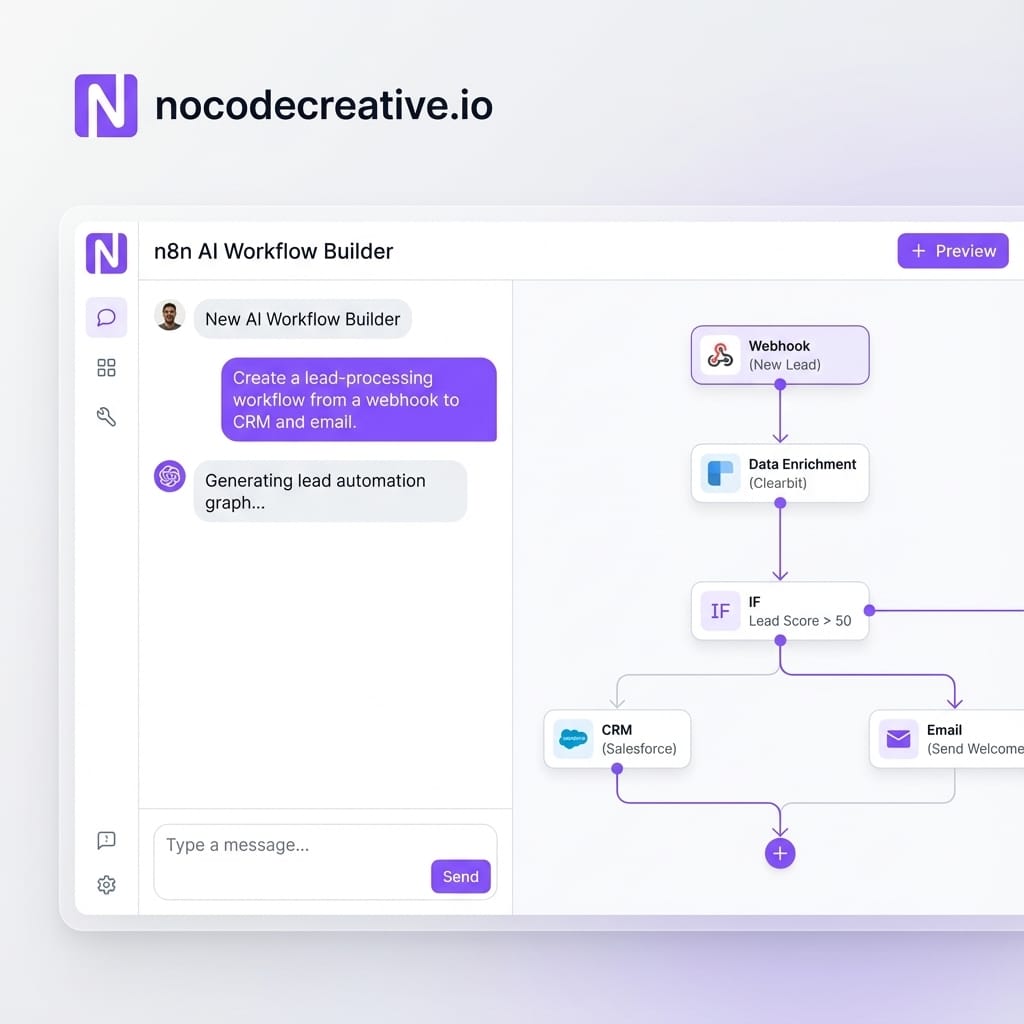
AI Workflow Builder is often talked about as “prompt to automation”. The documentation is clearer: it creates, refines, and debugs workflows from natural language descriptions by handling node selection, placement, and configuration on your behalf. (docs.n8n.io)
Under the hood, each message uses a credit. The LLM sees your prompt, the current workflow structure, node definitions, and mock execution data—but not your actual credentials or historic executions. Cloud users have access based on plan, with Enterprise Cloud now getting an allocation of credits from n8n version 1.115 onwards.
When AI Workflow Builder works brilliantly
The builder is extremely good at linear and hub‑and‑spoke automations—for example, “when an email arrives, extract the attachment, parse it, enrich it, load into a database, then send a notification”. It also excels at quickly drafting HTTP Request flows to third-party APIs and suggesting node combinations you might not think of immediately.
If you invite operations or marketing teams into n8n with AI Workflow Builder turned on, they can sketch real, working prototypes instead of throwing over feature requests and waiting weeks.
When you still need an architect
However, it is not a silver bullet. You still need an expert to handle error handling (retries, dead-letter queues), idempotency (preventing duplicate processing), and multi-environment deployment strategies.
Our experience is that it works best as a front door for experimentation. Business users describe what they want, the builder drafts a workflow, and a small platform team then hardens that workflow for production as part of a controlled pipeline.
If you want help building that kind of pattern as a reusable template for your teams, our AI automation and chatbots implementation services using n8n and Microsoft are designed for exactly this sort of rollout across departments.
MCP everywhere: n8n workflows as tools for modern AI agents
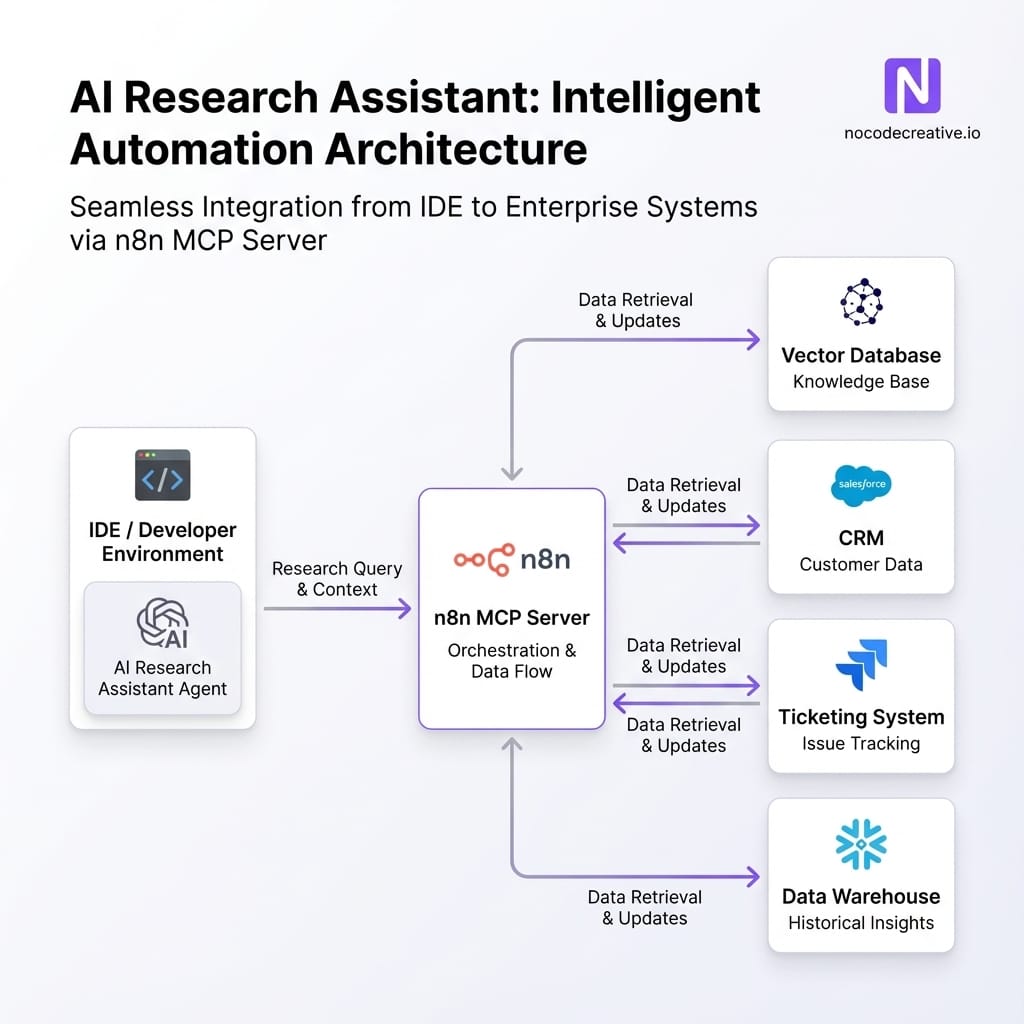
The other big shift is n8n’s embrace of Model Context Protocol (MCP). This standard lets AI clients like Claude Desktop, Claude Code, Lovable, and other agentic IDEs discover and call tools in a structured way.
Instance‑level MCP access and MCP Server Trigger
n8n can now act as an MCP server. This comes in two flavours:
- Instance‑level MCP access: One connection per n8n instance. You decide which workflows are discoverable by toggling “Available in MCP”, allowing connected clients to search and trigger them.
- MCP Server Trigger node: A specific node added to a workflow that exposes just that workflow’s tools, useful for crafting a custom MCP surface.
This gives AI tools a typed, discoverable interface to your automations, rather than forcing you to hand‑roll HTTP wrappers for every interaction.
MCP Client Tool: letting n8n agents call out
Conversely, the MCP Client Tool node lets your n8n agents connect to other compatible MCP servers. Inside an AI Agent workflow, this means you can give your agent abilities like “query our research knowledge base” or “call our internal analytics service” simply by wiring in an MCP Client Tool node.
Operational maturity: environments, project sync, and safe production
For bigger estates, the releases around project‑level variables and Improvements to Environments are just as important as the AI features.
Key capabilities now include project-level variables that override global values, fully synchronised projects across environments, and hardened read-only production instances that block ad-hoc changes. Tools like workflow diffs and Insights (custom date ranges, time saved per execution) help quantify value and maintain stability.
Example: a dev–test–prod promotion flow
- Develop in a dedicated dev instance: Builders experiment, pin sample data, and use AI Workflow Builder.
- Commit to Git: Workflows and config are pushed to a branch. Sensitive values stay in external secrets.
- Deploy to test: Platform engineers pull changes, using workflow diff to verify changes at the node level.
- Promotion into read‑only production: Approved changes are merged. The production environment picks them up, but the UI is read‑only, preventing "quick tweaks" that break sync.
- Monitor with Insights: Operations teams track failure rates and execution metrics.
Safer AI at scale: guardrails and evaluations
Letting AI agents trigger real workflows raises valid concerns: What if someone prompts it into leaking data? n8n now gives you several layers of control.
Guardrails node
The Guardrails node sanitises inputs and outputs. You can detect jailbreak attempts, strip PII, or define custom policies using regular expressions. For agentic workflows, it is reasonable to insist every user input and model output passes through these checks. (docs.n8n.io)
Metric‑based evaluations
Evaluations for AI workflows let you run test suites of prompts against expected behaviours. You can capture edge cases, define custom metrics (e.g., "was the answer aligned to policy?"), and compare runs over time. This moves you from "gut feel" to statistical confidence.
Scoped API keys and instance‑wide 2FA
On the security edge, scoped API keys allow you to limit third-party access to specific resources (like variables or projects). Additionally, Enterprise customers can now enforce 2FA across the instance, a critical requirement for compliance teams.
Implementation playbook: a 6–12 week rollout pattern
For many organisations, the right path is not “turn everything on and hope for the best”. A focused engagement can get you to a sensible baseline.
1. Assess your current automations
Start with discovery. Catalogue existing workflows and identify "AI-ready" candidates like support triage or document processing. Map your systems of record and credential locations.
2. Stand up shared infrastructure
Connect n8n to your external secrets store. Enable SSO and 2FA. Set up Git-backed environments for dev, test, and prod. Enable Insights to track "time saved."
3. Pilot 2–3 flagship AI automations
Pick meaningful pilots—a support assistant, a reporting pipeline, or a lead enrichment flow. Use AI Workflow Builder for ideation, then harden with MCP, Guardrails, and Evaluations.
If you want a partner to design and deliver this rollout, we do exactly this kind of work for clients across property, events, and SaaS. You can see real outcomes in our property automation results where n8n drives compliance and invoice processing.
Where n8n fits in your broader low‑code stack
Most teams are not choosing between n8n and the Microsoft stack. They are choosing how to make them work together.
A pattern that works well in practice is using Power Automate for simple Office 365 tasks, while n8n becomes the orchestration hub for complex, cross-system workflows and AI tooling. Azure Functions handle the heavy custom logic.
With MCP in place, agentic IDEs like Cursor or Claude Code can treat n8n as a toolbox layer, triggering predefined workflows to provision environments or query metrics, all while maintaining proper role-based access.
Moving from experiments to a strategic platform
The last year of releases has transformed n8n from a clever playground into shared automation infrastructure. With global credentials, SSO, MCP, and AI governance, you can now run it across teams with full confidence.
If you are looking to structure your automation landscape, this is the moment to act.
References
- n8n release notes (1.x series)
- AI Workflow Builder documentation
- Accessing the n8n MCP server
- MCP Client Tool node documentation
- External secrets
- Source control and environments
- Insights
- Guardrails node
- Metric-based evaluations

 Wayne Simpson
 Wayne Simpson


Discussion