

Unlocking n8n Chat Hub as your internal AI front door
Tucked away behind most n8n instances is a lot of quiet, highly valuable automation. Chat Hub is the piece that lets everyone else in the organisation talk to that power as if it were a set of assistants, without ever touching a workflow canvas.
At nocodecreative.io, we specialise in turning n8n, Microsoft 365, and Azure into practical systems that real teams use every day, not just proof‑of‑concept bots. n8n Chat Hub arrives at exactly the right layer in that stack, providing a safe, central gateway into your internal AI agents.
What n8n Chat Hub is (and how it differs from embedded website chat)
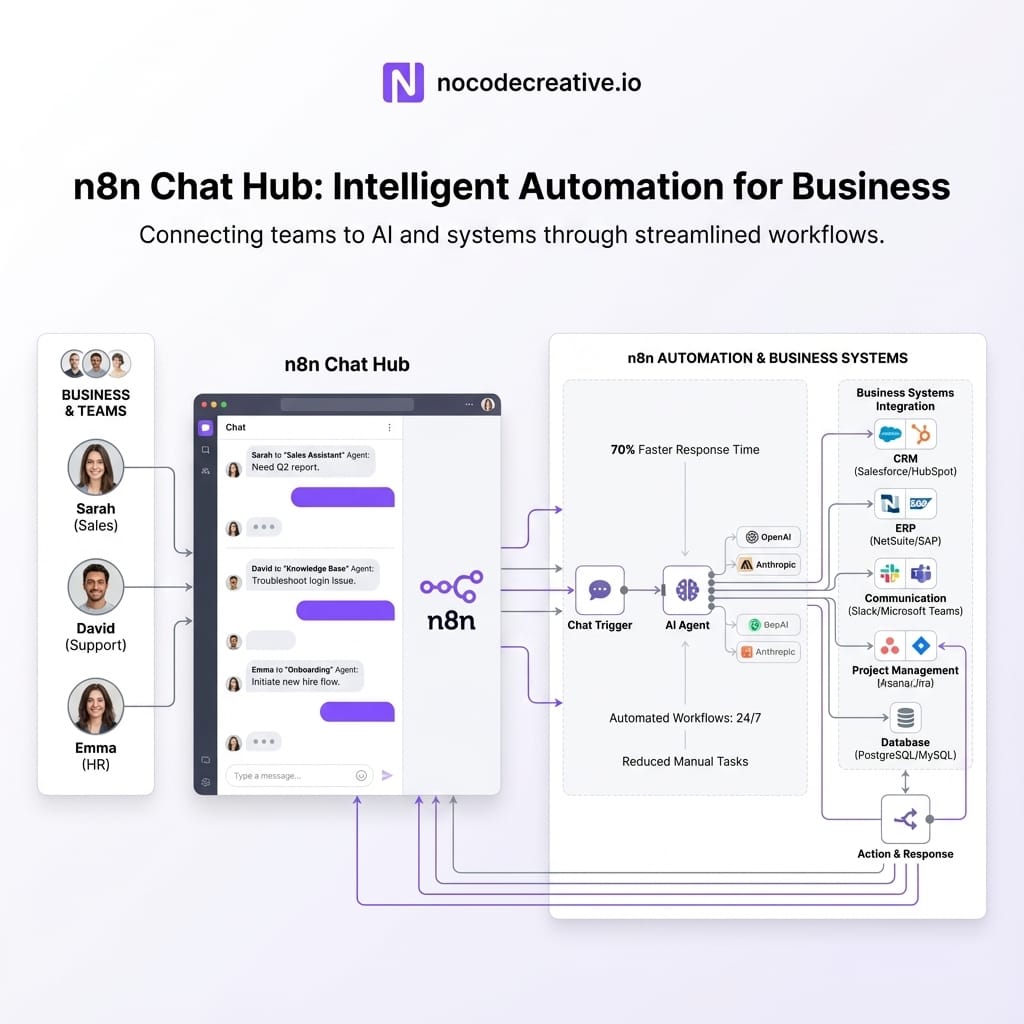
n8n Chat Hub is a built‑in “Chat” screen inside the n8n app that acts as a central place to talk directly to AI models such as OpenAI, Anthropic, or Gemini. It allows users to interact with simple personal agents containing custom instructions or sophisticated workflow‑backed agents implemented as proper n8n workflows.
The official docs describe it as “a centralized AI chat interface where you can access multiple AI models, interact with n8n agents, and create your own agents.” Importantly, it introduces a dedicated Chat user role for people who only need the chat surface, not the editor or credentials.
Distinction: Chat Hub vs. Embedded Chat
It is vital to distinguish this from the Chat Trigger hosted or embedded chat:
- Hosted / embedded chat from the Chat Trigger node gives you a standalone chat interface (or widget) that you can expose publicly or embed into another app. It is ideal for website chat, customer portals, mobile apps, and so on.
- Chat Hub lives inside the n8n UI and is meant for internal users. It is where your sales, support, finance, or IT staff choose from a list of internal agents and models that builders have wired up.
Practically, Chat Hub becomes your “internal ChatGPT.” But instead of being a loose tab in someone’s browser, it is governed by your n8n roles and permissions, bound to centrally approved models and credentials, and wired directly into your existing n8n workflows and data sources.
Core building blocks: Chat Hub, Chat Trigger, AI Agent and provider settings
To make Chat Hub useful, you combine four main ingredients from the n8n stack.
1. Chat Hub
Chat Hub itself is just the front end. Users open the Chat tab, pick a model or agent from a selector, and start typing. Behind the scenes, each agent in that list is either a simple personal agent defined in the Chat Hub UI or a full n8n workflow agent created by your builders, exposed to Chat Hub via the Chat Trigger node. Crucially, Chat Hub understands role‑based access, so users only see agents and workflows that they are allowed to use.
2. Chat Trigger node
Every workflow that appears as an agent in Chat Hub must start with a Chat Trigger node configured correctly. This means the node needs to be on the latest version, “Make Available in n8n Chat” must be enabled, and the workflow must be activated with a clear agent name and description.
Under the hood, the Chat Trigger turns each incoming chat message into a workflow execution. While it can also provide hosted or embedded chat endpoints, for Chat Hub, the key configuration is the availability toggle.
3. AI Agent node
The AI Agent node is where the actual agent logic lives. It represents a tools‑based AI agent that receives a prompt (plus context), chooses which tools to call, and returns a response.
Typical Configuration:
- Connect at least one tool sub-node (vector store, database, API, or other workflow).
- Attach a Chat Model sub-node (OpenAI, Anthropic, Gemini, etc.).
- Turn on streaming so responses feel snappy.
- Plug in a memory sub-node if persistence is required.
4. Provider settings
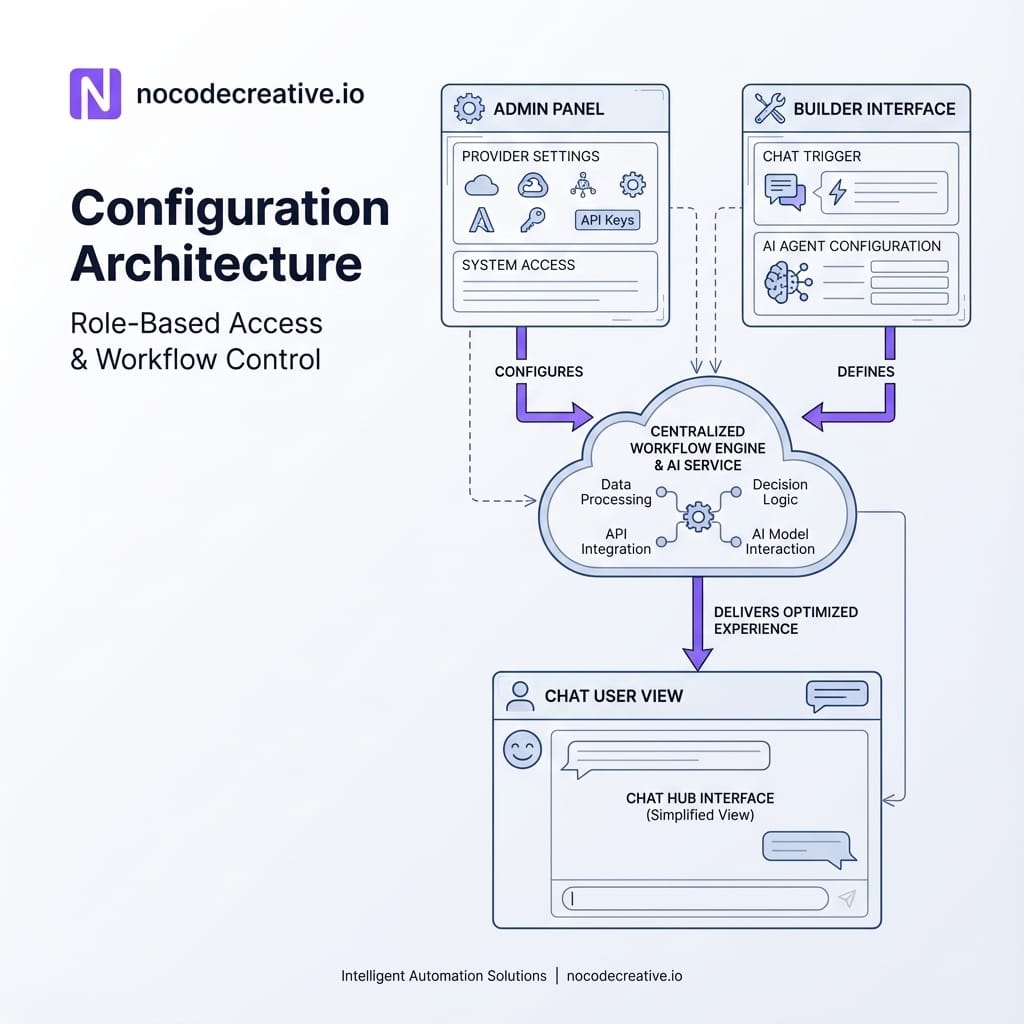
Finally, Chat Hub is governed by provider settings under Settings → Chat. Admins can enable or disable specific providers and models, prevent users from adding their own models, set default credentials, and use the wider permission system to stop users from creating their own credentials.
Instead of having one OpenAI key per department, you can standardise on shared, governed credentials. This is a big part of stopping AI sprawl and keeping costs under control.
Governance first: Chat user role, shared credentials and model restrictions
Chat Hub is clearly designed with governance in mind, which is why it appeals so much to operations and IT leaders. The Chat user role (available on Starter through Enterprise plans) is central to that design.
Chat users only see the chat interface. They cannot create or edit workflows, nor can they add credentials by default.
You then layer this with standard n8n controls:
- Workflow sharing and projects decide which users can see which workflow agents.
- Provider settings decide which models and credentials can ever be used in Chat Hub.
- Role‑based access control controls who can administer providers, workflows, and credentials in the first place.
For many organisations in the UK and globally, this makes it realistic to give AI access to frontline teams without breaching internal security policies or regional data rules.
At nocodecreative.io, this is often the point where n8n starts to look less like a developer tool and more like an internal platform. When you combine n8n Chat Hub with Microsoft 365 identity, Azure hosting, and your existing policies, it becomes a consistent front door to AI across the business.
Internal policy and SOP helpdesk agent in Chat Hub
The easiest place to see n8n Chat Hub shine is an internal policy and SOP helpdesk.
The Architecture
A workflow starts with a Chat Trigger that has “Make Available in n8n Chat” turned on and is labelled “Policy Helpdesk”. An AI Agent node connects to tools such as a vector store over your policies, or connectors to SharePoint, Confluence, or Notion. Memory is configured to allow the agent to remember context across a short conversation.
The User Experience
Users simply log in as a Chat user, choose “Policy Helpdesk” in Chat Hub, and ask questions like “What is our UK holiday policy?” or “How do I request a laptop replacement?”.
The workflow takes care of retrieval strategy, redaction rules, permission checks, and handling low-confidence answers (e.g., by routing to HR). Handled well, this removes constant “Where do I find…” traffic and rescues the organisation from yet another separate chatbot product.
Self‑serve metrics and reporting agent for ops and finance
A more advanced but very high‑value pattern is a reporting agent that lets operations and finance leaders explore key metrics in natural language.
Conceptually, the Chat Trigger receives a request such as “Show me last week’s revenue by region.” An AI Agent interprets the question into a constrained query plan against your warehouse or BI tool, runs parameterised queries, and returns both raw results and a narrative explanation.
This works nicely with common stacks like Snowflake, BigQuery, or PostgreSQL, visualizing data via Power BI or Looker. However, these agents need strong guardrails:
- A clear semantic layer mapping business language to specific metrics.
- Limits on time windows and complexity to avoid runaway queries.
- Obvious masking logic for sensitive data like salaries.
When we design these at nocodecreative.io, we treat them like a thin conversational layer over a proper semantic model, not a free‑form “ask the database anything” bot.
Sales copilot for CRM updates and follow‑ups
Sales teams rarely want another dashboard. They want to move conversations forward and keep the CRM accurate without spending their evenings logging calls.
n8n Chat Hub lets you offer a Sales Copilot that accepts natural language instructions such as “Log a call with ACME from this morning and move the deal to Proposal.” The AI Agent parses the intent and entities, calls CRM nodes (HubSpot, Salesforce, Pipedrive), and even drafts follow-up emails that match your sales playbook.
From a Chat Hub perspective, sales reps never see credentials or node wiring. They simply pick “Sales Copilot,” type short commands, and confirm what the agent proposes. This works nicely alongside Microsoft Copilot in SMEs—while Copilot handles Outlook/Teams summarization, n8n orchestrates cross-system actions following your specific business rules.
IT incident copilot on top of existing runbooks
For IT and SRE teams, Chat Hub can sit on top of your existing runbooks and incident automations, presenting them through a safe conversational interface.
A typical Incident Copilot workflow starts with a Chat Trigger limited to IT projects. It uses an AI Agent with tools to query monitoring platforms, fetch deployment info, look up runbooks, and trigger safe remediation workflows (with explicit confirmation). Because everything runs through n8n, you can log conversations and actions back into ServiceNow or Jira Service Management, keeping security and audit teams happy.
Implementation roadmap: from first agent to organisation‑wide rollout
Rolling out n8n Chat Hub is not an all‑or‑nothing move. A simple, staged plan works best.
1. Start by enabling Chat Hub and defining roles
Once your n8n instance is updated, turn on Chat Hub. Work with IT to decide on Admins, Members, and Chat users. Integrate with your existing SSO (Entra ID, Okta) and agree on which teams will join the pilot.
2. Pilot one low‑risk internal helpdesk
Build a small internal helpdesk agent focused on policies or FAQs. This allows you to establish standard Chat Trigger patterns, sort out memory/logging decisions, and socialise the tool with a small group.
3. Add a targeted value agent per department
Identify clear wins: a KPI explainer for finance, a logging copilot for sales, or a macro-suggester for support. This creates visible value without excessive risk.
4. Evolve towards a governed internal agent catalogue
Treat your agents like internal products. Maintain a catalogue, track quality, and manage prompts as versioned artefacts. This is often where a partner like nocodecreative.io helps teams transition from "experiments" to a coherent, managed rollout.
Limitations and design considerations
Chat Hub is powerful, but there are boundaries you need to be aware of.
Personal vs. Workflow Agents: Users can create personal agents with custom instructions, which are great for small tasks. However, personal agents cannot currently accept their own file knowledge and have fewer tools than full workflows. Anything touching internal systems should be a workflow agent.
Memory & Tools: Not all use cases need memory; many operational agents are safer as single-turn tools. Furthermore, every tool is a potential side effect. It is good practice to default to read-only tools and separate "suggest" flows from "apply" flows, logging every invocation for audit.
Where expert implementors add value
You can build a simple internal helper in an afternoon. The work becomes more interesting when you need agents across multiple regions, alignment with strict compliance standards, or deep integration with Microsoft 365 and Azure.
Specialist teams typically help by designing the overall architecture, building robust initial patterns, implementing governance, and supporting ongoing iteration. Handled in this way, n8n Chat Hub stops being a novelty and becomes the safe, central front door to AI across your organisation.
Ready to build your internal AI workforce?
Our expert AI consultants can help you implement these workflows securely and effectively.
References
- Chat Hub - n8n Docs
- Chat Trigger node - n8n Docs
- AI Agent node - n8n Docs
- Tutorial: Build an AI workflow in n8n
- Announcing Chat Hub Beta – n8n Community
- NOCODECREATIVE.IO | AI, Automation & App Development



Discussion