
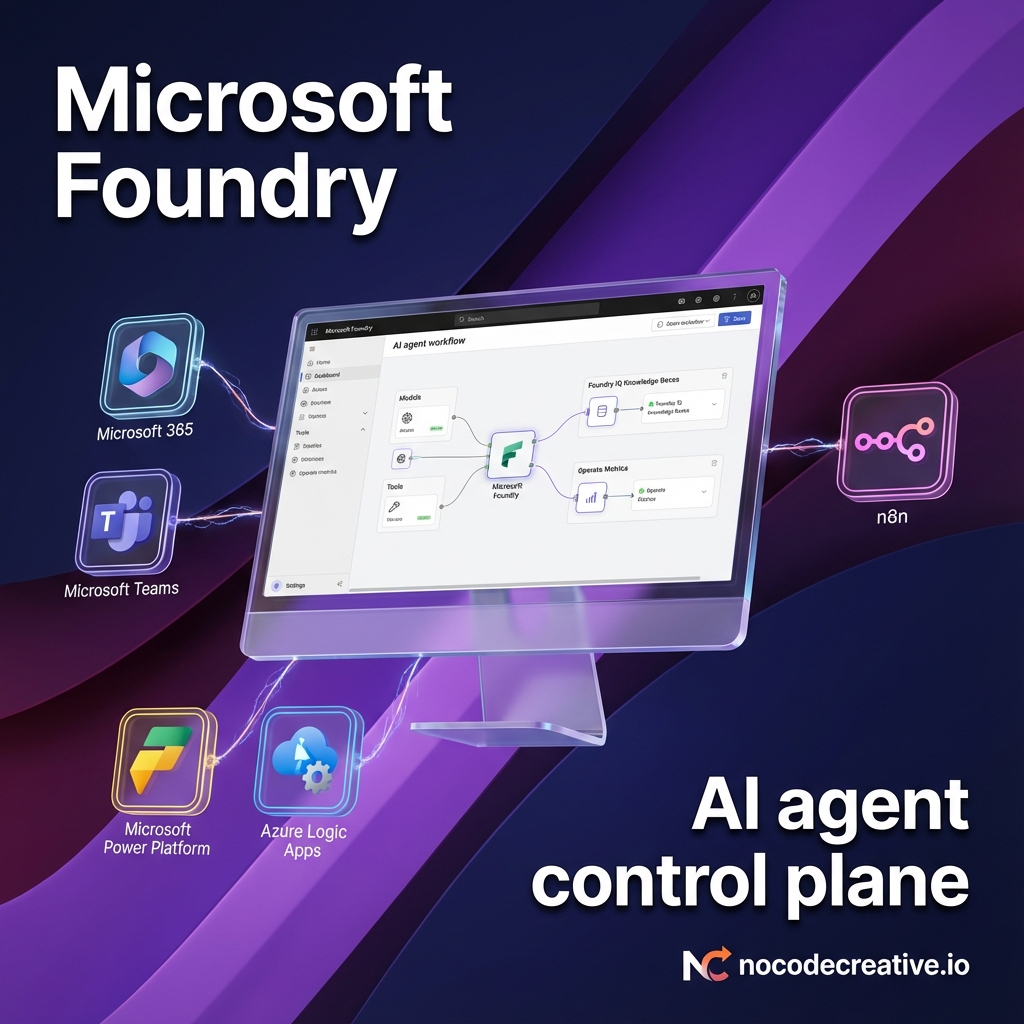
Microsoft Foundry explained: your AI agent control plane
Most organisations are now past the first round of AI experiments. The hard part is turning those experiments into reliable agents that IT can govern, finance can budget, and teams can actually use in Microsoft 365.
This is exactly where Microsoft Foundry sits. It is not a single model or a demo portal. It is Microsoft’s enterprise platform-as-a-service for building, running, and governing AI agents and applications across Azure, Microsoft 365, and beyond. (learn.microsoft.com)
Strategic Insight: At nocodecreative.io, this aligns perfectly with the work we deliver for clients: centralising AI decision-making while keeping automation flexible at the edges with tools like n8n, Logic Apps, and Power Platform.
In this deep dive, we will unpack how Microsoft Foundry works as an AI agent control plane, how it fits with Copilot, Power Platform and n8n, and what a 90‑day rollout can realistically look like for a real business.
From Azure AI Foundry to Microsoft Foundry – what actually changed
You will still see “Azure AI Foundry” in some documents, but the platform has now been rebranded and expanded as Microsoft Foundry. The intent is to offer a single control plane for models, agents, tools, and governance rather than a collection of loosely related services. (learn.microsoft.com)
There are a few practical changes that matter for architects and IT leaders:
Unified platform identity
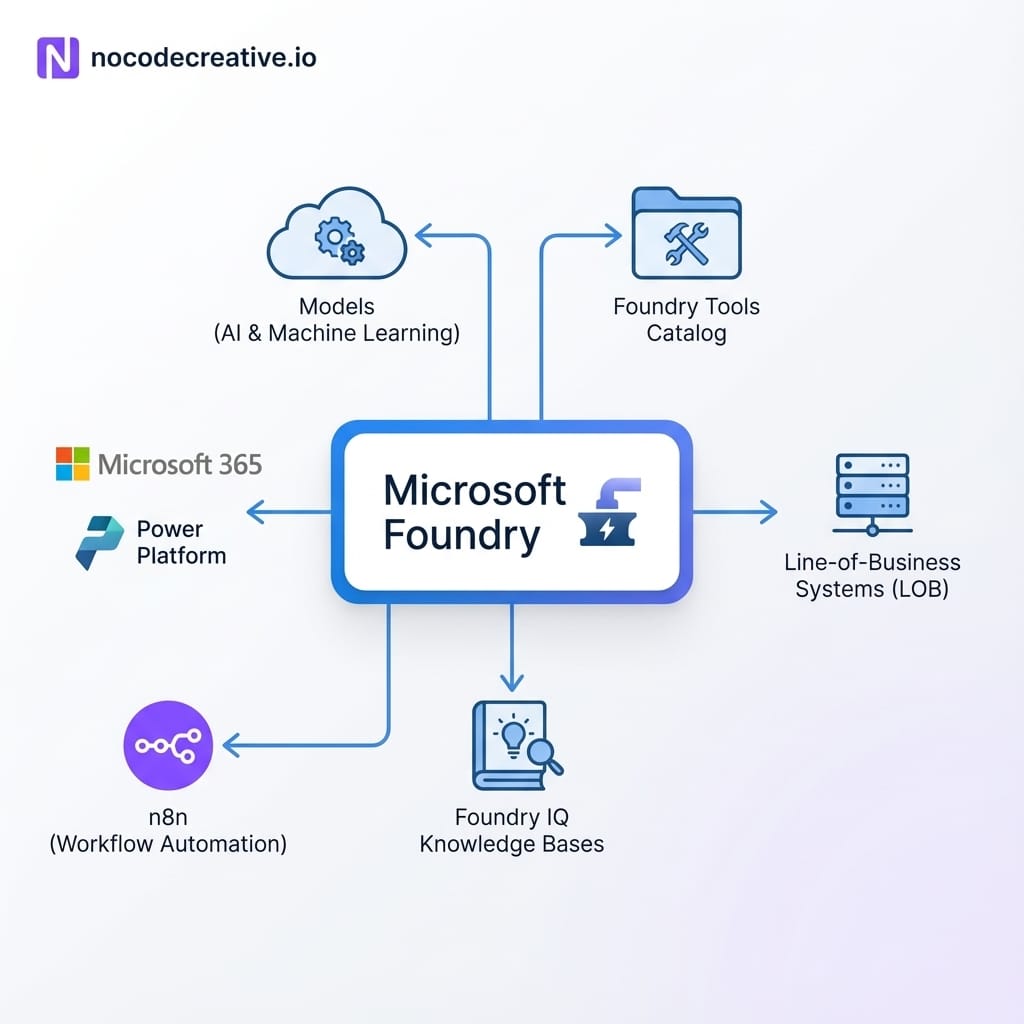
Microsoft Foundry now front‑doors the wider Azure AI stack. You use it to create projects, deploy models, define agents, connect tools, and wire in observability and governance in one place.
Foundry Agent Service as the default runtime
Instead of every team inventing its own agent runtime, Foundry Agent Service provides a first‑class runtime for agents with built‑in threading, tool orchestration, safety filters, identity, and observability.
Foundry Tools catalog
A curated, governed tool catalog lets agents connect to more than 1,000 Microsoft and partner tools, plus your own internal APIs. It supports open standards such as MCP (Model Context Protocol), A2A (Agent‑to‑Agent), and OpenAPI.
Foundry IQ for knowledge grounding
Foundry IQ builds on Azure AI Search to provide knowledge bases that agents can call via MCP tools, returning cited, relevant content rather than opaque answers.
Tighter integration with Microsoft 365 and Agent 365
One‑click publishing routes Foundry agents into Microsoft 365 Copilot, Teams Chat, BizChat, and Agent 365, with Microsoft 365 Admin Center in the middle for approval and governance.
Put simply: where Azure AI Foundry felt like a sophisticated model and playground experience, Microsoft Foundry is positioning itself as the backbone for enterprise AI agents.
Core concepts – projects, models, agents, tools, and Foundry IQ
To understand how to design on Foundry, you need to get comfortable with its basic building blocks.
Foundry projects vs hub‑based projects
Microsoft is moving from older “hub‑based” projects to Foundry projects as the default unit of work. New capabilities, such as continuous evaluation for agents and advanced observability, are now exclusive to Foundry projects.
For most organisations, this means strictly starting new builds on Foundry projects and migrating existing hub‑based workloads early to avoid being locked out of features. From an architectural perspective, treat a Foundry project as the scoped environment where you attach models, register tools (including remote MCP servers), define agents, and configure cost controls.
How models and tools are unified
Microsoft Foundry exposes models and tools through a unified project and SDK surface rather than a sprawl of separate services. You access models from a central catalog—mixing OpenAI models (like GPT‑4.1) with other Microsoft and third‑party options—and connect tools via Foundry Tools. This creates a single control plane to manage allow-lists, standardise authentication patterns (Entra Agent ID, managed identities), and apply consistent policy across everything your agents touch.
Agents and Foundry Agent Service
Agents in Foundry are significantly more than just prompt wrappers. The Agent Service manages the entire lifecycle: threads, runs, tool orchestration (including multi-step logic), content safety, and identity. It also handles resilient state storage using customer-managed Cosmos DB, ensuring continuity across regions. This reinforces the “control plane” concept—every agent interaction flows through a governed runtime rather than custom code glued together in a web app.
Foundry IQ for knowledge grounding
Foundry IQ leverages Azure AI Search to expose knowledge bases as MCP tools that agents call at runtime. For architects, this means the agent talks to a knowledge base—which performs query planning and answer construction—rather than directly accessing raw blob storage.
We recommend a strategy where you use Foundry IQ for structured retrieval and grounding, while supplementing with additional tools like Elastic MCP Server or MongoDB MCP Server for vector search and operational data when required.
Architecture deep dive – how Foundry fits with Azure, Copilot, and Power Platform
Foundry Agent Service as the orchestration layer
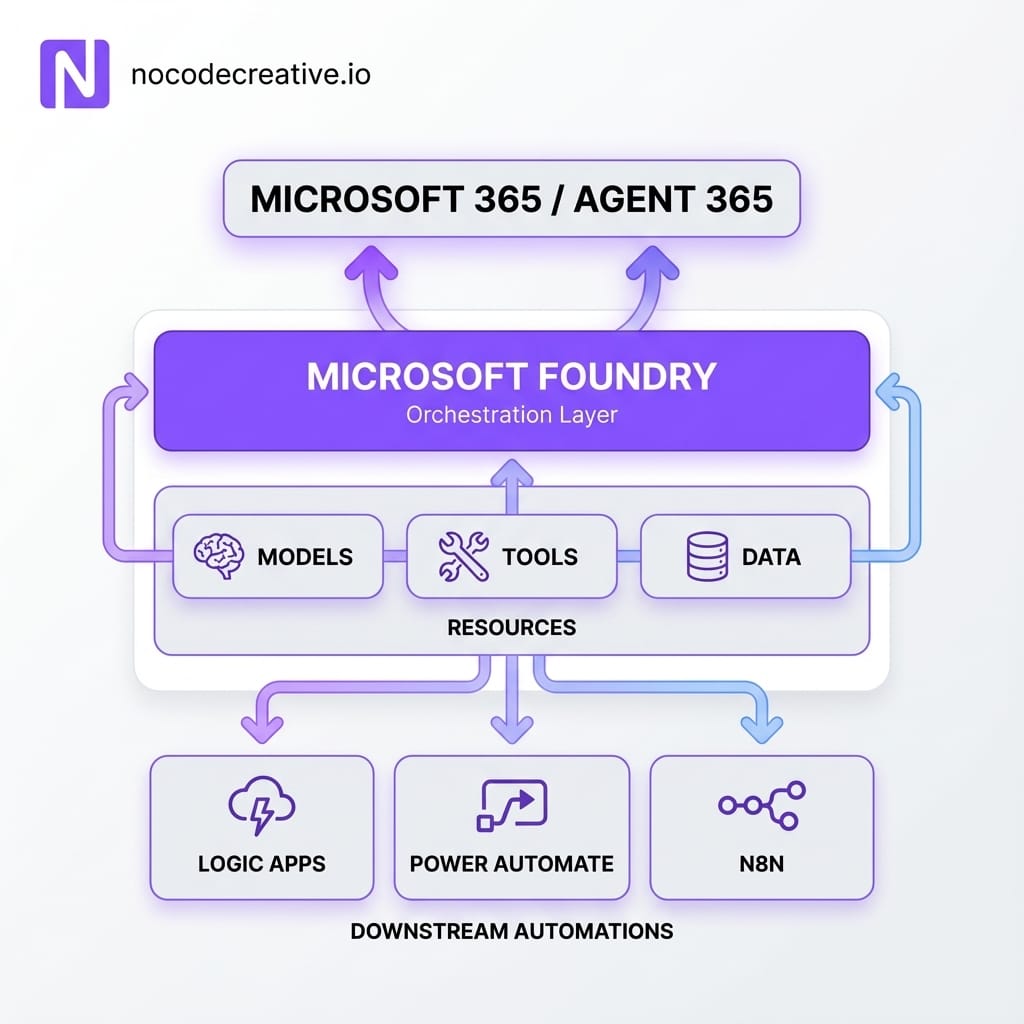
The Foundry Agent Service provides a runtime open to multiple frameworks, designed for multi-agent workflows and hosted agents. It acts as the primary place where agents live, reason, and call tools. Crucially, it serves as the integration point for Microsoft Agent 365, allowing business users to access these agents directly in Microsoft 365 experiences without needing to understand the underlying runtime.
Foundry IQ for retrieval
In most production projects, the pattern follows a clear sequence:
- Data lands in line-of-business systems (SharePoint, Fabric, Azure SQL, MongoDB, etc.).
- You build knowledge bases in Foundry IQ or connect external MCP servers for retrieval.
- Agents use those knowledge bases as tools when answering questions or making decisions.
This approach decouples your storage choices from your agent design—essential for navigating complex legacy estates.
Foundry Tools, MCP, and A2A integration
Foundry Tools solidifies the platform's role as a control plane by offering a public catalog of 1,400+ tools alongside organisational catalogs for internal APIs. Support for MCP, A2A, and OpenAPI allows you to wrap existing services—such as Logic Apps, Functions, or n8n flows—as tools. This transforms Foundry into the decisioning layer that coordinates work, while specialized systems continue to handle the heavy lifting.
Building multi‑agent workflows
Defining agents in code
The Microsoft Foundry SDKs provide a consistent model across Python, C#, JavaScript, and TypeScript. In code-first architectures, you define agents and tools alongside your domain logic, configure memory (including long-term user context), and attach evaluation and tracing. This ensures every run is observable from day one and fits neatly into modern DevOps and CI/CD pipelines.
The planner–worker pattern
A common pattern for cross-system processes is the planner–worker topology:
- A planner agent receives a high-level goal (e.g., “resolve this support ticket”).
- It breaks the goal into steps and delegates to worker agents specialized in domains like knowledge retrieval or CRM actions.
- Workers call tools in Foundry Tools to take real actions in external systems (ERP, n8n flows, Logic Apps).
Since everything runs inside Foundry Agent Service, you gain centralised tracing of the entire plan: which tools were used, what data was accessed, the associated costs, and performance metrics.
Using Operate for tracing and optimisation
The Operate experience provides thread and run traces, continuous evaluation via hosted evaluators, and metrics for quality and safety. This visibility is what finally makes it realistic for risk, compliance, and security teams to sign off on AI deployments.
Integrating Foundry agents into Microsoft 365 & Automation
Publishing agents to Microsoft 365
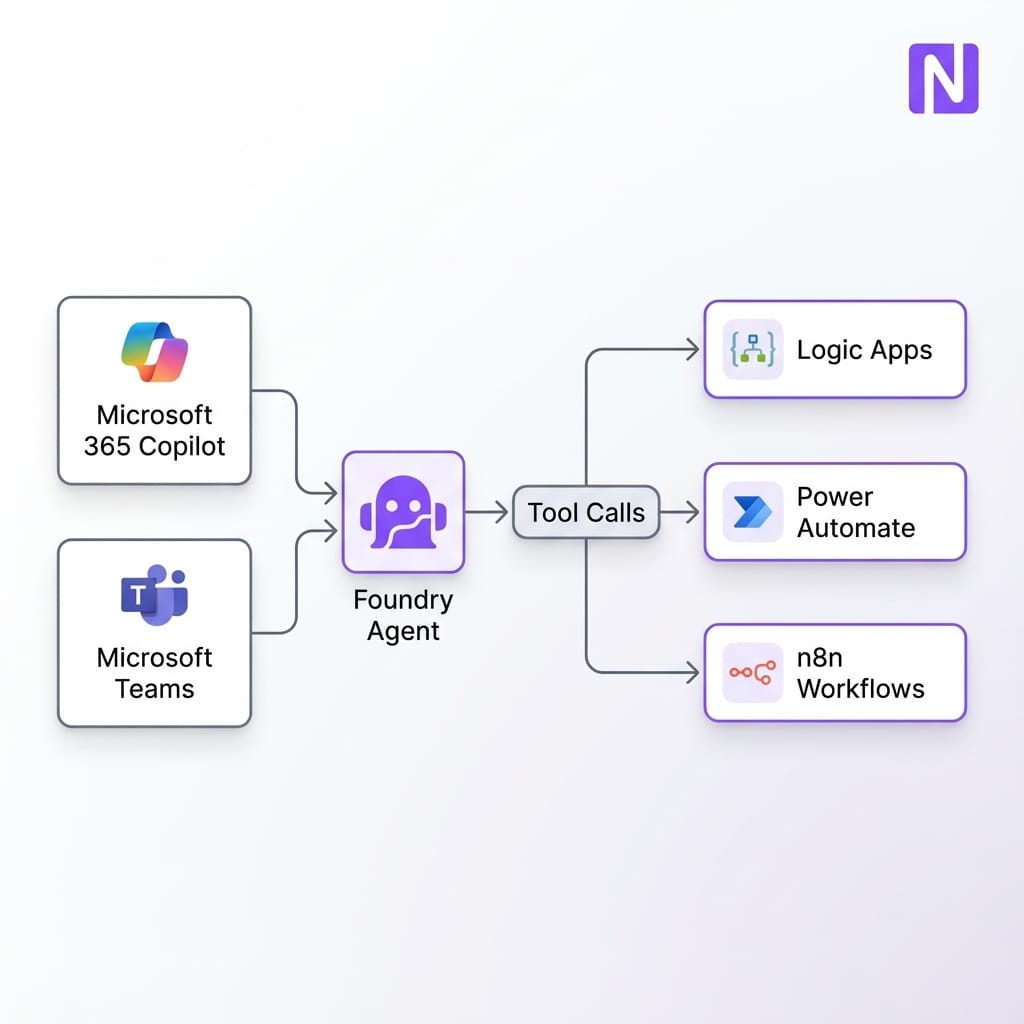
Recent updates to Foundry allow one build to target multiple Microsoft 365 channels, including Teams Chat, Copilot Chat, and BizChat. Publishing is handled through a simplified flow that wires up Azure Bot Service and Entra ID behind the scenes, routing through the Microsoft 365 Admin Center for governance. This ensures users meet agents where they already work, while IT maintains control through existing admin consoles.
Connecting to Power Platform and n8n
Foundry does not replace Power Platform or n8n; it sits above them as a reasoning layer.
In a Foundry + Power Platform setup, Foundry agents act as the brain, while Power Apps provide low-code front ends. Power Automate connectors can even be exposed as tools for the agents.
For Foundry + n8n, while there is no native connector, you can easily expose n8n workflows as HTTP endpoints or OpenAPI definitions. From the agent’s perspective, a complex n8n workflow is simply another tool it can decide to run. This enables a vendor-neutral architecture where Foundry provides governance, and tools like n8n orchestrate detailed workflows across SaaS and legacy systems.
Governance, security, and cost
Foundry inherits Azure’s security model, adding agent-specific RBAC and networking options like private endpoints. Integration with AI Gateway allows you to enforce policies on tool usage and outbound connections. Furthermore, the Operate dashboards provide granular cost visibility at the agent or project level—replacing scattered logs and spreadsheets with a single source of truth for your AI fleet.
Implementation playbook – 90 days to rollout
The timeline will vary, but for many Microsoft‑centric organisations, a 90‑day path is realistic if you stay focused.
Phase 1: Foundation and landing zone (Weeks 1-3)
Focus on establishing your environment. Choose your subscription and region, establish a basic landing zone with RBAC and networking rules, and design your initial tool and knowledge strategies. This is the time to decide which global tools are allowed and how to register private APIs.
Phase 2: First two production agents (Weeks 3-8)
Anchor your rollout in concrete use cases. An IT operations copilot can triage incidents using Foundry IQ, while a Customer support copilot can centralise FAQs and trigger downstream workflows. For each, implement the agent in Foundry Agent Service, expose it to Teams, and wire in observability immediately.
Phase 3: Scaling patterns (Weeks 8-13)
Move from "doing a project" to building a capability. Extract templates for agents and tools, formalise an AI centre of excellence, and expand your organisational tool catalog. Introduce a lightweight intake process to encourage departments to build on this shared control plane rather than fragmenting into shadow IT.
Where Foundry stops and other tools begin
It is important not to treat Microsoft Foundry as the answer to every problem. It is a control plane, not a replacement for every automation platform you already use.
Use Microsoft Foundry when
You need multi‑agent reasoning, tool orchestration, and deep integration with Azure/M365. It is best for strict governance, security, and standardising agent builds across teams.
Use Power Platform when
You are enabling citizen developers and departmental teams to build form‑driven apps and workflow automations primarily inside Microsoft 365 and Dynamics.
Use n8n/Logic Apps when
You need broad, vendor‑neutral integration across SaaS tools and legacy systems, or prefer a visual workflow-centric view for complex process orchestration.
In many modern stacks, you will end up using all three: Foundry as the agent brain, Power Platform as the departmental surface, and n8n or Logic Apps as the edge automation fabric.
Ready to build your AI control plane?
Designing this stack balances risk, skills, and legacy systems. At nocodecreative.io, we combine AI automation, engineering, and Azure expertise to build practical, governed AI systems.
Get in touch to discuss your needs
References
- What is Microsoft Foundry?
- Explore Microsoft Foundry models
- Continuous evaluation for agents
- Foundry Agent Service product page
- Publishing agents to Microsoft 365 Copilot and Teams



Discussion