

How to Use n8n + Microsoft Agent 365 to Build Governed Enterprise AI Agents
Most Microsoft 365 teams are now realising that chat-style assistants are not enough. The next step is properly governed AI agents that behave like digital colleagues, not side projects.
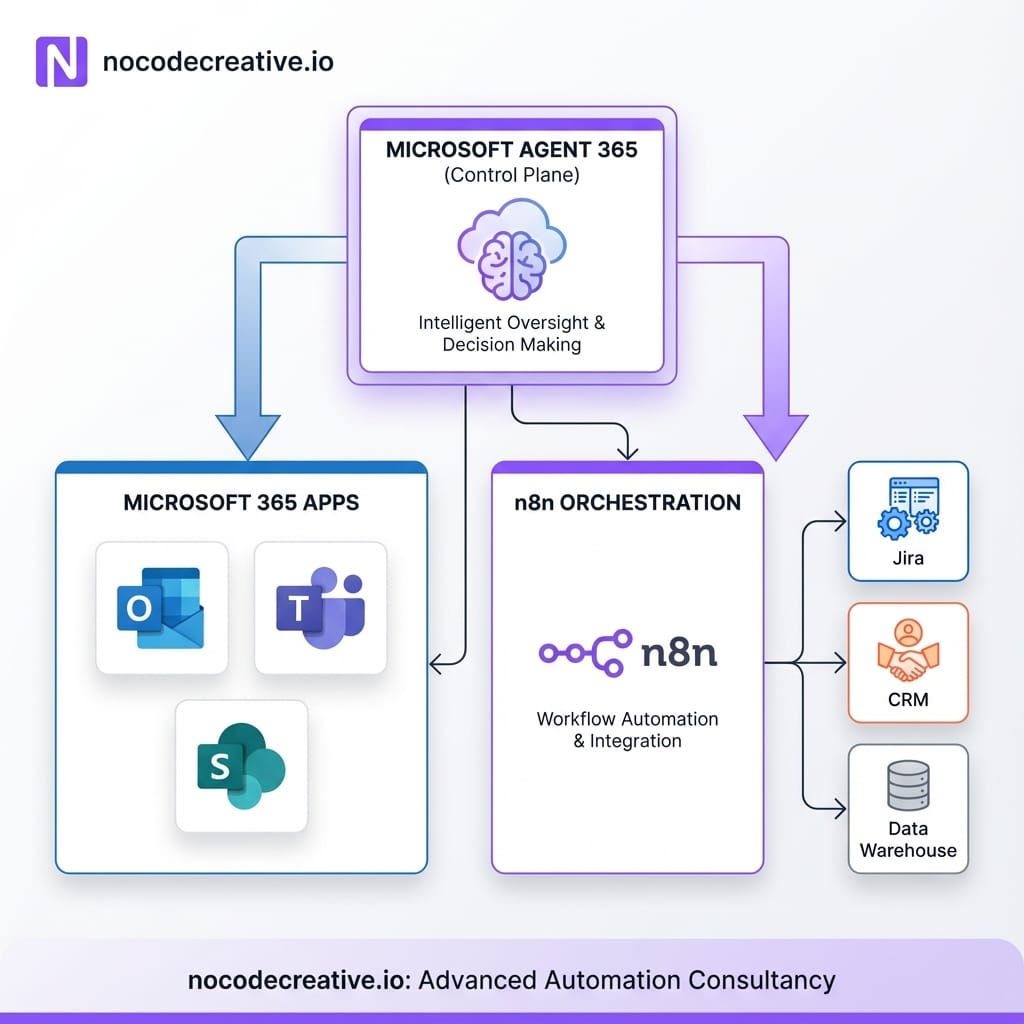
Microsoft Agent 365 gives you the control plane and identity layer. n8n gives you the orchestration brain and workflow fabric across the rest of your stack. Together, they create a practical way to run “real” enterprise AI agents inside Outlook, Teams, SharePoint and beyond.
At nocodecreative.io, this is exactly the sort of architecture we design and implement for teams that want to move beyond experiments into reliable, auditable automation with n8n and Microsoft 365.
Why agents need a control plane, not just another chatbot
The industry has spent a couple of years shipping chatbots and Copilot-style experiences. While helpful, they are often limited in scope. Once you start building real AI agents for operations, sales, finance, or IT, critical governance problems appear very quickly.
Organisations immediately face questions about who actually owns the agent, what permissions it holds, and how to track its historical actions. There are practical concerns regarding how to switch an agent off, rotate its credentials, or tighten permissions, as well as the necessity of proving to auditors or regulators exactly what happened during an interaction.
Without a proper control plane, you end up with “shadow agents,” hard-coded API keys, and brittle glue code scattered across tools. That is fine for experiments, but unacceptable for production environments.
Microsoft Agent 365 is Microsoft’s answer to that problem. It treats agents as first-class identities and assets, so you can manage them with the same rigour that you apply to people and applications. (microsoft.com)
The missing piece is orchestration. You still need something to coordinate tools, data, and AI models across Jira, PagerDuty, CRMs, data warehouses, and all the non-Microsoft systems your business relies on. That is where n8n fits.
What Microsoft Agent 365 actually is
Microsoft describes Agent 365 as “the control plane for agents,” extending the infrastructure you already use for users to AI agents. At the time of writing, it is available through Microsoft’s Frontier early access programme, so you need to be enrolled to try it in production environments.
Entra Agent ID and identity
Each agent registered with Agent 365 gets a Microsoft Entra Agent ID. This is a dedicated identity type for agents that can be registered, sponsored, and given role-based access to resources. Like human identities, they are managed through lifecycle events (creation, update, suspension, deletion) and governed with conditional access and access reviews.
In practice, that means you can apply the same identity governance controls that you use for employees to your agents, including risk-based policies and enforcement through Microsoft Entra and Defender.
Registry, store and observability
Agent 365 also introduces a central registry of all agents in the tenant—including those with Entra Agent ID and manually registered ones—alongside an agent store so business teams can find approved agents. Crucially, it provides dashboards and logging for usage, security events, and data access. These capabilities are designed to tackle “agent sprawl” and give IT, security, and business leaders a transparent view of how digital colleagues behave.
Where agents actually run
On the runtime side, Agent 365 connects agents with Microsoft 365 productivity apps such as Outlook, Teams, Word, SharePoint, and OneDrive. It utilizes Work IQ, Microsoft’s context layer that understands documents, people, and activities, and connects to agentic tools exposed through MCP (Model Context Protocol) interfaces. Agents can be invoked through familiar gestures, including @mentions in apps like Teams or Word.
So you can think of Agent 365 as:
- The identity, registry, and policy layer for agents
- The way those agents “appear” and act inside Microsoft apps
- The place where IT and security teams keep control
What it deliberately does not try to be is a cross-vendor workflow engine. That is where using n8n as your orchestration layer makes sense.
Where n8n fits as the orchestration layer for Agent 365 identities
n8n is a source-available automation and AI orchestration platform with more than a thousand built-in integrations and an extensible node ecosystem. The AI Agent node system lets you combine deterministic workflow steps, LLM reasoning, and human approvals in the same n8n workflow.
The Division of Labor
In an Agent 365 context, n8n plays a very specific role: Agent 365 handles identity, access, and presence inside Microsoft 365, while n8n acts as the “brain” that decides what the agent should actually do across your wider stack.
Instead of writing custom microservices for each agent, you model its behaviour in an n8n workflow. That workflow can call external systems like Jira, PagerDuty, ServiceNow, HubSpot, or Salesforce, use one or more LLMs for reasoning and planning, trigger follow-on workflows, and run evaluations to keep behaviour safe.
From a governance point of view, this is attractive for SMEs, mid-market, and enterprise organisations—especially in the UK and Europe—because you get Microsoft-grade identity and audit aligned to GDPR expectations, while keeping orchestration in a familiar low-code environment.
If you want help standing up that orchestration layer, our team at nocodecreative.io specialises in designing and implementing n8n automation services for Microsoft-centric organisations, including full-stack architectures that bridge Microsoft 365 and the rest of your SaaS estate.
The current integration pattern: Webhook Trigger, AI Agent nodes and the n8n Sample Agent
Today, you can already connect Agent 365 to n8n using a pattern that combines Microsoft’s Agent 365 SDK, the official n8n Sample Agent from Microsoft’s repository, and n8n Webhook Trigger/AI Agent nodes. From a high level, the flow looks like this:
1. Agent blueprint and identity
In Agent 365, you define an agent blueprint and obtain a Microsoft Entra App Blueprint with the right MCP servers and permissions. During this process, your agent is assigned an Entra Agent ID and registered in the Agent 365 registry.
2. Agent implementation using the n8n Sample Agent
The n8n Sample Agent in Microsoft’s GitHub repository shows how to implement an Agent 365 agent that forwards tool invocations to a configured n8n webhook endpoint. You deploy or adapt that sample so that whenever the agent needs to “do” something, it calls your n8n workflow.
3. n8n Webhook Trigger receives the call
Inside n8n, you create a workflow that starts with the Webhook Trigger node. This node accepts POST requests from the agent, including information about the user, channel (e.g., Teams or Outlook), and the task context.
4. AI Agent node orchestrates behaviour
The payload is passed into AI Agent nodes in n8n. These nodes interpret the request, decide which tools to call (Jira, CRM, APIs), compose responses, or hand off to sub-workflows.
5. Result returned to Microsoft 365
The workflow returns a response through the webhook, which the Sample Agent forwards to the relevant Microsoft 365 app—appearing as a Teams message, a draft email, or a document comment.
6. Error and evaluation workflows
Because this is n8n, you can plug in error workflows and evaluation nodes to record agent behaviour, flag anomalies, and continuously improve prompts.
This pattern is slightly more involved than a single “connector”, but the upside is clarity: Agent 365 owns identity, n8n owns orchestration.
The upcoming Microsoft A365 Agent Trigger node
In its announcement post, n8n confirmed that a dedicated Microsoft A365 Agent Trigger node is on the way. Once that arrives, integration will become significantly streamlined:
- Simpler configuration: Bind an Agent 365 agent directly to an n8n trigger inside the editor without hand-wiring webhooks.
- Richer metadata: Structured fields for agent identity, user, channel, and app context will make building reusable templates easier.
- Intuitive experience: For low-code builders, this will feel like selecting “When an Agent 365 agent is invoked…” and building from there.
From a rollout perspective, you do not have to wait. You can start with the webhook + Sample Agent pattern today, then migrate flows to the dedicated trigger node as it becomes available.
Reference architecture: from Agent 365 event to n8n to Outlook and Teams
It helps to picture how everything fits together when you are designing your first n8n workflow for Agent 365. At a high level, a typical end-to-end architecture looks like this:
- User interaction: A user @mentions an agent in Teams, invokes it in Outlook, or selects it from an Agent 365 store.
- Authentication & Routing: Agent 365 ensures the agent has a valid Entra Agent ID, checks policies, and routes the invocation to your implementation.
- Forwarding to n8n: The agent calls n8n via webhook, passing structured context about the user and operation.
- Orchestration: The n8n workflow loads context (CRMs, ERPs), uses AI nodes to plan, and applies deterministic rules and guardrails.
- Response & Logging: The workflow sends a result back for presentation in Microsoft apps while simultaneously writing observability data to monitoring tools.
- Audit: Agent 365 logs actions in Purview/Defender, while n8n manages credential usage and error workflows.
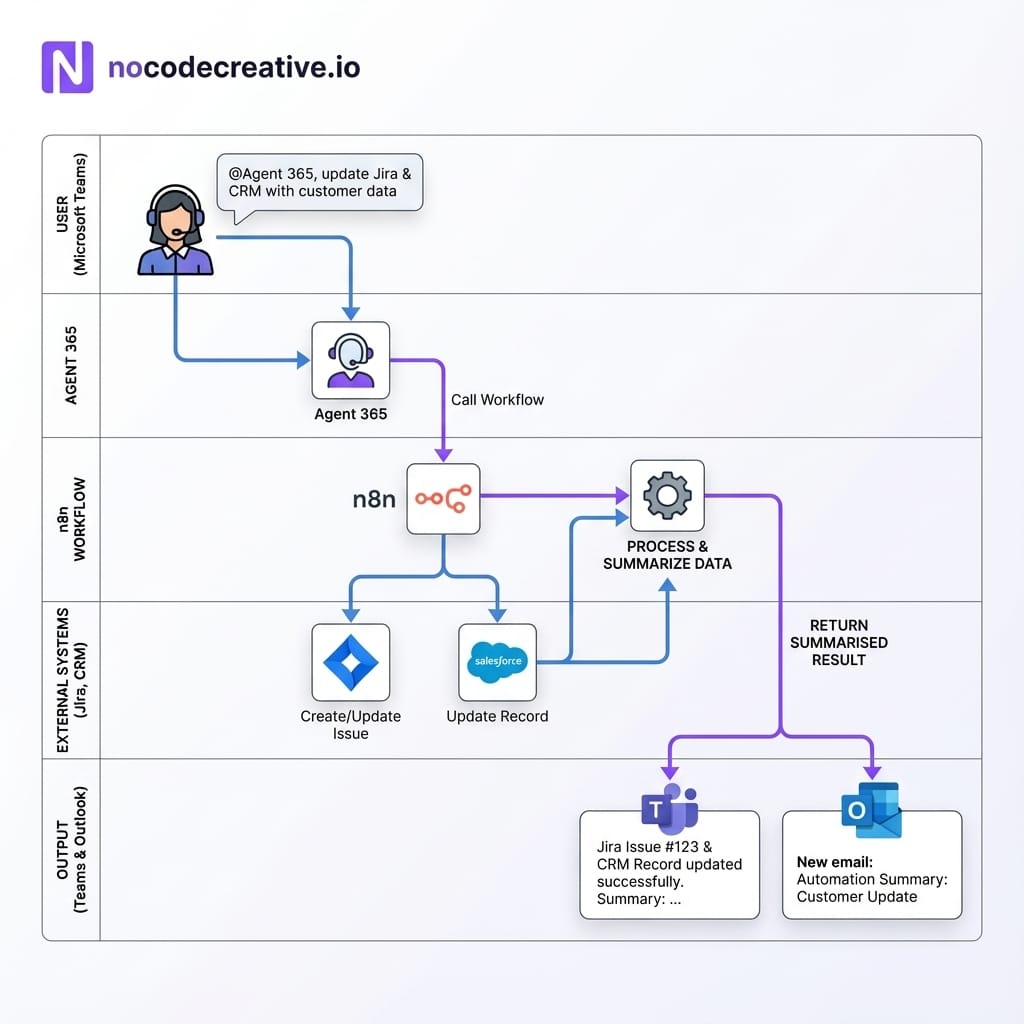
This pattern is flexible enough to support many use cases without forcing you into a single vendor’s LLM or automation stack.
Workflow example: incident command agent
A classic early win is incident management. Imagine an engineering leader who spends an hour daily checking Jira, PagerDuty, and Statuspage, then manually posting updates. With an incident command agent, Agent 365 provides a governed identity with scoped access, while n8n takes responsibility for aggregating and interpreting incident data.
A typical n8n workflow for this agent might:
- Run on a schedule or via Teams prompt.
- Collect open P1/P2 incidents and recent changes.
- Use an AI Agent node to group incidents by service and risk.
- Draft a succinct Teams update and a detailed Outlook summary.
- Flag anomalies for human review.
Workflow example: sales and account management
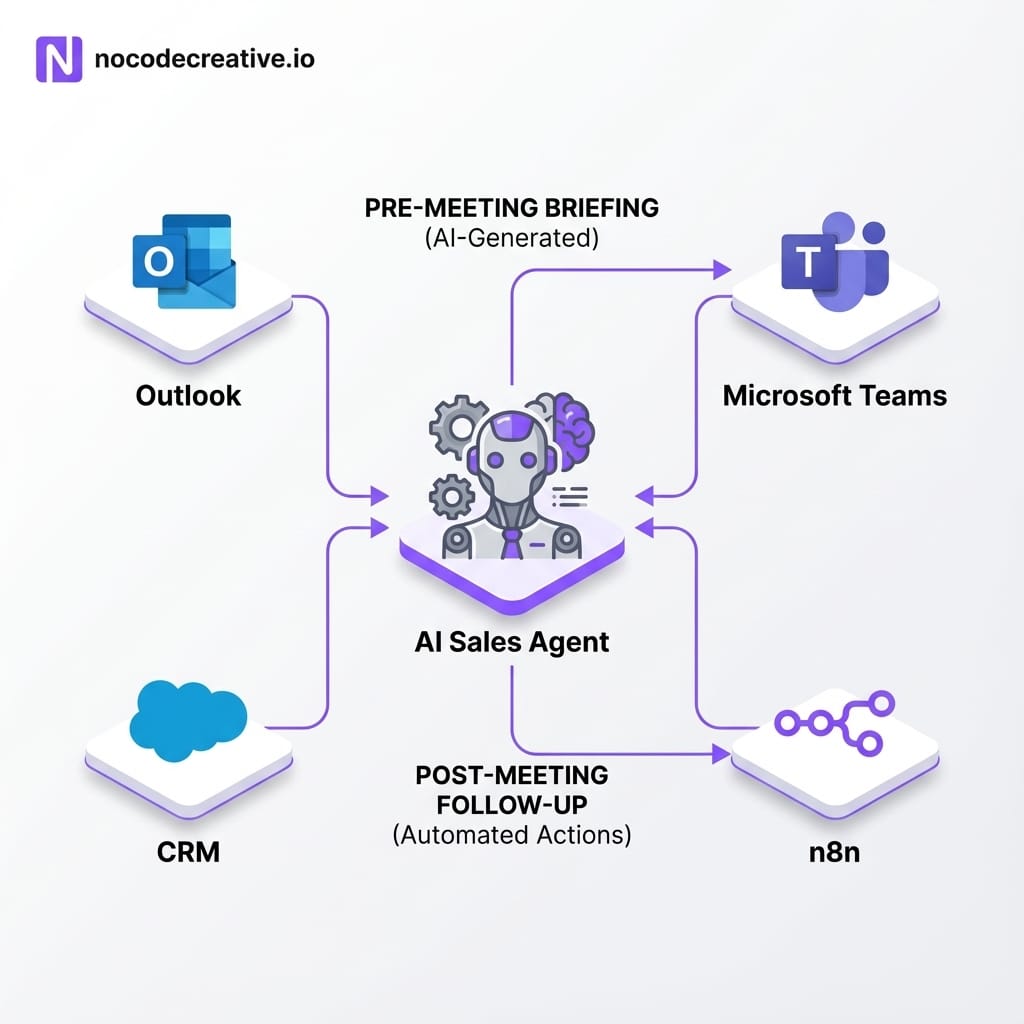
Sales teams need better preparation without extra admin. An Agent 365 + n8n sales agent can appear as a digital colleague in Outlook, with permissions constrained to sales data.
Before a meeting, a sales rep might @mention the agent in Teams: “Prep me for the 3pm call with Contoso.” Under the hood, the n8n workflow looks up the account in the CRM, gathers recent email threads, queries billing info, and generates a briefing note with talking points.
After the call, the rep can ask the agent to draft a recap email and log tasks. n8n handles the logic, while Agent 365 ensures the actions are logged as a governed identity.
If your team would benefit from this kind of AI agent for operations and sales, our consultants at nocodecreative.io can help you design secure data access paths and build the right n8n workflows.
Designing for security, compliance and observability
AI agents touch sensitive data, so traceability is paramount for GDPR, HIPAA, or SOC 2 compliance. A layered approach makes it easier to discuss risk with CISOs and auditors.
On the Microsoft side
- Identity: Least-privilege roles and lifecycle governance via Entra Agent ID.
- Data: Purview labels and DLP policies applied to content agents touch.
- Threats: Defender and Sentinel for anomaly detection.
On the n8n side
- Credentials: Secure storage scoped per environment, never embedded in code.
- Isolation: Separate environments for dev, staging, and production.
- Evaluations: Error workflows to track hallucinations and policy violations.
Rollout strategy: from Frontier preview pilot to organisation-wide use
Since Microsoft Agent 365 is in Frontier preview, a phased rollout is sensible:
- Pick one or two high-value, bounded use cases (e.g., incident command or sales prep). Avoid "universal agents" initially.
- Engage IT and security early to agree on system access, logs, and rollback plans.
- Design your orchestration layer intentionally. A hybrid approach often works best: Power Automate for simple local tasks, n8n for cross-system complexity.
- Pilot and iterate. Start with a friendly user group, collect metrics, and refine prompts before scaling.
- Scale out by duplicating patterns for other teams and building an internal “agent catalogue.”
Implementation Checklist
Ready to move from experiments to a structured Agent 365 rollout?
- ✔ Clarify first 2-3 agent use cases and success metrics.
- ✔ Confirm Frontier preview access for Agent 365/Entra Agent ID.
- ✔ Design Agent 365 blueprints and Entra policies.
- ✔ Implement the Microsoft n8n Sample Agent.
- ✔ Build and harden n8n workflows with AI Agent nodes.
- ✔ Integrate with logging/SIEM stack for observability.
- ✔ Document operating procedures for managing digital colleagues.
If you would like a partner across that journey, the team at nocodecreative.io offers assessments, architecture design, and build-and-run services for AI agents.
References
- n8n expands what’s possible in enterprise automation with Microsoft Agent 365
- Overview of Microsoft Agent 365 – Microsoft Learn
- Agent 365 SDK samples and prompts – Microsoft Learn
- n8n Sample Agent for Microsoft Agent 365 – GitHub
- From innovation to enterprise trust with Microsoft Agent 365 – Microsoft 365 Developer Blog

 Wayne Simpson
 Wayne Simpson
 Wayne Simpson


Discussion