

From prompts to pipelines with GPT‑Image‑1.5
ChatGPT just quietly turned into a serious visual studio.
OpenAI’s new GPT‑Image‑1.5 model, which now powers ChatGPT Images, delivers up to four times faster generation, more precise editing, and much better on‑image text. There is also a new Images space in the ChatGPT sidebar that feels less like chatting with a bot and more like working in a lightweight design tool.
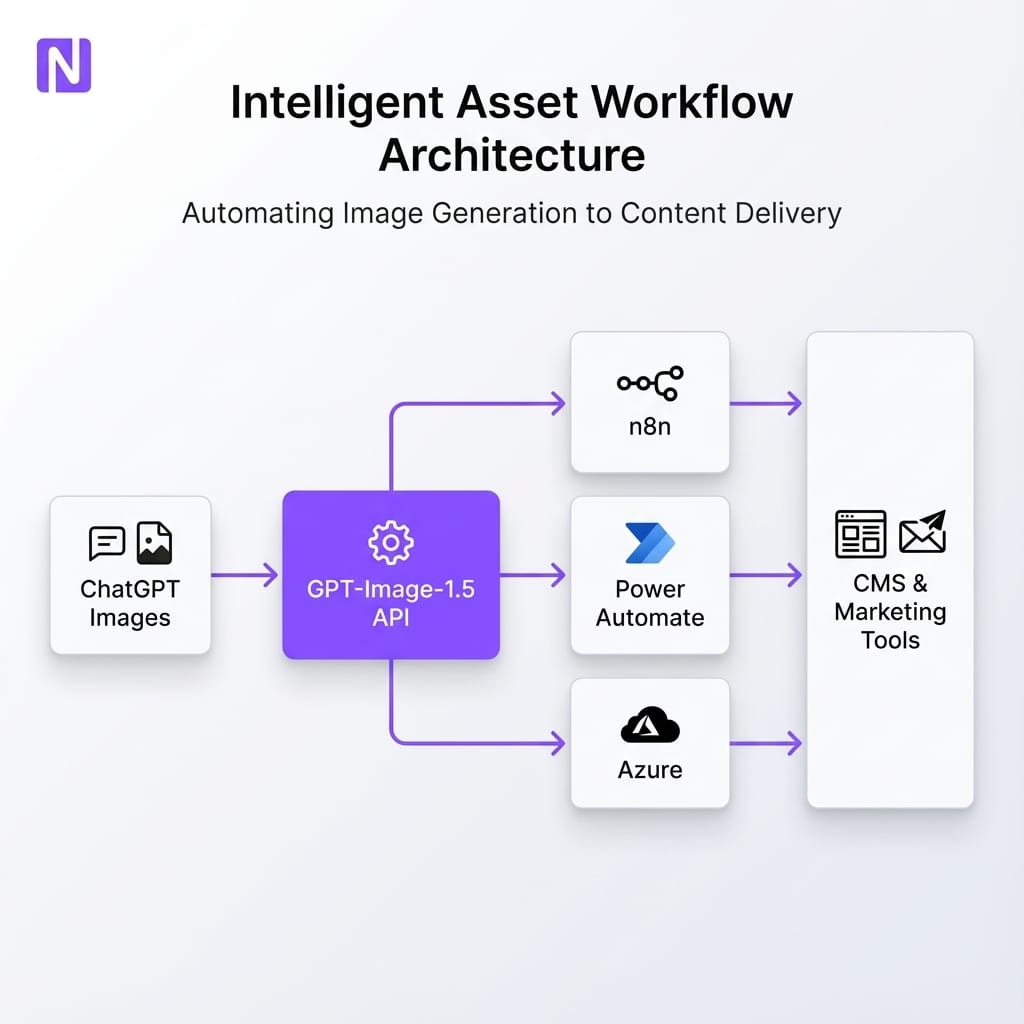
At nocodecreative.io, this is the sort of upgrade we look for, because it shifts AI images from “fun experiments” into something that can sit inside real marketing, ecommerce, and reporting workflows. When you combine GPT‑Image‑1.5 with n8n, Power Automate, and Azure, you are no longer just typing prompts—you are building a creative production line.
This guide walks through what changed, why it matters for SMEs and mid‑market teams, and how to wire GPT‑Image‑1.5 into practical pipelines that produce on‑brand visuals with humans firmly in control.
What actually changed in ChatGPT Images
OpenAI’s announcement on 16 December 2025 introduced GPT‑Image‑1.5 as the new flagship image generation model behind ChatGPT Images and the images API. The upgrade touches several pain points that used to limit production use.
Faster, more responsive generation
Images now render up to four times faster than the previous model, with the ability to keep generating while earlier images are still processing. That shorter feedback loop matters significantly when you are exploring multiple creative directions, testing variants, or tweaking layouts just before a launch.
In practice, this creates a tangible shift in workflow:
- Marketers can spin through several visual concepts in minutes instead of waiting for a single render.
- Automation workflows can afford to generate more variants per brief without blowing up run times.
- Design and brand teams can stay “in flow” instead of waiting for the model to catch up.
Precise editing that keeps what matters
GPT‑Image‑1.5 is significantly better at editing existing images without destroying the bits you wanted to keep. It can add, remove, blend, and transpose elements while preserving key details such as facial likeness and expressions, lighting, color tone, and specific layout compositions.
This precision unlocks new use cases:
- Clothing and hairstyle try‑ons on real people
- Updating product packaging while keeping the core pack shot consistent
- Cleaning up minor issues in photos without full retouching
For workflows, precise editing unlocks “master image plus variants” patterns where a single approved hero image can be safely reused across many contexts.
Much stronger on‑image text
One of the headline improvements is text rendering. GPT‑Image‑1.5 handles denser, smaller text more reliably, including multi‑line copy blocks, labels, UI elements, magazine layouts, and multilingual signage.
Older models often produced glitchy, misspelt, or warped text. The new model is not perfect, but it is now strong enough that posters, hero banners, social tiles, and infographics start to look like real creative assets rather than mock‑ups.
The new ChatGPT Images workspace
Inside ChatGPT, there is now a dedicated Images space in the sidebar. Instead of just typing prompts into a standard chat box, you get preset styles and filters to jump‑start ideas, trending prompts you can customize, and a one‑time likeness upload so you can reuse your own face across creations.
For non‑designers, this is a friendlier way to experiment. For teams, it becomes a sketchpad: marketers explore concepts here, then your automation workflows generate the structured, on‑brand variations at scale.
GPT‑Image‑1.5 in the API
The same capabilities are exposed through the OpenAI API as gpt-image-1.5. OpenAI has reduced image input and output costs by roughly 20% compared to the earlier GPT Image 1 model, which makes large‑scale automation more viable.
For n8n, Power Automate, and Azure Functions, that API is where the real leverage appears—whether accessing it through the Images API for classic text‑to‑image calls or via the Responses API for multimodal workflows.
Why this matters for SMEs and mid‑market teams
Most organizations are not short of ideas for visuals. The bottlenecks are time, coordination, and quality. Typical problems we see include marketing teams waiting days for banner resizes, designers bogged down in layout tweaks, and ecommerce managers stuck with single bland pack shots due to expensive shoots.
GPT‑Image‑1.5 does not magically solve all of this, but it changes the economics across four key areas:
1. Speed
Four times faster generation reduces the pain of iteration. You can afford to try more ideas, not just “the one safe layout”.
2. Cost
Lower API pricing and more consistent output means generating thousands of images for catalogues or campaigns becomes a realistic automation project, not a science experiment.
3. Quality
Better text, editing, and instruction following move the model from “concept art only” into genuine marketing, ecommerce, and internal comms assets.
4. Access
The new Images workspace lets non‑technical stakeholders get comfortable with the model before you plug it into pipelines.
There are still clear limitations: complex logos and exact typography are not guaranteed to be pixel perfect, and multi‑person scenes can still have occasional oddities. This is exactly why the right answer is not “let everyone type prompts and ship whatever they like”. The right answer is to build a few well‑designed pipelines, with n8n or Power Automate orchestrating the flow and humans in the approval loop.
If your team would rather focus on strategy than stitching APIs together, this is the type of work our team at nocodecreative.io delivers, combining n8n workflows, Microsoft 365, and Azure to create governed, repeatable image pipelines.
Workflow 1 – Campaign asset factory on n8n or Power Automate
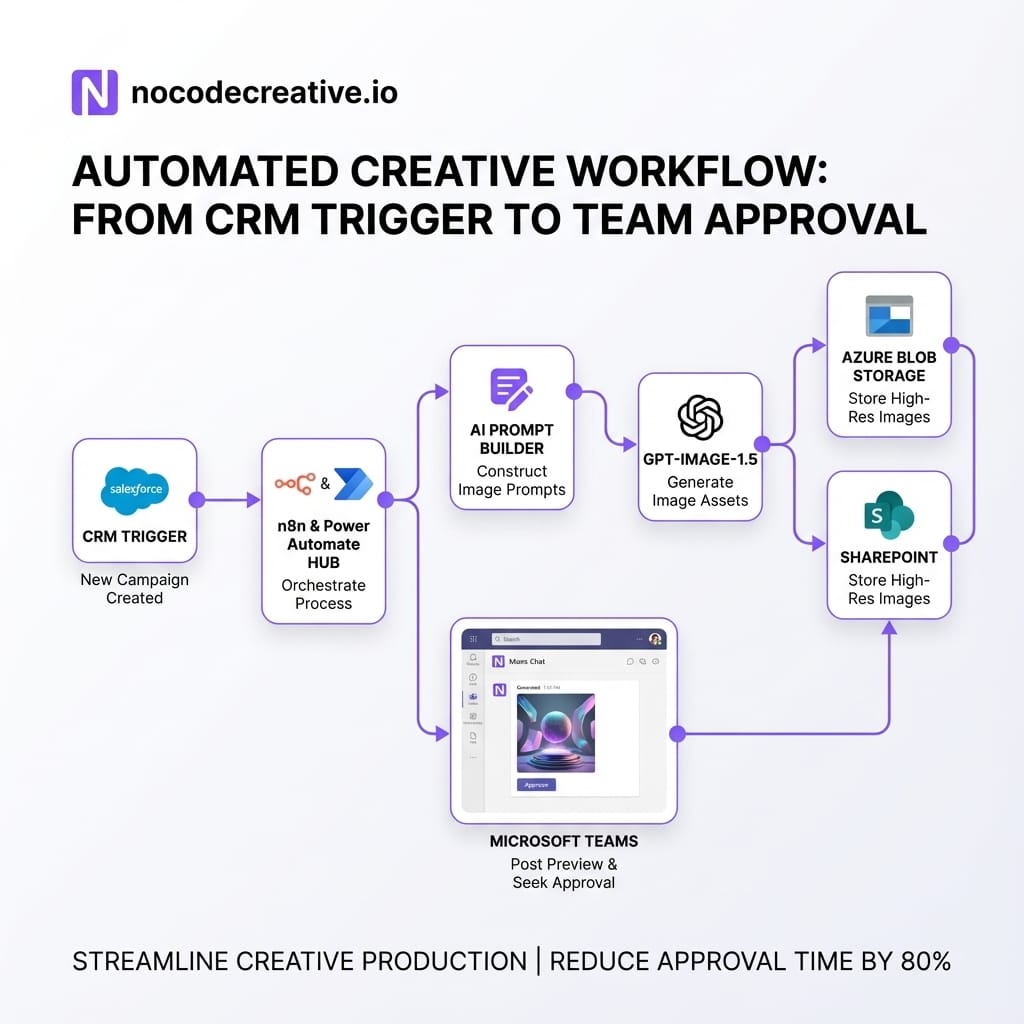
Imagine a world where a “new campaign brief” automatically becomes a folder full of ready‑to‑review assets in your CMS, with humans only stepping in to approve and fine‑tune. Here is how that looks with GPT‑Image‑1.5.
From brief to structured data
The flow usually starts with a brief being created in a familiar tool like Dynamics 365, HubSpot, or a task in ClickUp. Your automation platform (n8n or Power Automate) watches for new briefs and normalizes the input into a consistent schema containing campaign objectives, audience segments, channels, and brand tags.
Calling GPT‑Image‑1.5 for batched assets
For each planned asset type—whether it's a LinkedIn ad, email banner, or Instagram tile—the workflow constructs a targeted prompt. Because GPT‑Image‑1.5 is strong at instruction following, you can be explicit about which elements must stay consistent, where text should appear, and which brand motifs to favor.
In n8n, you would typically:
- Use a Function or Set node to build an array of asset definitions.
- Loop over that array with an Item Lists or Split In Batches node.
- Call the OpenAI Images or Responses node configured for
gpt-image-1.5. - Store the resulting image URLs and metadata.
In Power Automate, the same pattern appears as an “Apply to each” loop around a custom connector or HTTP action.
Routing for human approval
No image from the model should go live without a human glance. A simple approval loop involves the workflow posting preview images into Teams or Slack. Each group links to a lightweight review interface where approvers can mark assets as Approved, Needs changes, or Reject.
When approvers request changes, you take advantage of GPT‑Image‑1.5’s editing capabilities. The workflow submits the original image plus a tightly scoped edit instruction, modifying only what is requested while preserving layout, faces, and lighting.
Publishing and logging
Once assets are approved, the same automation can push images into your CMS media library, schedule posts in HubSpot or LinkedIn, and update the campaign record with final asset locations. All of this runs in your existing environment.
If you want support designing the data schema, approval UX and brand guardrails, we often wrap this approach into broader intelligent workflow automation projects for marketing and operations teams.
Workflow 2 – Ecommerce product image catalogues on Azure
Ecommerce teams usually have one or two expensive studio shots per SKU and a never‑ending list of channels, seasons, and locales that want their own twist. GPT‑Image‑1.5 lets you multiply those master shots into a rich catalogue without dozens of reshoots.
Using a master image as the source of truth
The pattern starts with your PIM or ERP system holding a primary studio image. A scheduled job (via Azure Function, Logic App, or n8n cron) reads updated SKUs and defines variant recipes—white backgrounds, lifestyle settings, or seasonal scenes. By using editing prompts that say “keep the product and logo exactly as in the original image,” you maintain brand integrity.
Generating variants at scale
An Azure‑centric flow might orchestrate this via Azure Functions, writing outputs to Blob Storage organized by SKU. An n8n‑centric flow can integrate directly with Shopify or WooCommerce. Thanks to improved text rendering, you can even generate region‑specific promotional badges or simple comparison visuals.
Teams working in regulated sectors like property will recognize this pattern. If that represents you, check out how we handle guardrails in our property and real estate automation work.
Workflow 3 – Auto‑generated reports and infographics
GPT‑Image‑1.5’s improved handling of dense text makes it surprisingly useful for internal comms. While you shouldn't trust it to calculate numbers, you can absolutely use it to turn confirmed metrics into shareable images.
A typical pattern using Microsoft Fabric or Power BI involves extracting a curated set of KPIs and narrative snippets upon report refresh. The automation then hands this structured JSON to GPT‑Image‑1.5 with instructions to create an infographic using brand colors and a clean layout.
Because the model produces legible small text, these outputs can be posted into Teams as “state of the business” tiles or dropped into slide decks. You keep the authoritative numbers in Power BI, but stop hand‑crafting the same bar charts every month.

Guardrails and governance
Without guardrails you do not get “faster creative”, you get faster chaos. When we design GPT‑Image‑1.5 pipelines, we focus on three core controls:
Centralised prompt libraries
Do not let every user invent their own prompt. Maintain a central library of approved templates with clear wording for brand colors, layout preferences, and explicit “never do this” clauses.
Human‑in‑the‑loop features
Design approvals where people already work (Teams/Slack). Simple “approve / tweak / reject” choices keep legal and brand teams comfortable while delivering speed.
Security and data protection
Prefer running orchestration on your own infrastructure. Be explicit about which data is sent to OpenAI, and align retention rules with your existing compliance frameworks.
Implementation patterns
The good news is that you do not need a brand‑new stack. It fits neatly into patterns you may already have.
n8n as the cross‑tool automation hub
For organizations spread across many SaaS products, n8n often makes the best orchestration layer. It offers native nodes for CRMs and storage, plus fine‑grained control over error handling. We typically use n8n to receive triggers, normalize data, call OpenAI, and manage the approval notifications.
Power Platform for Microsoft‑first teams
If you live in Microsoft 365, Power Platform is the natural choice. Use Power Automate for triggers, Custom Connectors for the OpenAI API, and Power Apps for approval UIs. This keeps authentication and logging inside your existing tenant.
Azure for scale and DevOps
For larger organizations, Azure provides API Management for governance, Functions for complex logic, and Event Grid for resilient pipelines. At nocodecreative.io, we usually blend these layers to provide the right mix of flexibility and control.
Start building your creative pipeline
GPT‑Image‑1.5 makes ChatGPT Images feel less like a toy and more like a practical creative studio. The real advantage appears when you stop thinking in single prompts and start thinking in pipelines.
By wiring the new model into n8n, Power Automate and Azure, you can turn campaign briefs into governed, on‑brand visuals without burying your teams in manual production.
Discuss your automation needs →
References
- The new ChatGPT Images is here
- Images and vision – OpenAI API guide
- Introducing our latest image generation model in the API
- ChatGPT Images just got a major upgrade
- OpenAI supercharges ChatGPT images
- OpenAI Just Dropped a New AI Image Model in ChatGPT



Discussion