
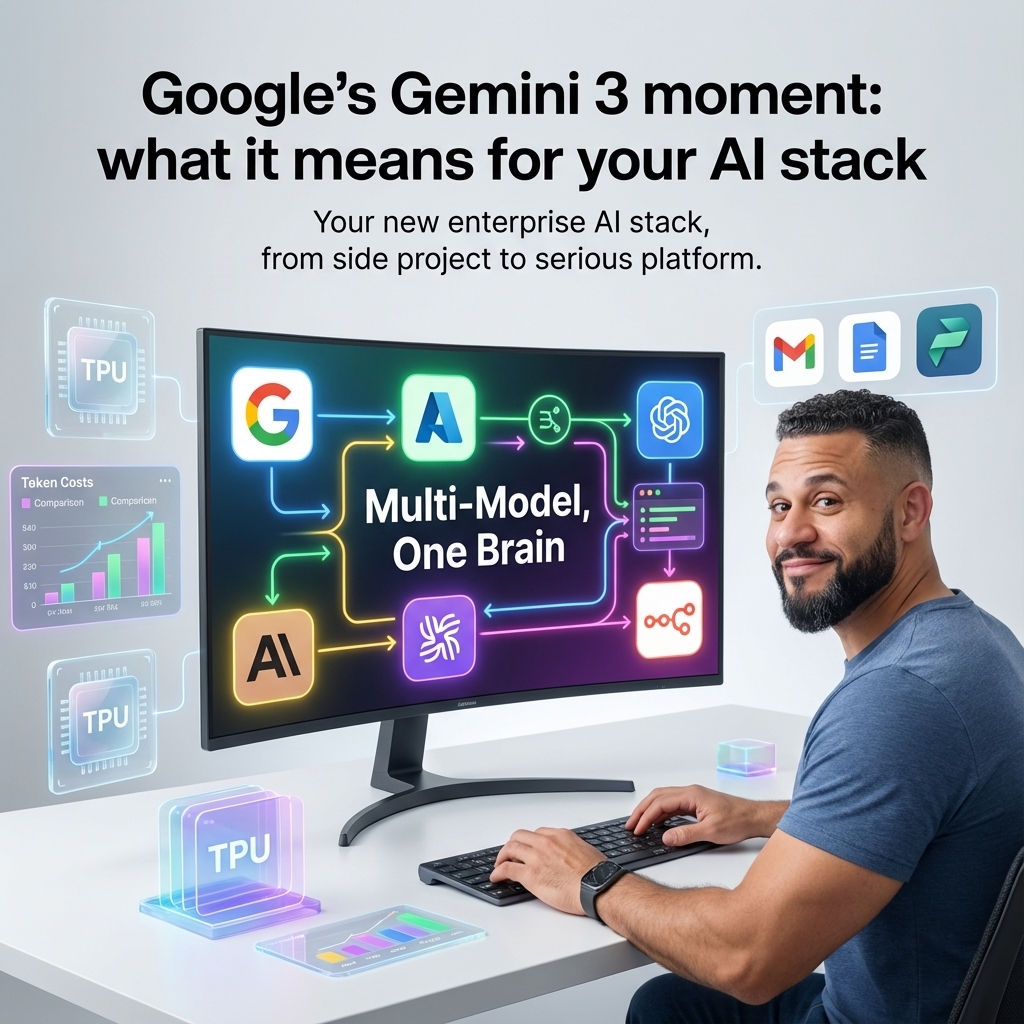
Google’s Gemini 3 moment: what it means for your AI stack
Google is no longer quietly watching the AI race from the sidelines. With Gemini 3, new TPU generations and its AI Hypercomputer architecture, it has stepped directly into the centre of enterprise AI planning.
For teams already living in Google Cloud, BigQuery or Workspace, this is big news. For everyone else, it is the moment when a multi‑model strategy stops being a slide in a strategy deck and starts being something you actually have to design.
At nocodecreative.io, this is exactly the kind of work we do for clients: stitching together n8n workflows, Microsoft 365, Azure, Google Cloud and AI models into something reliable that actually moves the needle on operations rather than just benchmarks.
From laggard to front runner: how Google re‑entered the frontier AI race
For a couple of years, Google felt like the “sleeping giant” of AI. It had the research pedigree, but most enterprises were making their first big bets on OpenAI via Azure, or on Anthropic, while using Gemini 1.x and 2.x more experimentally.
That changed on 18 November 2025, when Google announced Gemini 3, described as its most intelligent model to date and the foundation for the next phase of its AI roadmap. (blog.google) Gemini 3 arrived not as a lab release, but integrated across:
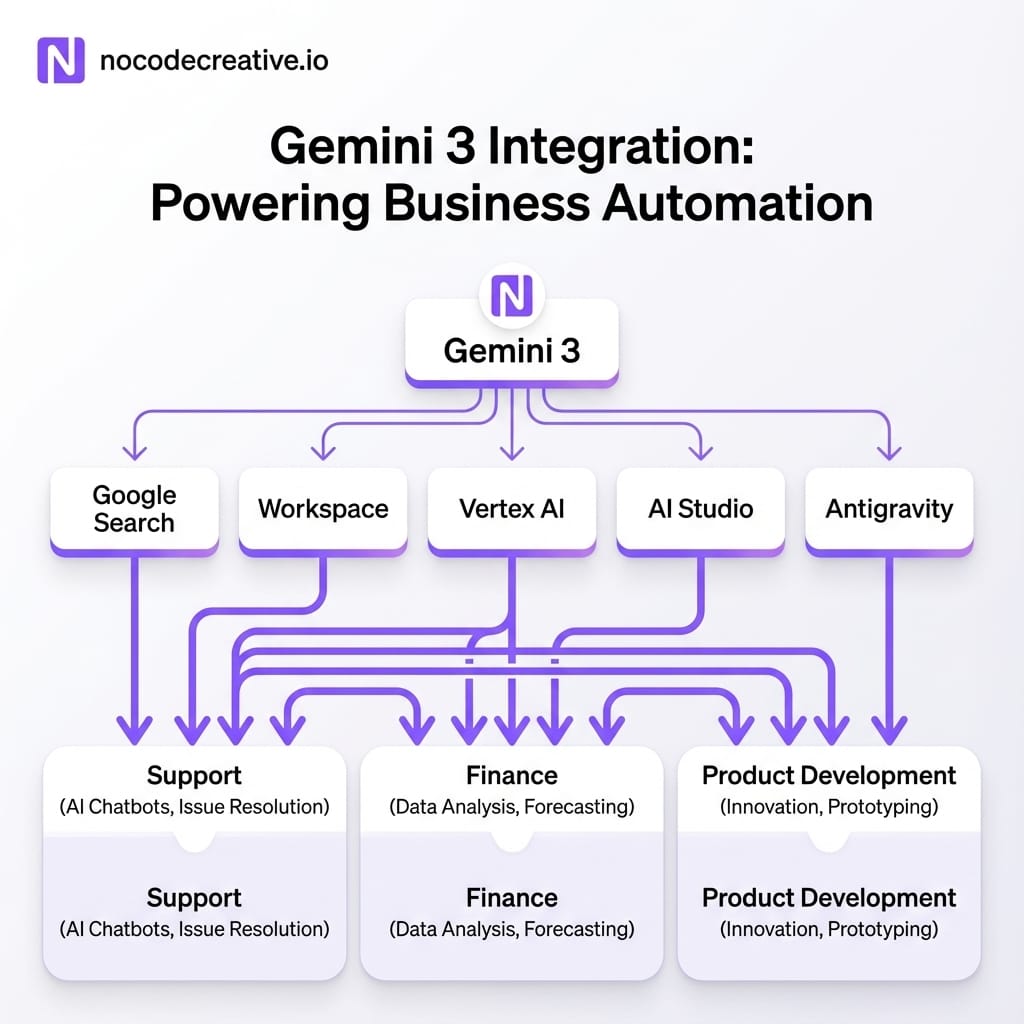
- The Gemini app and Google AI Studio
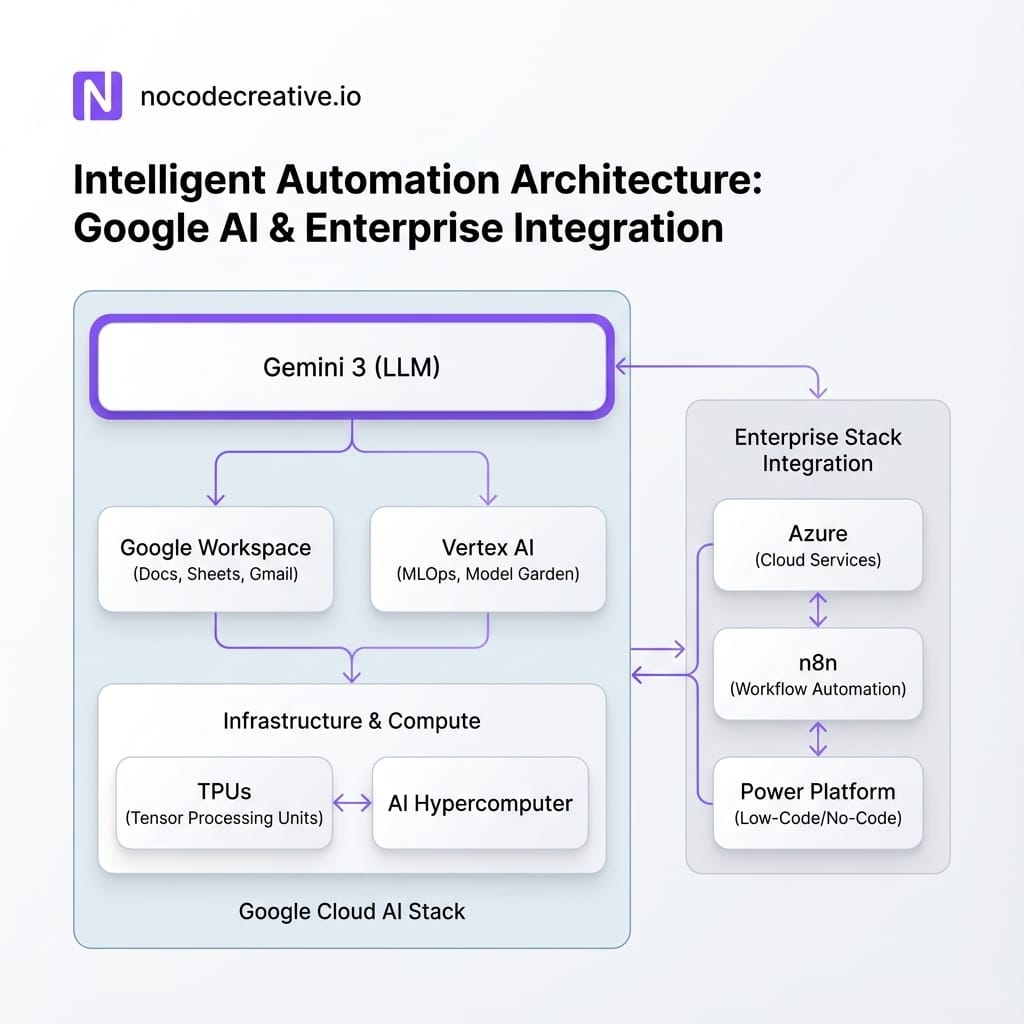
- Vertex AI and Gemini Enterprise for businesses (cloud.google.com)
- Google Search, via the new AI Mode, on day one (blog.google)
- Google Workspace, through Gemini features in Gmail, Docs, Sheets and more (blog.google)
At the same time, Google started talking more clearly about the lower layers of the stack: Trillium TPUs, its sixth‑generation tensor processing unit, and the AI Hypercomputer architecture that ties compute, storage and networking together for large‑scale training and inference. (cloud.google.com)
This is not just “a new model”. It is a full‑stack story, from silicon to IDE, which makes Google suddenly very attractive to CIOs and CTOs planning serious AI workloads over multiple years.
What Gemini 3 actually is, in plain English
Gemini 3 is Google DeepMind’s newest multimodal foundation model, designed to handle text, images, video, audio and documents in a single context, then generate long‑form text and code with strong reasoning. (gemini3ai.pro)
A few key properties matter for enterprise teams:
Deep reasoning and “Deep Think” mode
Gemini 3 Pro already tops a range of reasoning benchmarks, including advanced mathematics and graduate‑level science, and the Deep Think mode pushes performance further for the hardest problems. (venturebeat.com) In practice, that means it is better at multi‑step planning, complex chains of thought and long, structured tasks.
Multimodal and long‑context by default
The model is built to work across modalities rather than bolting them on. It can accept large bundles of documents, code repositories, images, videos or PDFs, and reason over them in one go, with context windows up to around a million tokens in the Pro configuration. (gemini3ai.pro)
Agentic coding and automation readiness
Gemini 3 is positioned as Google’s most powerful “agentic and vibe‑coding” model, aimed at building and running agents that can use tools, call APIs, manipulate UIs and work with developer environments. (blog.google)
For an operations leader or head of data, you can think of Gemini 3 as a general problem‑solving engine that is particularly good at navigating complex documents and datasets, writing and refactoring code across languages, and acting as the brain behind AI agents that call tools, APIs and workflows.
Where Gemini 3 sits in the Google stack
One of Google’s big advantages is that Gemini 3 does not just live in one place. It shows up differently depending on whether you are a developer, analyst or business user.
Gemini app
The Gemini consumer and enterprise apps are the chat‑style front end. They are ideal for early exploration and internal prototyping, lightweight internal assistants, and quick checks of reasoning quality on your own prompts. Useful as a starting point, but not where you will build production automation.
Google AI Studio and Gemini API
AI Studio and the Gemini API are where developers and low‑code builders configure prompts, tools and safety profiles. Gemini 3 Pro is exposed here for backend services, internal chat tools, and front‑end applications needing copilots. This is usually the integration surface we use when wiring Gemini 3 into cross‑cloud architectures at nocodecreative.io.
Vertex AI and Gemini Enterprise
For enterprises, Vertex AI and Gemini Enterprise add governance, observability and integration with data platforms. This includes model catalogues, built‑in monitoring/quota management, and direct access to BigQuery and Looker. (cloud.google.com) If you are running serious workloads, or need to integrate with Anthropic Claude on Vertex, this is usually the right layer to target.
Workspace and “Gemini in the tools you already use”
Gemini for Workspace brings the model into Gmail, Docs, Sheets, Slides and more, providing drafting, rewriting and summarisation. (blog.google) Combined with automation platforms like n8n or Power Automate, this is extremely powerful for support, HR and sales operations.
Antigravity: agent‑first development
Antigravity, Google’s new agent‑first coding environment, is effectively a modern IDE that treats AI agents as first‑class collaborators. It uses Gemini 3 Pro as the core model and can orchestrate multiple agents that interact with the editor, terminal and browser. (theverge.com)
The infrastructure story: TPUs, AI Hypercomputer and cost/performance
Underneath Gemini 3 is Google’s TPU roadmap and AI Hypercomputer architecture. Trillium, the sixth‑generation TPU, is designed for higher performance and better energy efficiency than previous generations, and is now generally available on Google Cloud. (cloud.google.com)
For you, this matters in three ways:
- 1. Cost per token and latency: If your workloads are high volume, TPU‑optimised models can significantly impact your spend profile compared with generic GPU serving, especially when you use long contexts or multimodal inputs.
- 2. Capacity and reliability: AI Hypercomputer is built for training and serving large models at scale, with predictable performance. That is useful when you start moving from pilot to production and need SLAs.
- 3. Future‑proofing: Google is already talking about Ironwood as a next step in its TPU line. Even without every number published yet, the pattern is clear: an ongoing cadence of more efficient dedicated silicon for AI serving that will sit behind Gemini.
You do not have to be a chip specialist to care. You just need to recognise that cloud‑level cost curves are shaped by this layer, which feeds into your FinOps picture.
Anthropic + Google Cloud: Claude and Gemini on the same fabric
Google’s partnership with Anthropic means Claude models are available on Google Cloud and Vertex AI, alongside Gemini. (cloud.google.com)
That means:
- You can expose Claude and Gemini from the same platform, with shared logging, IAM and security policies
- You can route workloads based on what each model does best, instead of picking a single provider for everything
- You reduce your dependency on any one vendor, while still centralising governance
For heavily regulated organisations in the UK and EU, and for US states with strong data protection regimes, having multiple frontier models inside one compliant cloud boundary is particularly attractive.
Choosing between Gemini 3, OpenAI, Anthropic and open‑source
If you are already embedded in Microsoft 365 and Azure, you will not drop OpenAI overnight. Likewise, if you have invested in Anthropic for safety‑sensitive knowledge work, you will keep that. The realistic direction is multi‑model.
When Gemini 3 is a strong choice
- You are already on Google Cloud or using Workspace at scale
- Your workloads are multimodal or long‑context heavy
- You want tight integration with BigQuery, Looker or Search
- You are interested in agentic coding and Antigravity for developer productivity
When Azure OpenAI / OpenAI remain compelling
- Deep integration with Microsoft 365, Teams, SharePoint and Microsoft Copilot is central to your day‑to‑day work
- You already rely on Copilot Studio, Power Apps and Power Automate as your main low‑code surfaces
- Regional data residency requirements are already satisfied in your Azure setup
When Anthropic Claude shines
- You have knowledge management or legal / policy workloads that need especially careful reasoning and conservative behaviour
- You value Claude’s strengths in long‑form analysis, writing and tool‑use for sensitive use cases
Where open‑source fits (Qwen, DeepSeek)
- Highly cost‑sensitive workloads where good enough is genuinely good enough
- On‑prem or sovereign cloud deployments where you cannot send data to a major US hyperscaler
- Use cases that benefit from heavy fine‑tuning or custom control
The priority is to design an architecture where switching or combining models is easy, instead of betting everything on a single name.
Reference architectures for SMEs and enterprises
This is where it gets concrete. Below are four patterns we are already helping clients explore, using n8n, Power Platform, Vertex AI and Azure side by side.
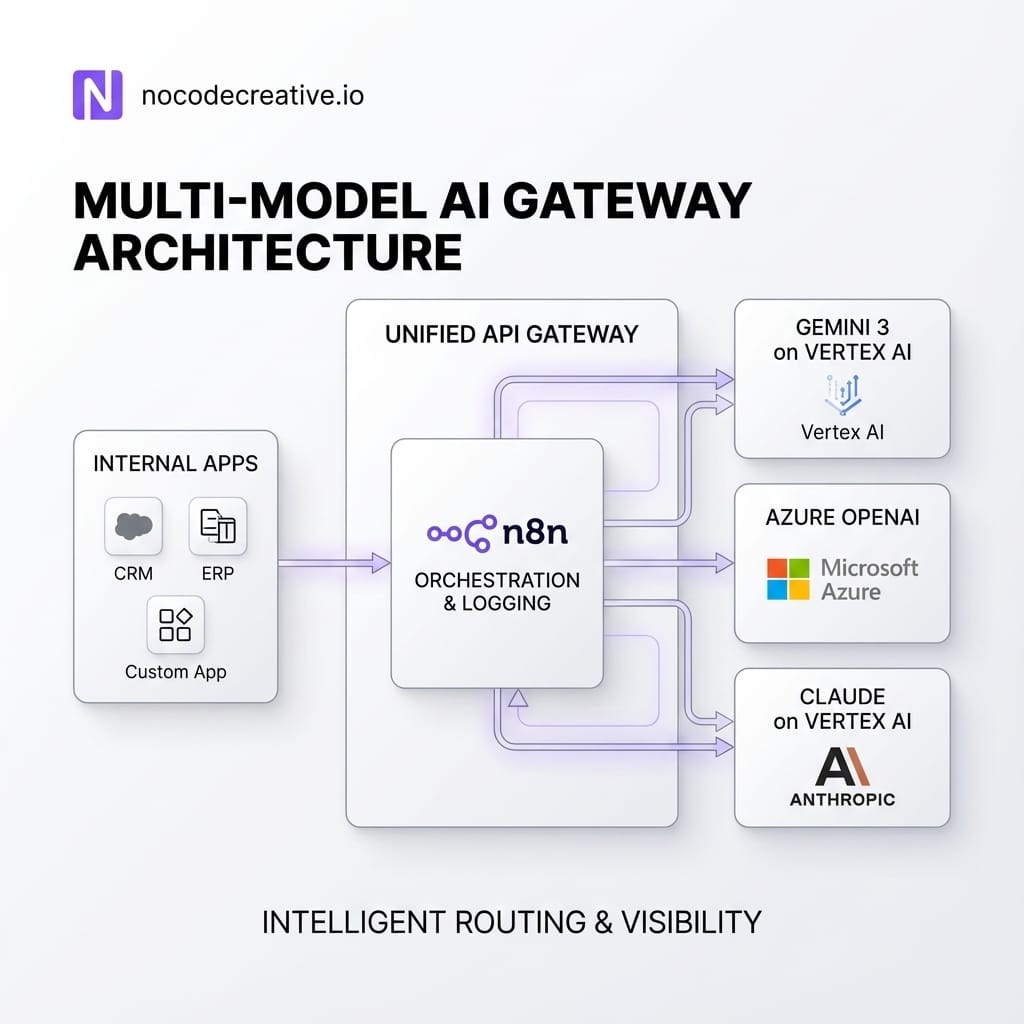
Multi‑model AI gateway across Azure OpenAI, Gemini 3 and Claude
Instead of wiring every app directly to every model, you can build a simple “AI gateway”. Internal tools (Power Apps, custom web apps) all talk to a single internal API or an n8n workflow. This workflow analyzes the task type, residency constraints, and cost preferences, then routes the call to the appropriate model (Gemini 3, Azure OpenAI, or Claude).
Logging, safety filters and cost tracking sit in one place. Over time, you can adjust routing rules based on real‑world performance. This is exactly the kind of cross‑cloud architecture our team builds using n8n‑centred intelligent workflow automation for SMEs.
Conversational BI with Gemini 3, BigQuery, Looker
Google has been steadily moving towards “chat with your data” through BigQuery and Looker. A practical architecture involves BigQuery holding core data, Looker providing the semantic layer, and Gemini 3 handling natural language queries. Workflows then push results into Power BI, Excel, or Slack summaries.
Workspace‑centric support and sales copilots
Support and sales teams often live in Gmail, Docs, and chat. A simple pattern involves Gemini 3 summarising email threads and suggesting replies, while n8n flows receive structured events to update CRMs or trigger tasks in Teams. You get a practical copilot that offloads triage while humans retain final decision-making power.
Regulated deployments on Google Distributed Cloud
For regulated sectors like banking or healthcare, Google Distributed Cloud (GDC) allows running Gemini and Vertex AI within your own controlled environment. By orchestrating cross-cloud workflows via n8n or Power Platform, you can keep data in-region while benefitting from Google's models.
A 30‑60‑90 day implementation playbook
You do not need a two‑year transformation programme to start using Gemini 3 sensibly. A focused 90‑day plan is usually enough to get from slideware to working pilots.
First 30 days: Discovery and Design
Map your current data landscape across Microsoft and Google. Identify 3 to 5 high-value candidate use cases. Decide where Gemini 3 fits and design a basic AI gateway pattern.
Days 31 to 60: Pilots and Evaluation
Implement 1 or 2 narrow pilots with clear success metrics. Use Vertex AI for sensitive data to leverage monitoring. Capture qualitative feedback and adjust routing rules. At nocodecreative.io, we often step in here to handle the workflow design so internal teams can focus on adoption.
Days 61 to 90: Scale, Integrate and Harden
Extend successful pilots to additional teams. Integrate AI workflows into standard operating procedures. Implement proper governance, including prompt libraries and approval flows. Build dashboards for usage and cost.
Governance, safety and FinOps in a multi‑model world
The more models you add, the more important your control plane becomes. Here are a few principles we typically apply:
- Centralised policy, decentralised experimentation: Keep security and logging central. Let teams experiment locally within that envelope.
- Single front door for sensitive data: Use an AI gateway or orchestration layer as the only way production systems send data to external models.
- Model‑agnostic evaluation: Maintain small, realistic evaluation sets to compare Gemini 3, Claude and GPT‑family models fairly.
- Cost and performance visibility: Track spend per workflow. Use data to decide when to drop from a frontier model to a cheaper open‑source alternative.
- Region and compliance awareness: Be explicit about where data lives, especially for UK/EU organisations.
This is where a partner who understands both AI models and cloud infrastructure can be valuable. We often combine AI architecture with practical automation work, as seen in our AI and n8n nutrition advice platform case study.
How our team helps with cross‑cloud, multi‑model AI
At nocodecreative.io we specialise in designing cross‑cloud AI architectures that combine Google Cloud, Azure and sovereign setups. We build n8n workflows and Power Platform solutions that act as the nervous system for AI agents, integrating Gemini 3, OpenAI, and Anthropic into real business workflows.
It is an ideal moment to revisit your AI roadmap. Gemini 3 gives you a serious new option, TPUs and AI Hypercomputer underpin the cost side, and Anthropic’s presence on Google Cloud rounds out a credible multi‑model core.
Our expert AI consultants can help you implement these workflows.
Get in touch to discuss your automation needs
References
- A new era of intelligence with Gemini 3
- Bringing Gemini 3 to Enterprise
- Google Search with Gemini 3: Our most intelligent search yet
- Trillium TPU is GA
- AI Hypercomputer: Google Cloud’s AI infrastructure
- Gemini is now available anywhere with Google Distributed Cloud
- Anthropic forges partnership with Google Cloud
- Use Gemini and open-source text embedding models in BigQuery
- Looker Conversational Analytics now GA
- Google Antigravity is an agent-first coding tool built for Gemini 3

 Wayne Simpson
 Wayne Simpson


Discussion