


Stop Chatting, Start Programming with Gemini 3
Most teams are still talking to Gemini 3 like a friendly chatbot instead of treating it like a serious reasoning engine. That is leaving a surprising amount of value on the table.
Google has just made things much clearer. Between the new Gemini 3 developer guide and the official prompt design strategies, we finally have vendor-backed rules on how this model really wants to be used (ai.google.dev).
At nocodecreative.io, this is exactly the kind of thing we turn into standardised workflows for clients, wiring prompt templates into n8n, Power Platform, Azure and Vertex AI so every call to Gemini hits the model in a consistent, auditable way.
This guide walks through those rules, then shows how to convert them into a Gemini 3 prompt playbook you can deploy across your organisation.
Why Gemini 3 behaves differently from older models
Gemini 3 is not just a bigger version of previous models. Google describes it as a reasoning-first model that is explicitly designed for multi-step planning, deeper analysis, and complex multimodal inputs (blog.google).
In the Gemini 3 developer guide, Google is very direct about what this means in practice. Because it is a reasoning model, you should fundamentally change how you prompt it. It features a built-in “thinking” capability, controlled by thinking_level, eliminating the need for elaborate chain-of-thought tricks just to get it to reason. Furthermore, it is tuned to be less verbose by default, preferring short, efficient answers unless you explicitly ask for something chattier (ai.google.dev).
On top of that, Gemini 3 Pro offers a very large context window and new controls like media_resolution for images and PDFs, which let you trade accuracy against cost when feeding big documents or visual inputs.
The Risks of Legacy Prompting
If you keep using prompt styles that were designed for older models, three things tend to happen:
- Long, fussy “prompt engineering scripts” get over-analysed and can actually hurt quality.
- You get shorter answers than you expect because the model’s default style is quite direct.
- Context-heavy tasks feel hit-and-miss because your instructions are buried in the middle of a giant blob of text.
This is why Google’s own best practices now push you towards shorter, cleaner instructions and properly structured prompts.
Google’s three core Gemini 3 rules in plain English
The Gemini 3 developer guide compresses things into three simple prompt rules (ai.google.dev). Tom’s Guide reinforces these exact points in their coverage of the new user guide (tomsguide.com).
1. Be PreciseBe precise and concise in your instructions. Avoid fluff.2. Control ToneControl personality and verbosity explicitly.3. Structure ContextPut context first and questions last when working with large inputs.
Let us turn that into something you can operationalise.
Be precise and keep it simple
For Gemini 3, “better prompt” rarely means “longer prompt”. Google’s wording is clear: Gemini 3 responds best to direct, clear instructions and can over-analyse verbose, old-school prompt engineering techniques.
In practice, use one or two short lines for the instruction itself. Move detail into structured context sections or examples, not into a rambling paragraph of English. When a task is simple, resist the urge to over-specify.
❌ Bad pattern:
“You are an AI assistant that is extremely helpful, detailed, precise, careful, and always checks its work…”
✅ Better pattern:
“Task: Summarise the context in 3 bullet points for a non-technical executive.”
Then put the article, ticket, code or data below as context. The only time you should add real detail to instructions is when you are tightening constraints (e.g., “Never invent data that is not present in the context”). Those are constraints, not fluff.
Choose personality and tone per workflow
Out of the box, Gemini 3 prefers short, efficient answers. Google explicitly says that if you want something more conversational or “chatty”, you must steer the model with your prompt. Instead of leaving persona to chance, treat it as part of your template:
- For support: “You are a tier 2 support agent. You write calm, concise, empathetic replies in plain language.”
- For finance: “You are a cautious finance analyst. You highlight assumptions and never guess missing numbers.”
- For marketing: “You are our in-house copywriter. You write in our brand voice: confident, clear and friendly.”
Set these as a “Role” or “Identity” section that rarely changes. When you embed Gemini 3 in tools like n8n or Power Automate, that persona becomes part of the workflow itself.
Structure long prompts and big datasets with context at the top
Gemini 3 is very good with long inputs, including whole books, codebases, CSVs and videos. Google’s guidance is specific: when working with large datasets, place your question or instructions at the end of the prompt after the data context, and start the question with wording that anchors it to the context above.
For example, a data question workflow might look like:
- A
<context>section containing the transformed CSV, data extract or BI query result. - A
<task>section at the very end that begins with “Based on the information above…” and then asks the actual question.
This pattern sounds minor, but it strongly nudges the model to ground its answer in the supplied data and keeps your prompts consistent across tools.
Inside the official Gemini 3 prompt guide
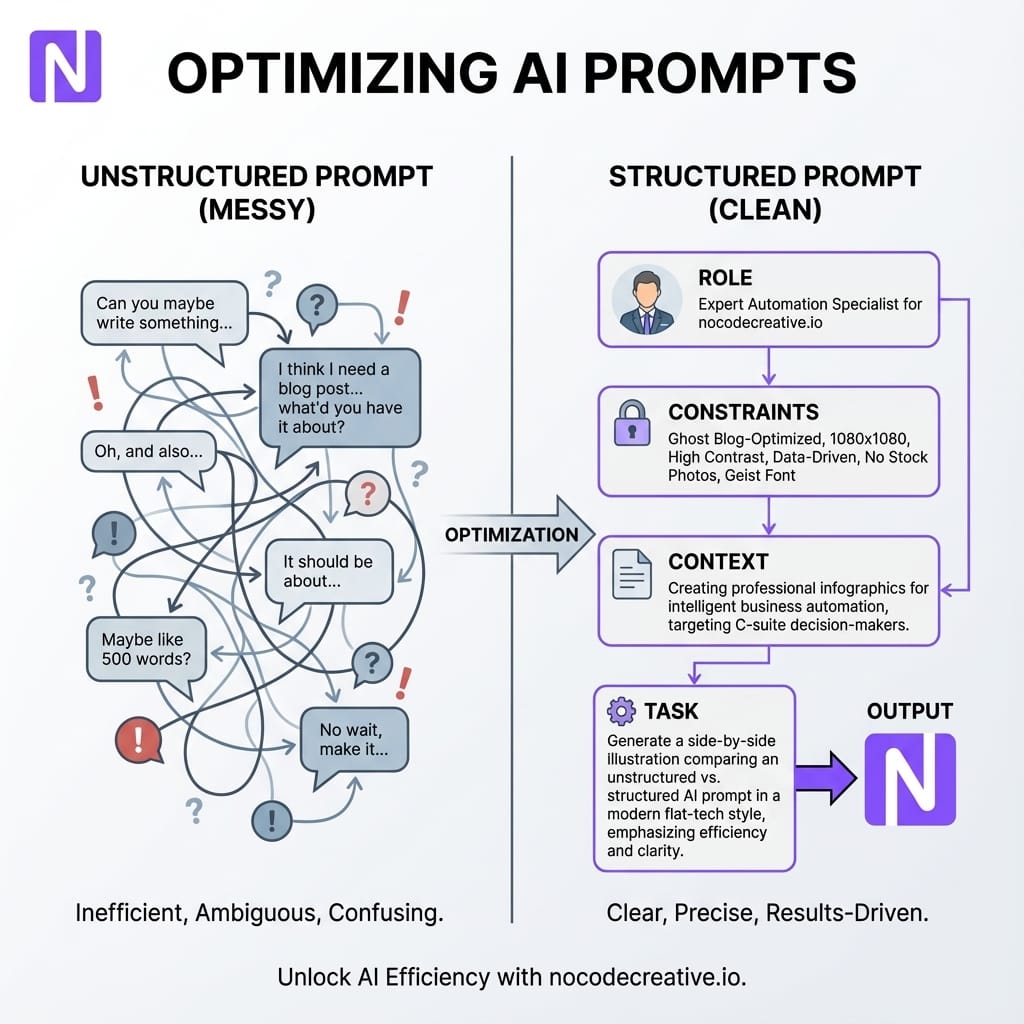
The general prompt design guide for the Gemini API introduces a set of useful building blocks you can turn into a standard schema (ai.google.dev). In practice, four elements matter most: Role, Constraints, Context, and Task.
Roles, constraints, context and tasks as building blocks
If you reframe Google's guide into a business-friendly template, you get something like this:
# Role
You are a ...

# Constraints
- Tone
- Length
- Safety / compliance
- What to avoid

# Context
[Data, snippets, previous messages, knowledge base extracts]

# Task
Based on the information above, ...
You can then add optional sections like # Examples for few-shot prompt patterns or # Reasoning if you want the model to describe its plan. The key is that each part has a clear purpose.
System instructions vs user prompts
The Gemini prompt guide explicitly distinguishes “system instructions” from user input. In an organisational setting, System instructions are where you encode policies that should never be skipped (e.g., GDPR compliance, UK English). User prompts should stay small (e.g., “Draft a reply to this ticket”).
By separating the two, you can evolve policies centrally without retraining everyone how to prompt.
Planning and self‑critique to unlock deeper reasoning
Google’s “thinking” guide and the Gemini 3 developer docs make it clear that you can adjust how much internal reasoning the model performs using parameters like thinking_level. You can combine that with prompt patterns that ask Gemini to propose a step-by-step plan, identify risks, or critique its own draft.
For higher risk workflows, ask Gemini 3 to produce a hidden “Reasoning” section for internal reviewers, then output a short, clean “User-facing answer” that you actually send to customers.
From rules to playbook across your organisation
Knowing the rules is useful. The real value comes when you turn them into reusable schemas and templates that every team shares.
Design a common prompt schema
Start with one simple schema that works across most use cases: Role, Constraints, Context, Task, and optional Reasoning. Document it in your internal wiki and treat it like an API contract. Whether it lives in an n8n workflow, a Power Automate flow, or a backend service, any new workflow that calls Gemini 3 should use this schema.
Templates for support, analytics and content
Build a small template library for your biggest workloads. Support templates should include tiered agent personas and context from knowledge bases. Data question templates need strict grounding in supplied data and a requirement to highlight assumptions. Content templates need fields for brand voice, audience, and banned phrases.
If you would like help turning these schemas into working systems, our team’s intelligent workflow automation services are designed for exactly this sort of work. Check out our page on AI automation for property and real estate companies.
Implementation patterns on Power Platform, n8n, Azure and Vertex AI
You have two broad architectural shapes that work well for Gemini 3.
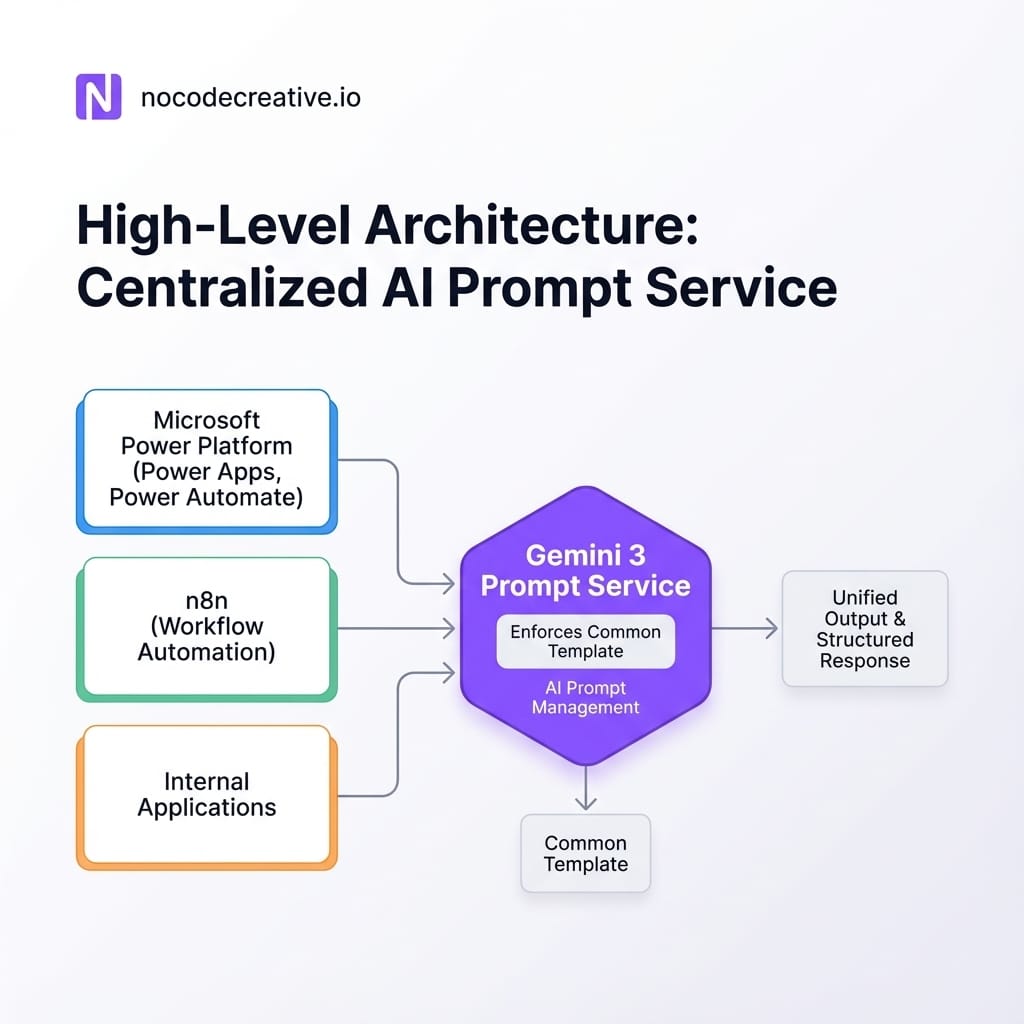
Architecture option 1 - Central Gemini prompt service
In this pattern, you build a small backend service (Azure Function, Cloud Run, etc.) that owns all interaction with Gemini 3. It exposes endpoints like /support-reply, loads the right prompt template, assembles context, and calls Gemini 3 via Vertex AI or the Gemini API.
Your Power Automate flows and Power Apps then call this service using standard HTTP actions. This keeps prompts centralised, version-controlled, and secure, making it easier to respect data residency requirements across the UK and EU.
Architecture option 2 - n8n orchestrating multi-step flows
If you prefer a visual automation layer, n8n works very well as a Gemini 3 “hub”. In a typical workflow, a trigger starts the flow (e.g., a new ticket), context is collected from databases or SharePoint, and a function node assembles the prompt in your standard schema before calling the API. Downstream nodes then route the output to Teams, Slack, or back to the ticketing tool.
Security, governance and cost controls
Once you centralise Gemini 3 usage, you can address three non-negotiables:
- Security: Route all calls through hardened infrastructure with secrets stored in secure vaults and configure safety settings in one place.
- Governance: Log prompts and outputs for critical workflows to run A/B tests and post-incident reviews.
- Cost: Use features like context caching and the Batch API for Gemini 3 to significantly cut token usage for repeated contexts and low-priority jobs.
Four real-world workflows you can ship in weeks
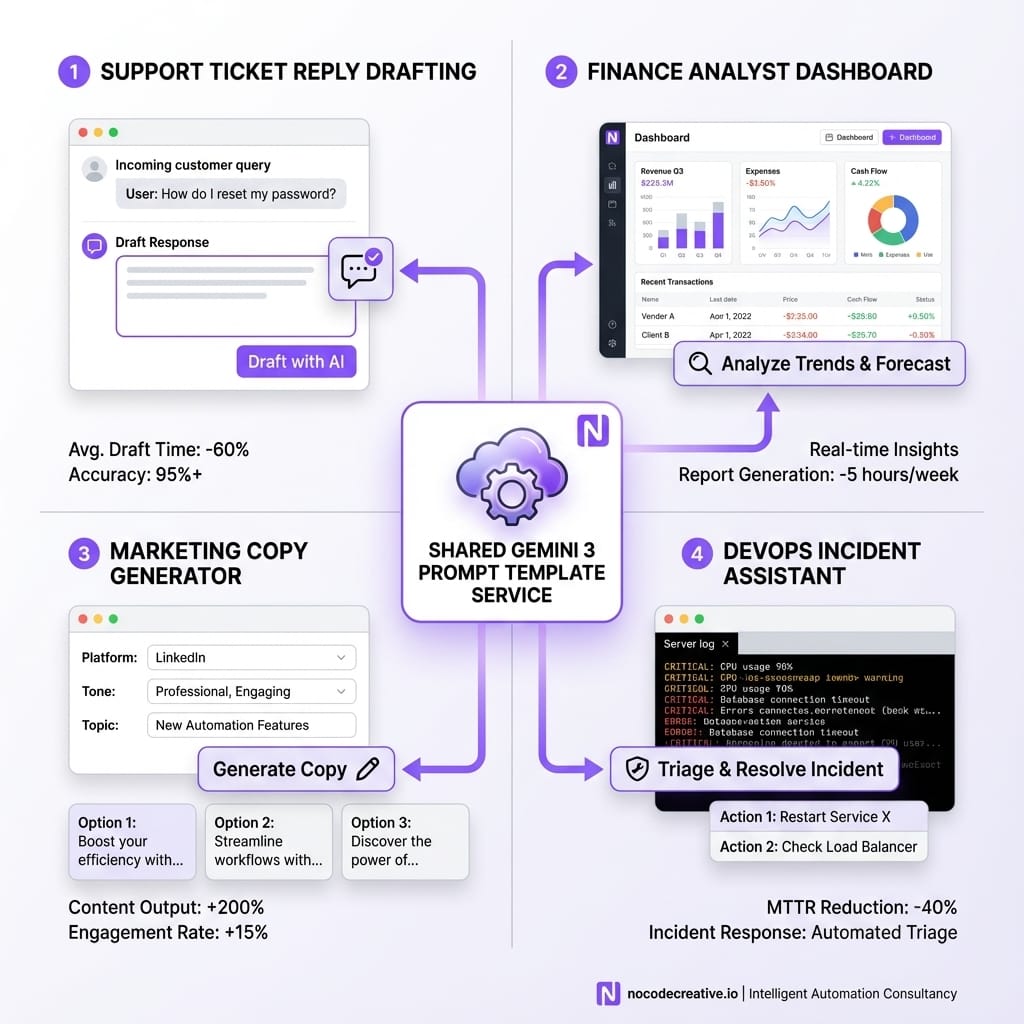
Support Reply Drafting
An n8n flow assembles a prompt with a Tier 2 support persona, brand constraints, and ticket context. It calls Gemini 3 and drops a draft back into the agent’s interface for review.
Finance Data Co-pilot
A governed assistant that answers questions about CSVs without users writing SQL. It uses a conservative persona to reduce hallucinations and provide executive summaries grounded in the data.
Marketing Prompt Library
Internal app for content requests where users pick templates (email, landing page). Inputs are wrapped into a strict brand copywriter prompt, with outputs sent to a staging area for approval.
Engineering Code Review
Uses Gemini 3’s reasoning to review logs and code diffs. Pushes thinking_level high to identify root causes and propose next actions for human audit.
Measuring impact so you can prove Gemini 3 is working better
If you want stakeholders to take AI seriously, you need clear evidence. Combine quality metrics (resolution rates, time-to-draft) with human review loops (thumbs up/down ratings). Use a centralised prompt schema to run A/B tests on prompt templates, routing a percentage of traffic to new versions to compare performance before a full rollout.
A 14‑day rollout plan for a Gemini 3 prompting playbook
- Days 1 to 3 - Align and secure accessChoose Gemini 3 models, confirm compliance for UK/EU, and select 2–3 target workflows.
- Days 4 to 7 - Design schemas and templatesAgree on a shared schema and draft initial templates. Review with legal and security.
- Days 8 to 11 - Build the plumbingImplement the central service or n8n hub. Integrate with one data source and one channel.
- Days 12 to 14 - Pilot and refineRun a small pilot, capture metrics, tweak settings, and decide on full deployment.
If you prefer not to do this alone, nocodecreative.io follows a similar cadence when delivering AI-powered workflow automation for SMEs and mid-market organisations.
Where this goes next
Google’s roadmap leans towards agentic behaviour: models that plan, choose tools, and coordinate multi-step tasks. Standardising your prompts now gives future agents a consistent way to talk to your systems and makes it easier to mix models later.
The organisations that pull ahead will be the ones that treat prompts as part of their architecture. If you want help turning Gemini 3 from a chat window into a dependable part of your operations, that is exactly the kind of work we do every day at nocodecreative.io.
Ready to automate?
Our expert AI consultants can help you implement these workflows. Get in touch to discuss your automation needs.
References
- Gemini 3 Developer Guide - Gemini API
- Prompt design strategies - Gemini API
- Gemini thinking - Gemini API
- A new era of intelligence with Gemini 3 - Google blog
- You’re prompting Gemini 3 wrong according to Google’s new user guide - Tom’s Guide

 Wayne Simpson
 Wayne Simpson


Discussion