

Three Years of ChatGPT: What The Past Tells You About The Next 36 Months Of AI
Three years after ChatGPT quietly appeared on 30 November 2022, we are living in what The Atlantic called "the world ChatGPT built" – a world that feels both AI‑powered and slightly precarious.
At nocodecreative.io this is not an abstract trend. It is the backdrop to every n8n workflow, Microsoft 365 Copilot roll‑out, Azure OpenAI deployment and AI agent architecture we deliver for clients. The question leaders bring now is simpler and sharper: how do we turn all this into durable capability, not just experiments?
This piece looks at what the last three years of ChatGPT actually changed, how it reordered the stock market, and what that means for SMEs and mid‑market organisations planning the next 36 months. Then we translate that into three concrete platform patterns you can implement with Azure, Copilot, Power Platform and n8n.
From research demo to default AI interface
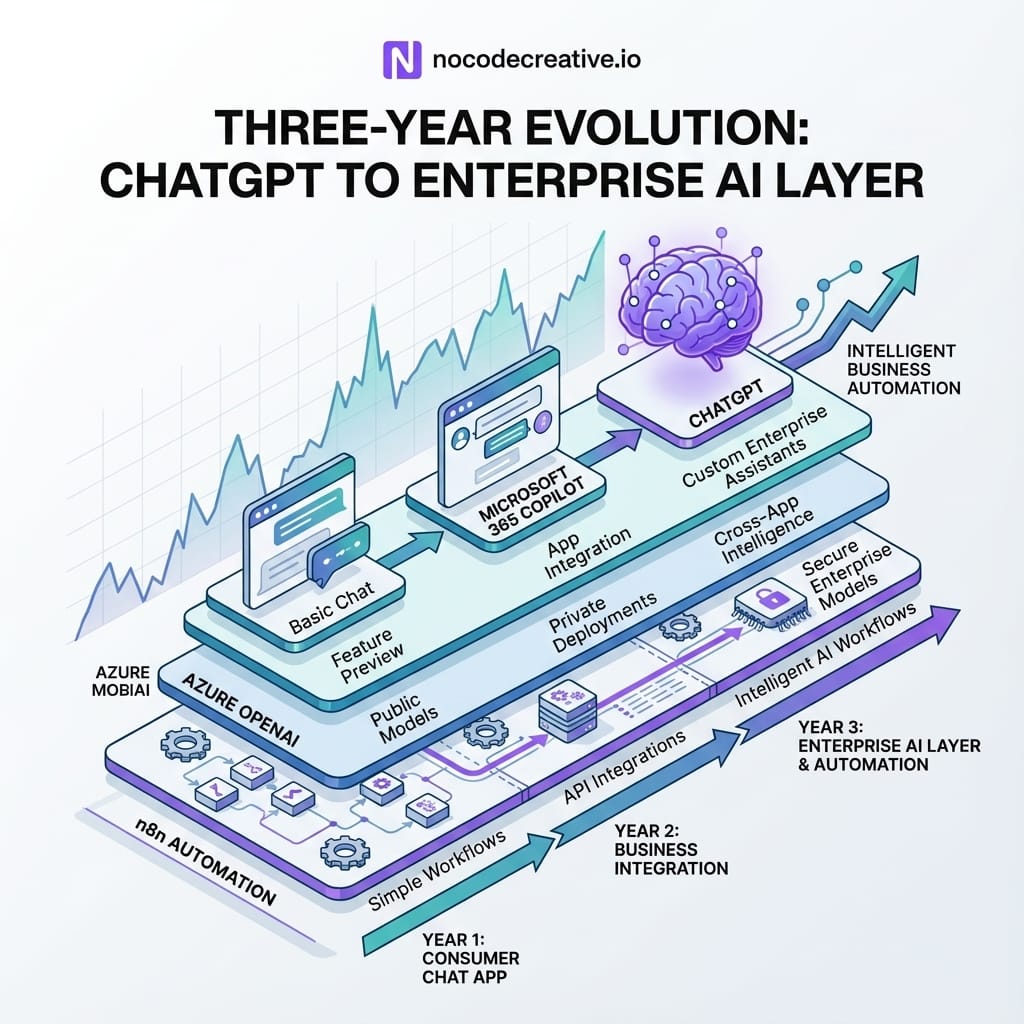
On launch day, OpenAI’s own post described ChatGPT as a model that "interacts in a conversational way". It was framed more like a research demo than a new computing layer. Within months it had become the default interface for modern AI in the public imagination and the fastest‑growing consumer app in history.
Key milestones in ChatGPT and GPT model evolution
You can broadly slice the first three years into a few waves:
2022 – Early 2023: Curiosity and prompt culture
ChatGPT launched on top of GPT‑3.5, making language models directly usable without API keys, SDKs or notebooks. This period gave us "prompt engineering" as a term, endless screenshots on social media and the first wave of start‑ups wrapping the web UI for specific jobs.
2023: GPT‑4 and the credibility shift
GPT‑4 arrived with better reasoning and coding performance, plus Azure OpenAI providing the same models inside enterprise boundaries. For many CIOs that was the point it stopped being a novelty and started to look like a legitimate platform component. Microsoft layered this into early Microsoft 365 Copilot experiences in Word, Excel, PowerPoint, Outlook and Teams, so AI became part of documents, meetings and email rather than a separate tool.
2024: Multimodal and long‑context models
GPT‑4o (the "omni" model) and its Azure equivalents brought text, images and audio into a single model family, while context windows stretched into hundreds of thousands of tokens. That shifted what you could do with single prompts: whole Power BI models, legal bundles, or large codebases became tractable in one call.
2025: GPT‑4.1, GPT‑5 and agent‑oriented stacks
GPT‑4.1 was designed explicitly as a more reliable API workhorse with up to a million tokens of context and better instruction following, positioned to power agents and automation. Around it, Azure OpenAI introduced GPT‑5 and o‑series reasoning models, while the OpenAI API rolled out GPT‑4.5 then deprecated it in favour of GPT‑4.1. Microsoft 365 Copilot added richer agents, Researcher and Analyst experiences, and even support for additional foundation models like Anthropic Claude.
That pace explains why Reddit and X fill up after every release with "ChatGPT got worse" threads. People feel the ground moving under products they assumed were static. For teams shipping on top of these models, this volatility is now a core engineering and governance concern.
From curiosity to daily work tool
The second shift was behavioural. ChatGPT usage moved from late‑night experiments to daily companion:
- Employees draft emails, minutes, job descriptions and incident reports directly in tools like Microsoft 365 Copilot.
- Developers and data teams lean on GPT‑4‑class models for code suggestions, debugging and SQL.
- Knowledge workers expect search and chat experiences that know about their files and conversations, not just the public web.
Key Takeaway: For CIOs and operations leaders, the message is clear: generative AI is no longer a side project. It is part of the basic productivity stack, just as email and spreadsheets are.
How ChatGPT reshaped Big Tech and the stock market
The TechCrunch retrospective pulls in Bloomberg analysis showing how AI enthusiasm has reshaped equity markets. Nvidia is the poster child, up nearly 10x since ChatGPT launched. The "Magnificent Seven" – Nvidia, Microsoft, Apple, Alphabet, Amazon, Meta and Broadcom – now account for roughly 35% of the S&P 500’s weight, up from about 20% three years earlier, and close to half of the index’s total gain over that period.
In other words, a small cluster of AI‑exposed giants has pulled far ahead of the rest.
Even some of the people at the centre of this trend are cautious. OpenAI’s own leadership and board members have described the current phase as a bubble or "mania", while still arguing that AI will, over time, create huge economic value.
For an SME CFO or COO, there are two useful takeaways:
- Capital markets are already pricing in AI capability as a differentiator. You might not care about the S&P 500, but your suppliers and competitors probably do.
- Even if some bets prove frothy, the underlying shift is real. You would not bet your business on a meme stock, but you also would not ignore cloud computing in 2010 because parts of the tech market looked bubbly.
The safe posture is not "wait and see". It is "invest pragmatically in capabilities that will still make sense when the hype cools".
What this means for SMEs and mid‑market enterprises
Why "we use the ChatGPT website" is not a strategy
Plenty of organisations are still in a place where the AI strategy fits on a Post‑it: "we allow staff to use ChatGPT". That is fine as hygiene, but it does not:
- Systematically reduce cycle times in your core processes.
- Give you governance over prompts, data access and outputs.
- Survive when a model behaviour changes or a vendor alters its UI, rate limits or pricing.
Relying on a single consumer web interface also leaves you exposed to basic issues like:
- No control over which model version is used for a given task.
- No central logging or analytics on how people are using AI and where value is created.
- No straightforward way to apply data loss prevention, retention and compliance policies.
In practice, "we use the ChatGPT website" is like saying "our cloud strategy is that people can save files in random consumer Dropbox accounts".
Treating AI like cloud or mobile: capabilities, not apps
Mature organisations are starting to treat AI in the same way they treated cloud or mobile in the last decade:
- Standardise on a small set of platforms and providers that meet your security and regulatory needs, rather than chasing every shiny product.
- Expose models via APIs, events and services so they can be composed into workflows, rather than tying logic to a particular chat window.
- Design for change over 3–5 years, accepting that today’s GPT version numbers will be footnotes by the time your current ERP contract renews.
For most SME and mid‑market teams, that points to a pragmatic stack of:
- Microsoft 365 Copilot and Microsoft Agents for "in the tools you already use".
- Azure OpenAI and Azure AI Foundry for secure, governed access to modern OpenAI models (and increasingly other vendors) via APIs.
- Power Platform for low‑code apps, flows and AI‑assisted experiences.
- n8n for cross‑platform automation, model routing and bespoke AI agents.
- Direct access to OpenAI or other OpenAI‑compatible endpoints where needed.
The rest of this article unpacks how to turn that mix into concrete patterns you can ship.
Platform choices: Azure, Copilot, n8n and OpenAI‑compatible stacks
When to lean into Microsoft 365 Copilot and Azure OpenAI
If your business already lives in Microsoft 365, Copilot and Azure OpenAI are natural starting points:
- Copilot in Word, Excel, PowerPoint, Outlook and Teams gives you embedded drafting, summarising and analysis directly where people work, backed by Microsoft Graph and your existing permissions model.
- Microsoft 365 Copilot Search provides an AI‑powered search layer across emails, chats, documents and third‑party data, which you can then extend with chat and agents.
- Azure OpenAI exposes the same model families that underpin ChatGPT and Copilot, with enterprise controls, regional deployment and data‑handling guarantees.
For many organisations, the right pattern is:
- Start by using Copilot "as designed" to upgrade individual productivity.
- Then use Azure OpenAI, Power Apps, Power Automate and Copilot Studio to build tailored agents and workflows on your own data.
This gives you the comfort that you are not building unsupported patterns, and that your AI front door and internal data flows are anchored in a platform your IT and security teams already know.
Where n8n and OpenAI‑compatible nodes fit for automation and agents
Microsoft’s stack is powerful, but it is not the only game in town, and it is not designed to be the only place you ever run models. This is where n8n earns its keep:
- n8n has a first‑class OpenAI node that can call models via the Chat Completions and Responses APIs.
- You can point that node at OpenAI, Azure OpenAI or any OpenAI‑compatible endpoint that implements the same API shape.
- Where the built‑in node does not cover a use case, you can fall back to the HTTP Request node with the same credentials.
That lets you:
- Keep your business logic, prompt libraries and monitoring in n8n, while swapping models and providers behind the scenes.
- Build AI agents and workflows that talk to Microsoft 365, your CRM, your ticketing system and your data warehouse in a single canvas.
- Implement failover, A/B testing and gradual migrations between models without rewriting half a dozen separate tools.
If you want an "AI operating layer" that sits alongside Microsoft 365 and your line‑of‑business systems, n8n plus Azure OpenAI is a very solid starting point.
For organisations that want help designing that layer with good governance and observability from day one, our team’s n8n and Azure OpenAI implementation services at nocodecreative.io are built exactly for this scenario, wrapping the technical build with training, documentation and change support.
Pattern 1 – The AI front door in Teams
The first pattern takes a lesson from ChatGPT itself: a single, obvious place to "talk to the system".
Architecture with Azure OpenAI, Copilot, Power Apps and Power Automate
At a high level:
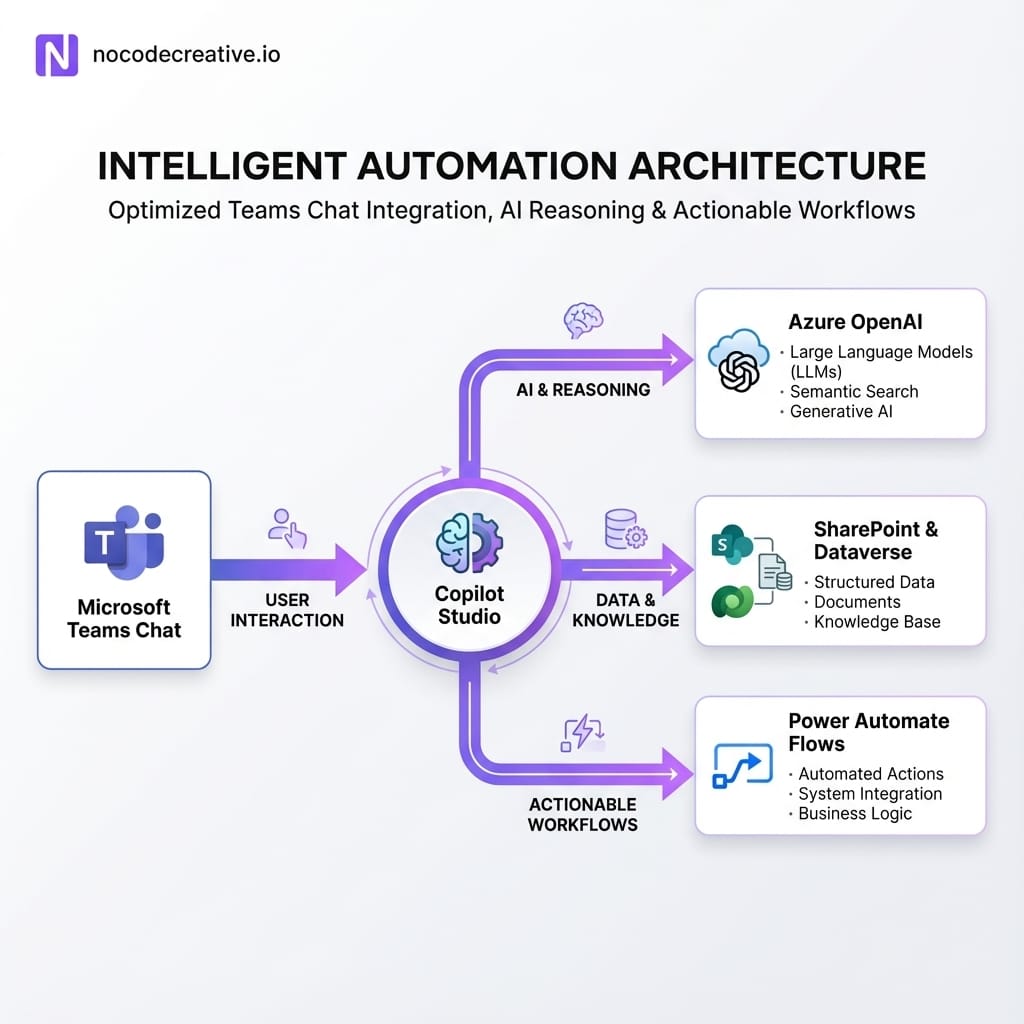
1. Entry point in Microsoft Teams
A Teams app, Copilot extension or Power Apps canvas app embedded in Teams provides a chat‑style interface. Staff can ask questions, request documents, raise tickets or kick off approvals from one place.
2. Bot and orchestration layer
Behind that, you use Copilot Studio or Power Virtual Agents to manage conversation flows and authentication, and to fan out to:
- Azure OpenAI for generative answers and drafting.
- SharePoint, OneDrive and Dataverse for documents and records.
- Line‑of‑business systems (HR, ITSM, CRM, finance) via connectors and custom APIs.
3. Grounding and safety
When a user asks "What is our parental leave policy in Germany?", the bot:
- Searches a curated SharePoint or Dataverse index of HR policies.
- Feeds the relevant passages, user context and question into Azure OpenAI.
- Returns a clear answer with citations and a link back to the source document.
4. Action triggers
For requests that are really actions ("request new laptop", "book annual leave", "raise supplier incident"), the bot hands off to Power Automate flows that update systems, create tickets or start approvals.
Governance, permissions and data boundaries
The key differences between this and a "ChatGPT bookmark in everyone’s browser" are:
- Tenant‑level control. Copilot and Agents respect your existing Microsoft 365 permissions, Purview labels and retention policies.
- Scoped knowledge. You decide which sites, libraries and tables are indexed for the AI front door, and you can use features like Restricted SharePoint Search and semantic indexing to tighten things.
- Auditing and monitoring. Prompts, responses and actions can be logged to a central workspace for review, tuning and training.
For many organisations, this is the safest way to give staff a powerful AI entry point without handing them raw model access and hoping for the best.
Pattern 2 – Document and email automation at scale
The second pattern focuses on the work everyone complains about: drafting, summarising and filing documents and email.
Standard prompts plus flows for RFPs, reports and approvals
A typical implementation looks like this:
1. Map a few document‑heavy processes
Common examples include RFP and tender responses, quarterly business reviews, incident and root cause analysis reports, or policy updates.
2. Define standard prompt patterns
In Word, Outlook and Teams, create Copilot prompt "recipes" that:
- Take a structured template or previous example as input.
- Pull in relevant data from CRM, finance or ticketing systems.
- Draft an initial version with clear headings, tables and action sections.
- Flag assumptions, risks or missing inputs.
3. Wrap outputs in Power Automate
When a user accepts a draft, save it to the correct SharePoint library, apply metadata and Purview labels, notify reviewers, and create records in Dataverse.
4. Standardise email workflows
In Outlook, combine Copilot drafting with flows that file key conversations, update CRM or helpdesk tickets, and generate structured follow‑up tasks.
The goal is not just that "Copilot saves you a few minutes writing an email", but that whole processes become measurable and repeatable, with AI taking the cognitively heavy parts and flows taking the admin.
Measuring time saved and error reduction
To keep finance and operations stakeholders on side, you need more than good vibes. At implementation time, set up:
- Baseline and target metrics for cycle time and effort per artefact (for example, days to complete an RFP draft, or hours senior people spend on board packs).
- Simple logging of how often prompts and flows are used, and where humans intervene.
- Quality checks, such as random sampling of outputs or mandatory human approval in specific stages.
We usually wire this into Power BI dashboards so COOs and CFOs can see, over a quarter, how much administrative time has moved from "doing the work" to "reviewing and approving what the system produced".
If you would like help choosing which processes to automate first and how to structure that measurement, our AI workflow design and Power Platform services at nocodecreative.io are designed for exactly this kind of change.
Pattern 3 – Model‑agnostic automation with n8n
The third pattern is about robustness. Given how often models and versions change, you do not want to scatter hard‑coded model names and API URLs across a dozen scripts and tools.
n8n makes it realistic for even modest teams to build model‑agnostic automation.
Designing an abstraction layer for OpenAI, Azure OpenAI and others
A practical design looks like this:
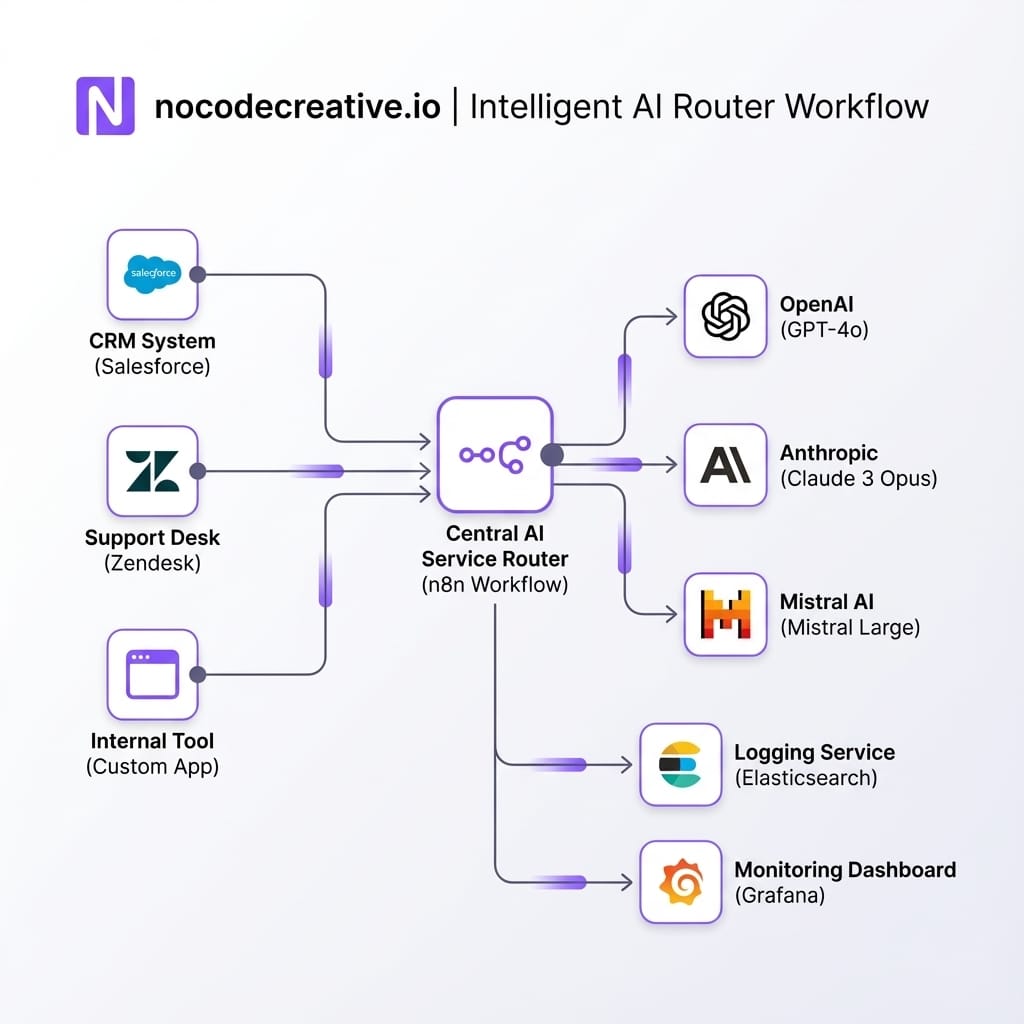
1. Create internal "AI services" in n8n
Create focused services like ai-classify-ticket, ai-draft-reply, ai-summarise-thread, or ai-enrich-contact.
2. Define the service flow
Each service accepts a well-defined JSON payload, chooses a model based on routing rules (cost, latency, content type), calls the model via the OpenAI node, normalizes the response, and logs the activity.
3. Consume services, not models
Your CRM, helpdesk, marketing automation and internal tools should call ai-classify-ticket via webhooks, rather than directly choosing gpt-4.1.
4. Centralize configuration
Use environment variables so that switching workloads from OpenAI to Azure OpenAI is a config change, not a code change. This allows you to pilot new models for small traffic percentages easily.
Handling monitoring, fallback and vendor changes
Once that abstraction is in place, you can start behaving like a small "AI SRE" team:
- Track error rates, response times and content quality for each model and route.
- Set thresholds that trigger fallback to a different model or provider when things degrade.
- Build simple canary and A/B test flows that mirror a slice of production traffic to new models and compare outputs before committing.
This is the sort of pattern that used to require a bespoke platform team. With n8n, most of the plumbing is accessible to technical operations, data or "vibe coder" teams inside an SME, especially with some upfront architecture help.
Change management, skills and risk management
Technology patterns are the easy part. Making them usable and safe in real organisations is where most initiatives falter.
Training staff, capturing prompts and setting guardrails
Three practical habits help:
- Treat prompts as assets, not personal hacks. Create shared prompt libraries in Confluence, SharePoint or Git, and encourage teams to contribute variants that work well for their processes.
- Give people concrete patterns, not just access. "Use Copilot where it helps" is too vague. "Use this prompt plus this Power Automate flow when responding to customer renewals" is actionable.
- Wrap freedom with some simple rules. For example, strictly prohibit pasting sensitive data into external tools, require human sign-off for external AI communications, and mandate the use of internal AI front doors for operational questions to ensure logging.
Dealing with model regressions and product changes
Model and product churn is guaranteed. You can reduce its blast radius by:
- Avoiding direct coupling to specific preview models unless you have a clear migration plan.
- Monitoring behaviour around release dates for key providers, and having "freeze" and rollback plans for critical workflows.
- Keeping a thin compatibility layer (as in the n8n pattern) so you can swap models while keeping call patterns and guardrails constant.
When OpenAI deprecates a preview model or Microsoft swaps the underlying model powering a Copilot experience, you want to be in a position where you are validating behaviour and flipping a version flag, not discovering on Monday morning that your entire helpdesk triage pipeline has gone sideways.
A 90‑day plan to move from experiments to platform
To finish, here is a realistic 90‑day roadmap you can adapt.
Days 1–30: Quick wins and discovery
- Enable Microsoft 365 Copilot for a pilot group across operations, finance, sales and support.
- Run a few guided workshops where people complete real tasks using Copilot, and capture the prompts and patterns that feel most valuable.
- Stand up a small n8n instance and prototype one contained AI service such as ticket classification or email triage, hooked into a non‑critical queue.
Days 31–60: Foundation projects
- Design and begin implementing your AI front door in Teams for two or three domains (for example HR FAQs, IT help, policy queries), using Azure OpenAI and Power Platform.
- Pick one document‑heavy process and build a Copilot plus Power Automate flow around it, with clear metrics.
- Formalise your AI service abstraction flows in n8n, including logging and a basic routing rule or two.
Days 61–90: Scale, governance and measurement
- Extend the AI front door to more content sources, and pilot a small number of actions (ticket creation, simple approvals).
- Expand document and email automation to a second process, reusing as much of your first pattern as possible.
- Start reporting basic metrics to leadership: time saved, cycle‑time reduction, deflection rates, and a simple risk / incident log related to AI use.
By the end of that period you have not just "allowed ChatGPT at work", but established concrete, governable capabilities across Microsoft 365 Copilot, Azure OpenAI, Power Platform and n8n, with room to evolve as models do.
Ready to professionalize your AI stack?
If you want a partner who lives in these stacks, our expert AI consultants can help you design and implement these architectures, from Microsoft 365 Copilot pilots through to n8n‑based AI service layers.
References
- ChatGPT launched three years ago today – TechCrunch retrospective
- Introducing GPT‑4.1 in the API – OpenAI
- What is Microsoft 365 Copilot? – Microsoft Learn
- Foundry Models sold directly by Azure (Azure OpenAI models) – Microsoft Learn
- OpenAI node documentation – n8n

 Wayne Simpson
 Wayne Simpson
 Wayne Simpson


Discussion