

From New Hire To Reliable n8n AI Agent
Most AI issues inside automation platforms are not about the model at all. They are about vague instructions.
Anthropic’s own team, including philosopher Amanda Askell, describes working with Claude as giving directions to a brilliant but completely new employee with amnesia. If you do not spell out norms, goals, formats, and edge cases, you get improvisation instead of consistent work. (businessinsider.com)
Context: For teams building n8n workflows and AI agents, that framing is incredibly useful. At nocodecreative.io we specialise in AI, automation and n8n, and we see the same pattern across SMEs and mid-market organisations: the difference between flaky AI and dependable AI often comes down to whether the “job description” in the prompt is any good.
This guide shows how to take Anthropic’s prompt engineering advice and operationalise it inside n8n, so your AI agents behave like reliable colleagues rather than unpredictable chatbots.
Why AI projects quietly fail in automation platforms
If you have experimented with AI in tools like n8n, you might recognise some of these symptoms:
- ✖ A support triage flow works during testing, then suddenly starts returning malformed JSON that breaks the workflow.
- ✖ A sales follow-up agent produces lovely emails for one segment, then wildly off-brand messages for another.
- ✖ Changing one line in a prompt to “make it shorter” silently degrades performance across several flows.
From the outside it can look like the model is unreliable. In practice, Anthropic’s documentation and blog posts point to a simpler diagnosis: prompts are often too short, missing context, and not treated as first-class artefacts. (docs.anthropic.com)
Inside an automation platform this hurts even more than in a chat window. A flaky answer is annoying in a browser. A flaky answer in an n8n workflow can fail JSON parsing and halt the flow, route a ticket to the wrong queue, or trigger the wrong finance or compliance path.
The fix is rarely “switch model provider”. It is almost always “treat prompts as structured, versioned instructions, and wire them into your workflows properly”.
Anthropic’s mental model: Claude as a brilliant new employee with amnesia
Anthropic’s official prompt engineering guide encourages you to “think of Claude as a brilliant but very new employee with amnesia who needs explicit instructions”. (docs.anthropic.com)
The New Hire
- Has raw capability
- Does not know your processes
- Does not understand what “good” looks like for your organisation
- Needs explicit policies and templates before you let them loose in production
Claude (The AI Agent)
- Does not know your tone of voice
- Does not know your internal SLAs
- Does not know your escalation rules
- Does not know which fields your n8n workflow expects in its JSON
If you treat your n8n AI Agent like a generic chatbot, you effectively drop a genius intern into your live systems with no induction. When you instead treat prompts as onboarding documents and runbooks, behaviour becomes far more predictable.
Business Insider’s profile of Amanda Askell reinforces this. She highlights clarity, experimentation, and careful explanation of your own thinking as central to good prompting, not clever tricks. (businessinsider.com)
Core Anthropic prompting principles mapped to n8n
Anthropic’s prompt engineering material focuses on a small set of principles that map neatly to how you configure n8n AI Agents. (docs.anthropic.com)
1. Clear role
Anthropic recommends giving Claude an explicit role, not a vague instruction. For example, “You are an L1 support triage analyst for a SaaS product” rather than “Help me with support tickets”.
In n8n, this belongs in the system prompt or “instructions” field of your Anthropic-powered AI node, or in the Agent’s base prompt if you are using the AI Agents framework. (docs.anthropic.com)
2. Rich context
Claude performs better when you include what the task is, who it is for, constraints, policies, and domain-specific hints. In n8n, you pass this context through the normal input data the AI node receives. For example, the node might be given:
- The raw support ticket text
- Customer plan and region
- Current ticket count and SLA
- Links or pasted snippets of policies
3. Constraints and guardrails
Anthropic’s docs stress the importance of telling Claude what not to do, as well as what to do, and of giving guardrail instructions like “if you are unsure, escalate”. (docs.anthropic.com)
In n8n, this again lives in your system prompt, but you can strengthen it by pairing the AI node with manual approval nodes, conditional checks on model output, and clear routing rules for “uncertain” or “needs human review” cases.
4. Examples (multishot prompting)
Anthropic calls examples a “secret weapon” for getting Claude to match your style and structure. Their multishot prompting guide shows how a few concrete examples dramatically improve consistency, especially for structured outputs. (docs.anthropic.com)
In n8n, those examples live directly inside your prompt template that you send to the Anthropic node, often using XML-like tags to separate sections.
5. Structured outputs and formats
Anthropic actively encourages using structured formats, including XML-style tags and JSON-like output definitions, especially when the output is being consumed by code. (docs.anthropic.com)
In n8n this is essential. Your workflows expect valid JSON, fixed keys and datatypes, and predictable enums such as priority: "low" | "medium" | "high".
Designing system prompts for n8n AI Agents as job descriptions
A good n8n AI Agent prompt reads less like a clever one-liner and more like a short role document. A helpful pattern is to structure the system prompt into sections: About the role, Inputs you will receive, What you must do, What you must never do, Output format, and Examples.
In practice, the system prompt for a support triage agent might look roughly like this:
[ROLE]
You are an L1 support triage analyst for our SaaS product.
[GOAL]
Classify incoming tickets and suggest a safe first reply that helps the customer and respects our policies.
[INPUTS]
You will receive:
- Ticket text
- Customer plan
- Region
- Previous tickets (if any)
[INSTRUCTIONS]
1. Read the ticket carefully.
2. Decide if it is a bug, feature request, billing issue, or account access problem.
3. Assign a priority of "low", "medium", or "high".
4. Decide if it needs immediate human escalation.
[CONSTRAINTS]
- If you are unsure, set `needs_escalation` to true.
- Never promise refunds or discounts.
[OUTPUT_FORMAT]
Respond only with valid JSON matching this TypeScript type:
{
"category": "bug" | "feature" | "billing" | "access" | "other",
"priority": "low" | "medium" | "high",
"needs_escalation": boolean,
"tags": string[],
"suggested_reply": string
}
[EXAMPLES]
...
In n8n you would store this as a text template, inject any per-environment details (currency, legal language), send it as the system content to the Anthropic node or AI Agent configuration, and then parse the JSON response for routing and automation.
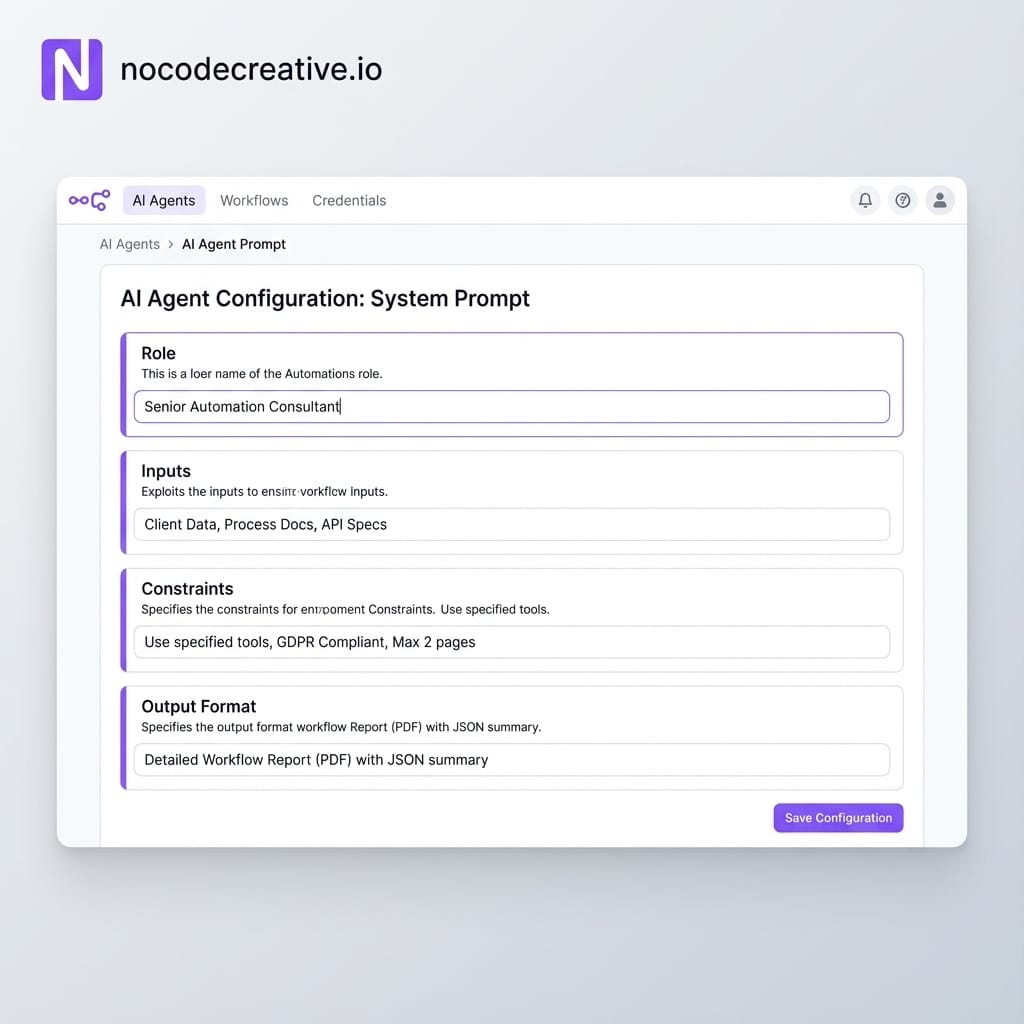
Treat these prompts as artefacts you review with stakeholders, not just as something the builder types into a node at midnight.
Central prompt library for n8n
Once you have more than a handful of AI-powered workflows, storing prompts directly inside each node becomes unmanageable. This is where a central prompt library pays off.
Anthropic’s guidance pairs nicely with a simple pattern in n8n:
- Prompts live in one source of truth, such as a Git repository, LangFuse, a database table, or an internal document store.
- Each prompt is versioned and has metadata: name, owner, last updated, environment, use case.
- n8n nodes load the correct prompt at runtime based on an identifier and environment.
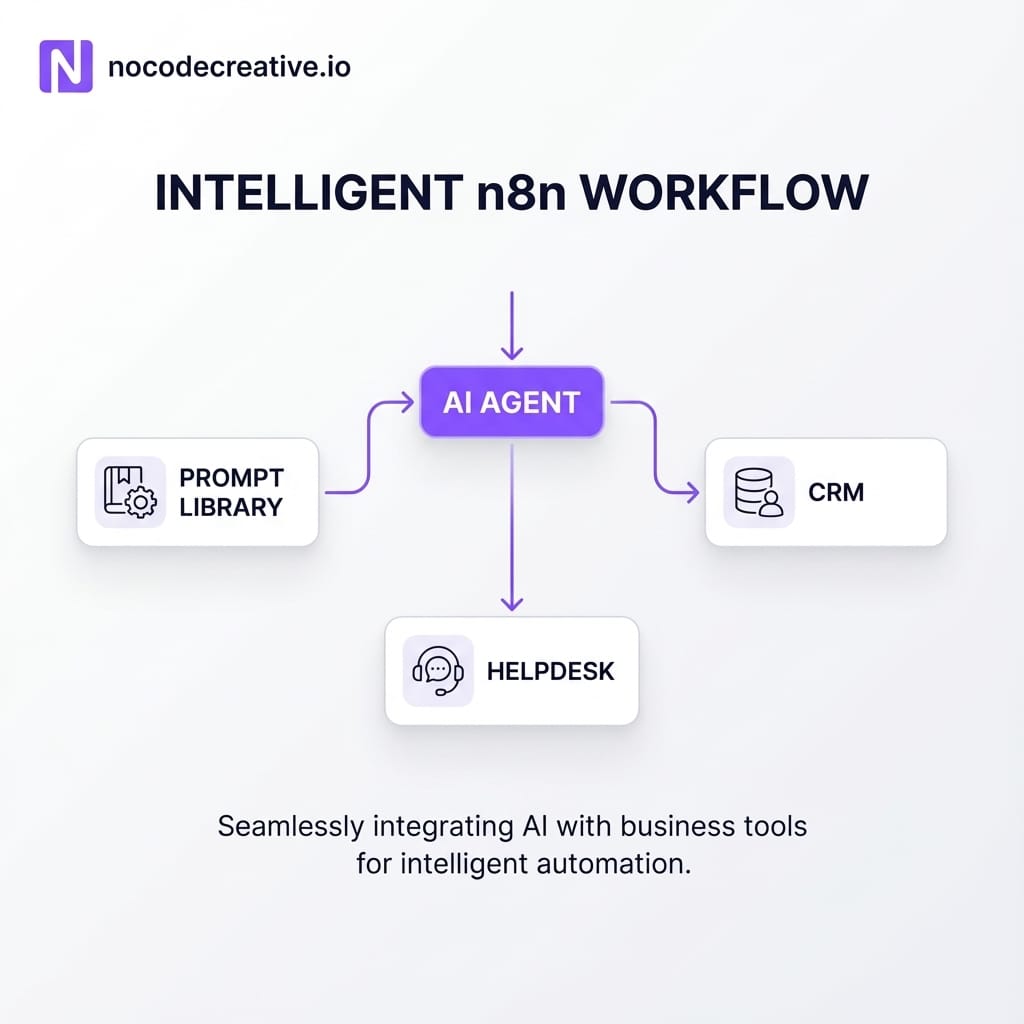
In a typical n8n setup you might use a data store or database node to fetch the current version of the “support_triage_v3” prompt, then pass that text into your Anthropic Chat Model node as the system prompt. (docs.n8n.io). You would also log which version was used alongside each run for debugging and evaluation.
For SMEs and mid-market teams this model is far more realistic than hiring a dedicated prompt engineering function. Your ops or IT lead becomes the “prompt owner”, and the library becomes a shared asset the whole organisation can improve over time.
If you would like help designing that sort of prompt library and wiring it cleanly into your n8n instance, our team at nocodecreative.io focuses on n8n-based AI and workflow automation. We can help you design storage patterns, metadata, and retrieval workflows that keep prompts in sync with the rest of your stack.
Multishot examples and strict schemas in support and sales workflows
Anthropic’s multishot prompting guide shows that including a few carefully chosen examples inside your prompt can dramatically increase accuracy and consistency, especially when you need structured data. (docs.anthropic.com)
Inside n8n, this is ideal for support and sales use cases.
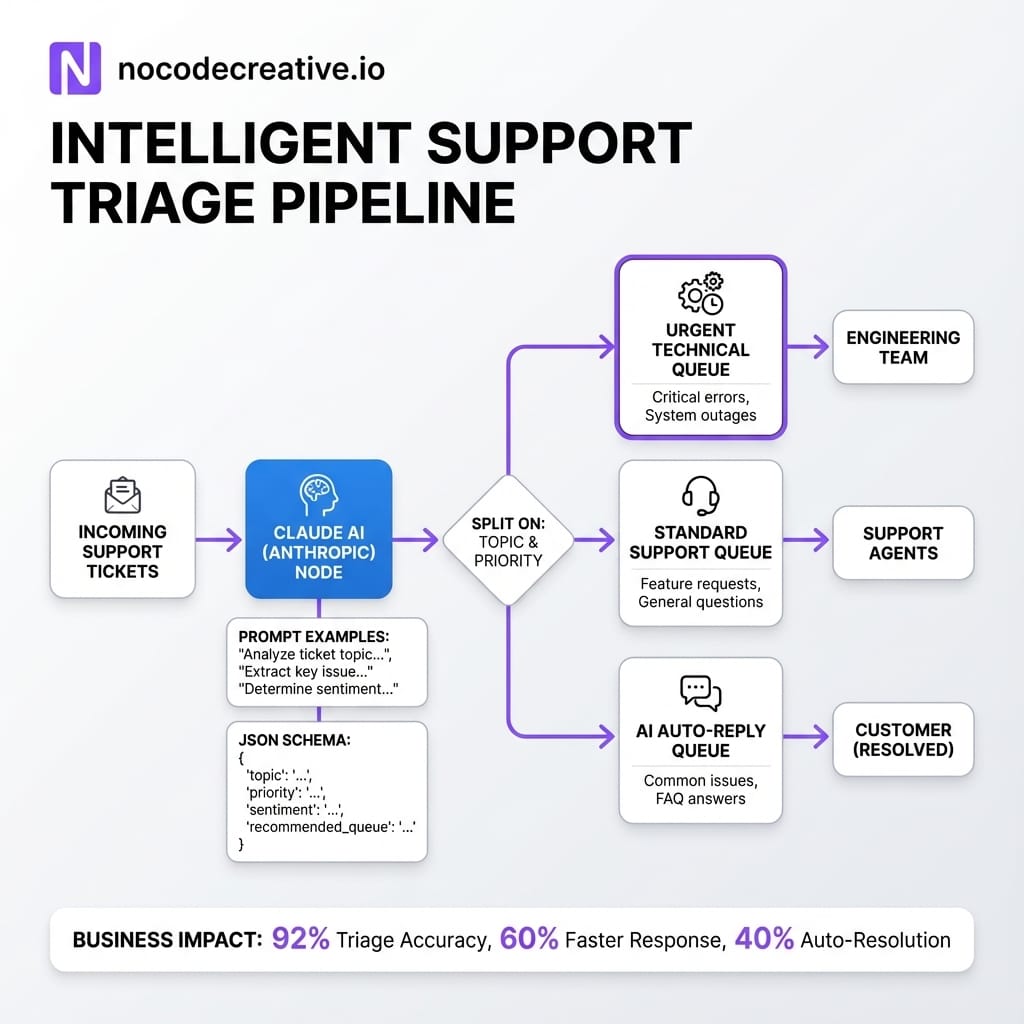
Support triage and summarisation
For support, your prompt might include two or three sample tickets that map to different categories and priorities, the ideal JSON output for each, and a short suggested reply for each example.
When real tickets flow in via your helpdesk integration:
- n8n passes the ticket, customer context, and the multishot prompt to Claude
- The Anthropic node returns JSON with
category,priority,suggested_reply, andneeds_escalation - n8n routes the ticket accordingly, posts the summary back to your helpdesk, and queues suggested replies for human approval
Sales messaging copilot
For sales, you can treat Claude as a junior SDR sitting inside your CRM flows. A new lead enters your system, n8n collects lead data and segment information, and an AI node with a multishot prompt generates a structured payload such as:
{
"subject_line": "string",
"body_markdown": "string",
"tone": "warm_consultative"
}
The multishot examples in the prompt show Claude exactly what a “warm, consultative” email looks like for your brand, using UK or local compliance rules as needed. Reps then receive draft messages already mapped to your CRM fields, ready for quick review rather than writing from scratch.
Prompt chaining and evaluation flows in n8n
Some tasks are too complex for a single prompt. Anthropic’s guidance on chaining prompts and using chain-of-thought hints encourages breaking work into smaller, inspectable steps. (docs.anthropic.com)
n8n is naturally suited to this pattern because workflows already run step by step. Typical chains inside n8n might look like:
- Step 1: Research Prompt
Gathers and summarises relevant information from a CRM, knowledge base or external API. - Step 2: Draft Prompt
Uses the research summary to produce an email, report, or plan. - Step 3: Review Prompt
Checks the draft against explicit criteria: tone, compliance, completeness. - Step 4: Policy Filter Prompt
Flags potential issues and sets a boolean likerequires_human_review.
If you later discover a policy gap, you can refine the review prompt without touching the draft step, which makes maintenance far easier.
Implementing prompt governance and testing in n8n
For higher-risk flows in finance, compliance, or customer communication, you should not change prompts directly in production. Anthropic’s own docs discuss evaluation, test cases, and guardrails as part of a broader context engineering practice, not as an afterthought.
In n8n you can turn that into a lightweight “prompt CI” pipeline:
- Prompts are stored in your central library with version tags.
- When a prompt changes, a separate n8n workflow is triggered.
- That workflow runs the updated prompt against a curated set of test inputs using the Anthropic node.
- The resulting outputs are compared to expected behaviours or checked against evaluation rules.
- Any failures generate alerts in Slack or Microsoft Teams via the relevant n8n nodes.
This does not need to be complicated. Even a basic suite asking “Does this still return valid JSON for 50 historical support tickets?” or “Does this ever suggest actions that violate our refund policy?” will catch a surprising number of regressions before they hit customers.
If you would prefer not to design that testing harness yourself, our intelligent workflow automation services at nocodecreative.io can help you set up prompt libraries, evaluation workflows, and approval flows that your ops and IT teams can own long term.
Practical rollout plan for SMEs and mid-market teams
It is tempting to redesign everything at once. In practice, SMEs make faster progress when they start very small. A sensible rollout path looks like this:
- Pick one use case where AI is clearly useful but failure is not catastrophic (e.g., Support triage, internal reports).
- Collect a small, representative dataset of real examples, including some awkward edge cases.
- Write a simple runbook that describes how a human would do the work.
- Turn that runbook into an Anthropic-style job description prompt, including examples and a strict output schema.
- Wire it into a single n8n workflow, with human approval on the final action.
- Watch how it behaves for a couple of weeks, then refine prompts based on real outcomes.
- Only then, copy the pattern into a second workflow.
That first “agent plus runbook” becomes your internal template. With each new use case you improve both the prompt style and your library structure.
Common pitfalls and how a structured approach avoids them
Across projects we see the same prompt-related issues crop up in n8n environments:
Over-clever prompts
Short, witty prompts might look impressive in a demo but are fragile in production. They rarely specify schemas, constraints, or policies.
Missing context
The AI is asked to “reply to this customer” without any idea who the customer is, what has been promised before, or what counts as a breach of policy.
No test data
Teams ship prompts into production without keeping a small set of canonical examples to run after each change.
Prompt sprawl
Slight variants of the same prompt live in ten different n8n nodes, so no one knows which one is “current” or safe to change.
Anthropic’s job-description style prompting, centralised libraries, and multishot examples give you a straightforward remedy. Combined with n8n’s ability to orchestrate both workflow steps and evaluation runs, you gain a more controlled, scalable AI layer rather than a collection of experiments.
At nocodecreative.io we design and implement exactly this kind of structure for clients, often starting with a single n8n agent in support, operations, or sales, then expanding once the pattern is proven.
Turning ad-hoc Claude prompts into n8n-ready assets in days
Many teams already have half-decent prompts buried in chat history or one-off experiments with Claude. The work now is to convert that pile of text into reusable assets. A practical conversion process looks something like:
- Take your best-performing ad-hoc prompts and copy them into a document.
- Normalise them into a common structure: role, inputs, tasks, constraints, output format, examples.
- Use Anthropic’s own prompt improver tool to tighten structure and reasoning where tasks are complex.
- Assign each prompt a clear identifier and owner.
- Store them in your chosen library store.
- Wire one into an n8n workflow in a low-risk context, then add simple evaluation tests.
Once that first “proper” agent is running, the rest of your prompts can be upgraded in parallel, one by one, with far less risk.
Ready to professionalise your AI agents?
Our team regularly helps clients do this in focused sprints, converting scattered prompts into a coherent library and wrapping them in n8n workflows, guardrails, and reporting. Our expert AI consultants can help you implement these workflows.
Get in touch to discuss your automation needs
References
- Anthropic’s “Be clear, direct, and detailed” prompt engineering guide
- Use examples (multishot prompting) to guide Claude’s behaviour
- Claude 4 prompting best practices
- Use our prompt improver to optimise your prompts
- Best practices for prompt engineering – Claude blog
- Build Custom AI Agents With Logic & Control – n8n AI Agents
- What is an agent in AI? – n8n advanced AI docs
- Anthropic credentials – n8n integration docs
- Anthropic’s resident philosopher shares her tips to create the best AI prompts – Business Insider

 Wayne Simpson
 Wayne Simpson
 Wayne Simpson


Discussion