


What Stanford’s AI‑first CS class means for your engineering team
Stanford is now teaching computer science students how to ship software without writing much code by hand. That is not a thought experiment; it is the design of a very real course.
In “The Modern Software Developer”, lecturer Mihail Eric encourages students to lean fully into tools like Cursor and Claude. The goal is learning to design specs, orchestrate AI agents, and review what those agents produce, rather than proving they can type out every line themselves. The course has become one of the most popular classes in the department and treats AI IDEs as standard kit, not as cheating (businessinsider.com).
At nocodecreative.io, this is exactly the kind of shift we help engineering and operations teams adapt to. The talent coming out of universities and bootcamps will assume AI‑first workflows, and the organisations that thrive will be the ones that turn that expectation into safe, governed practice across their stack.
This post looks at what Stanford’s AI‑first course signals for your hiring, tooling, and delivery, and how to stand up similar AI IDE workflows with Cursor, Claude Code, n8n, and Azure in a matter of weeks.
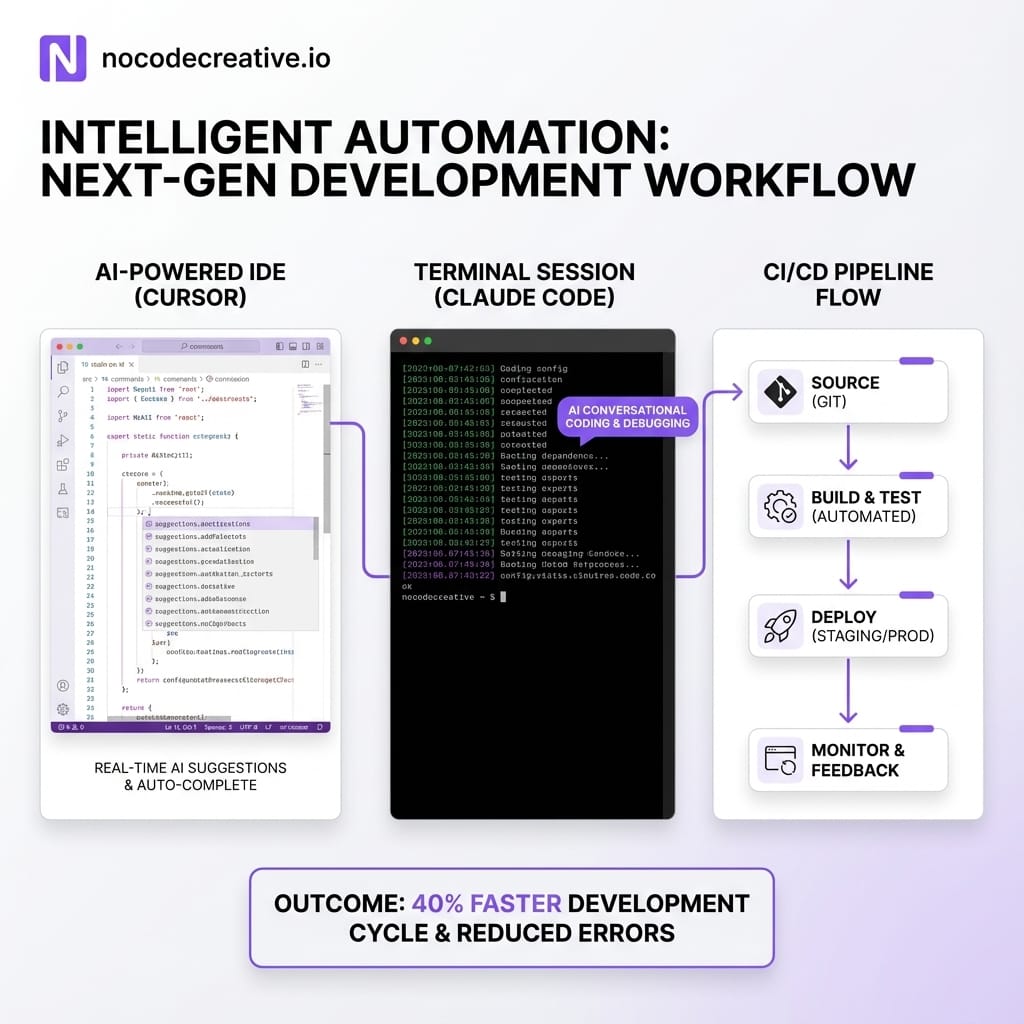
From typing code to orchestrating AI – the new developer skillset
For most of the last few decades, “strong engineer” meant someone who could hold a large codebase in their head and write high-quality code quickly. AI IDEs are shifting that centre of gravity.
The core skills that matter now look distinctively different:
- • Turning messy product requirements into clear, testable specs
- • Decomposing a problem into steps that an AI agent can execute safely
- • Providing the right context from the codebase, docs, and architecture
- • Critically reviewing, testing, and refactoring generated code
- • Knowing when to stop asking the AI and design the system yourself
In Stanford’s class, students are explicitly told they can complete the course while writing very little code manually, as long as they can frame problems, drive tools like Cursor and Claude effectively, and validate the results. Guest lectures from people behind Claude Code, Warp, and other agentic tools underline the point that the “best engineers” will be those who can wield AI rather than avoid it.
For hiring managers, that means interview loops and internal ladders need to evolve. Whiteboard coding on a blank editor is fast becoming orthogonal to how work is actually done in modern stacks that use n8n workflows, Microsoft Copilot for SMEs, or Claude Code in the terminal.
You still need deep fundamentals, but you also need people who treat AI like a pair programmer rather than a vending machine. These engineers can explain what a Cursor Agent is doing across a repo, understand the difference between a safe “lint and tests” refactor and a risky schema migration, and are comfortable designing guardrails rather than simply following them.
Inside “The Modern Software Developer”
The Business Insider piece paints an interesting picture. Students sit in a basement classroom while the lecturer opens by promising to “teach them how to code without writing a single line of code”. Cursor and Claude are front and centre in the curriculum, not grudging allowances on the side.
The structure roughly mirrors what a modern AI‑powered feature delivery lane looks like in industry: starting from a narrative problem statement and acceptance criteria, using AI tools to explore approaches, scaffold code, and write tests, and iterating quickly with human review and debugging at every step.
Cursor’s own docs show how far an AI IDE can go here. Its Agent can explore your codebase using semantic search, run terminal commands to edit files and apply diffs, maintain checkpoints for safety, and respect project‑level Rules that encode your standards and patterns (docs.cursor.com).
On the Claude side, Anthropic’s Claude Code gives students a terminal‑first agent that can plan multi‑step coding tasks, manipulate files, run tests, and integrate into CI and GitHub Actions. In other words, the tools being used in that Stanford classroom are the same tools your teams can—and probably should—be using in production environments, with slightly more structure, logging, and security around them.
The AI‑first delivery pipeline
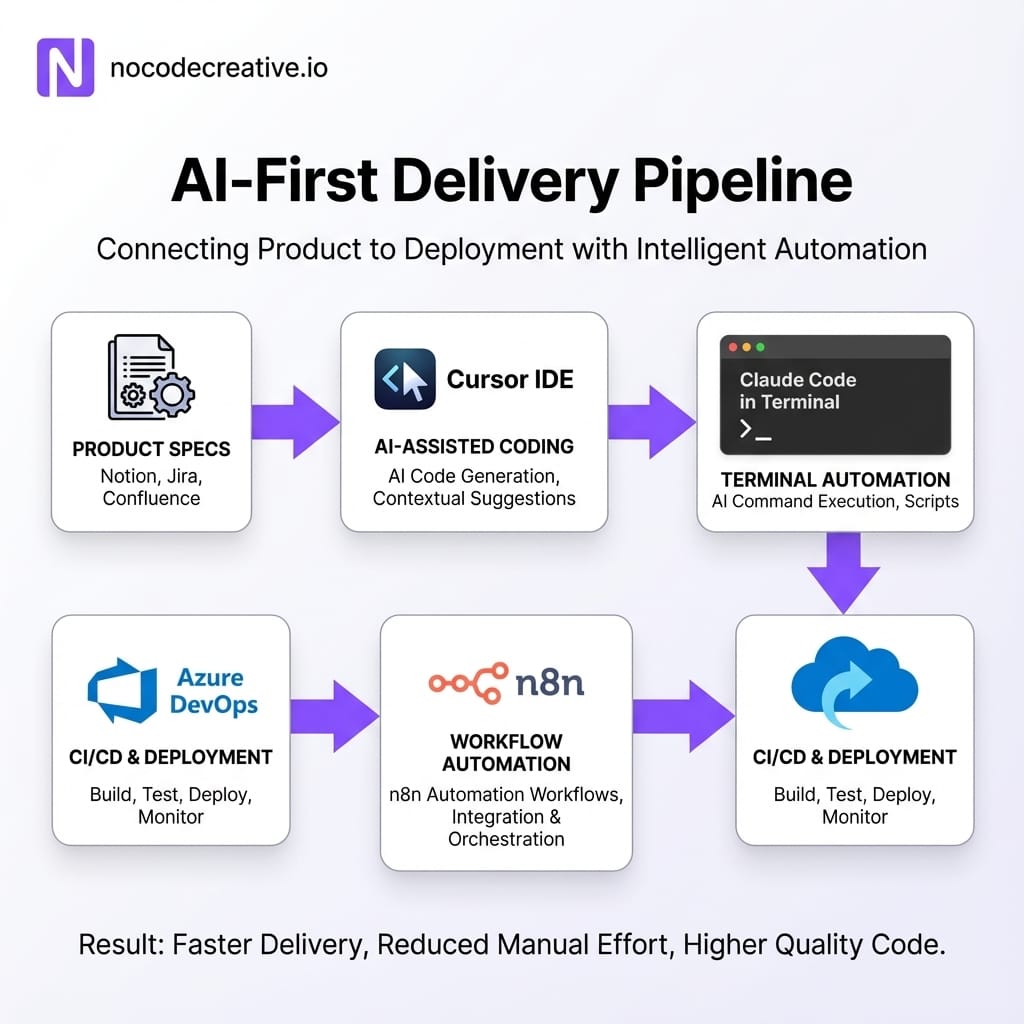
If you translate the course philosophy into an enterprise context, you get a recognisable pattern: an AI‑first feature delivery lane that sits alongside your existing “traditional” pipeline.
Defining specs and decomposition for AI agents
The biggest trap when teams “try AI” is throwing vague tickets at an agent and hoping for the best. The Stanford model starts earlier, with better inputs. In practice, you want product and engineering leads to:
- Use a single lightweight spec template for AI‑assisted work.
- Define clear business behaviour, edge cases, and non‑functional requirements.
- Annotate which parts are suitable for AI (scaffolding, boilerplate, data access) and which parts need human design (core algorithms, tricky security logic).
Those specs then become the briefing material for Cursor, Claude Code, or other agents. You can enforce this pattern with simple automations: for example, an n8n workflow that rejects GitHub issues that do not include acceptance criteria, or a Power Automate flow in Microsoft 365 that nudges product owners to complete key sections before work is picked up.
Using AI IDEs for scaffolding, refactors and tests
Once the spec is in place, tools like Cursor and Claude Code excel at creating initial project structure, implementing straightforward CRUD endpoints, generating test suites, and performing wide‑ranging refactors that would be tedious by hand.
Cursor’s Agent, for example, can open the side panel, read multiple files, run tests via the terminal and propose a diff that you then apply or reject in the IDE’s diff view.
The key difference between a hobbyist setup and an enterprise pipeline is how you capture what the AI did. At nocodecreative.io we often route AI‑generated diffs through a central GitHub or Azure DevOps branch policy and use n8n to log prompts and file paths into a data store. That turns ad‑hoc AI use into something observable and auditable, which is increasingly important for UK GDPR, EU GDPR, and similar data compliance regimes.
Human review, debugging and system design
None of this replaces human engineering judgement. Tools like Claude Code and Cursor are very clear that they are assistants; their docs repeatedly stress the need to review, test, and understand the changes they propose.
The AI‑first lane still contains standard code review, debugging sessions (sometimes with AI as a helper), and Architectural Decision Records (ADRs). The difference is that humans are now spending more time on what should exist and how it should behave, and less time typing boilerplate or shuffling imports.
Implementing AI IDE workflows in your organisation
You do not need to copy Stanford’s course wholesale. You can build a pragmatic, AI‑first workflow that fits your stack using tools you may already have: Azure, Microsoft 365, Power Platform, n8n, and GitHub or Azure DevOps.
Selecting tools and models
A sensible starting point involves a mixed toolchain:
- CursorPrimary IDE for teams that live in Visual Studio Code.
- Claude CodeTerminal-based tool for complex agentic work and CI integration.
- Azure OpenAIRuns alongside Claude for tasks requiring data residency in Azure or integration with Microsoft 365.
- n8nNeutral automation layer that orchestrates Git operations and pushes events to Slack or Teams.
For some teams, Power Automate will complement n8n when workflows must sit entirely inside Microsoft 365 boundaries. Choosing models is less about brand loyalty and more about fit: Claude models are particularly strong for agentic coding and planning, while Azure OpenAI models give you comfort around compliance and hosting.
Wiring repos, CI/CD and guardrails
To move from experimentation to something your risk and security teams can sign off, you need clear integration patterns. Connect Cursor to your repos with least‑privilege access. Configure Claude Code GitHub Actions to comment on PRs but block them from merging without human approval. Use n8n workflows to log interactions and enforce file path restrictions—like blocking AI from editing sensitive infra files.
Guardrails should also cover secrets and data. Ensure .env files are never sent to external APIs, use enterprise contracts so your code isn't used for training by default, and define clear policies for data handling.
Establishing prompt libraries and standards
The fastest way to make AI IDE use safe and consistent is to make it boring. That means shared patterns rather than every engineer crafting prompts from scratch.
Practical steps include creating a library of “blessed” prompts for common tasks (e.g., “Refactor this module for readability without changing behaviour”) and using Cursor’s Rules feature to bake project instructions directly into the IDE. Maintaining repo‑level files like `CLAUDE.md` gives Claude Code consistent context on layout and commands.
If you would like help designing those standards and wiring them into tools like Cursor, Claude Code, n8n and Azure DevOps, our team at nocodecreative.io specialises in building exactly this sort of AI‑native development environment.
Rethinking hiring and onboarding
Stanford’s approach is a useful preview of what your next generation of hires will expect when they arrive. They will not see AI IDEs as optional extras; they will see them as the standard way work gets done.
Instead of throwing junior engineers at a brittle legacy codebase, design an internal “AI IDE academy” that mirrors some of the course dynamics. Create a training repo seeded with safe tasks, focus exercises on problem decomposition and spec writing, and structure labs where engineers must explain the AI's output.
Measuring productivity, quality and risk
Leadership will rightly ask, “Is this actually helping?” You need metrics that capture more than lines of code. Useful signals include lead time for changes, test coverage trends, and the percentage of PRs that receive AI‑generated review comments. You can instrument much of this through n8n or Azure DevOps Extensions to create a feedback loop based on real outcomes.
Getting started in 4–6 weeks: a pragmatic roadmap
Standing up an AI‑first delivery lane does not need to be a year‑long transformation programme. A focused 4–6 week initiative can get you from “interesting idea” to production pilots.
Discovery and design (Weeks 1–2)
- Map your current delivery workflow from ticket creation to deployment.
- Identify one or two product areas that are low risk but high enough value to matter.
- Choose your initial tools (e.g., Cursor plus Claude Code, with Azure DevOps and n8n).
- Define governance: data residency, vendor contracts, model training settings.
Pilot lane and standards (Weeks 3–4)
- Create the AI‑first spec template and update issue trackers.
- Configure Cursor Rules, Claude Code projects, and DevOps integration.
- Implement minimal guardrails around file paths and secrets.
- Run a real feature end‑to‑end in the AI‑first lane with senior engineering oversight.
Scale and internal academy (Weeks 5–6)
- Refine prompt libraries and rules based on pilot feedback.
- Stand up your internal “AI IDE academy” for safer learning.
- Extend dashboards for leadership visibility.
- Decide whether to formalise a dedicated AI‑assisted squad or roll out broadly.
Turning AI‑first development into a durable advantage
Stanford’s AI‑first CS course is not just a curiosity in the academic world. It is a signal that the way engineers are trained, and the way they expect to work, is shifting towards orchestrating AI IDEs, not avoiding them.
If you bring that mindset into your organisation with care—clear specs, solid guardrails, shared prompt patterns, and thoughtful measurement—you get leaner teams that can ship more, with better tests and more time for deep system design.
There is a lot of noise around AI, but this particular shift is very practical and very implementable. Treated as part of your engineering discipline, it can quickly become just “how we build software here”.
Ready to adapt?
Our expert AI consultants can help you implement these workflows.
References
- The hottest Stanford computer science class isn't banning AI tools - it's embracing them (Business Insider)
- Cursor docs - Quickstart
- Cursor docs - Agent overview
- Anthropic docs - Claude Code quickstart
- Anthropic docs - Claude Code GitHub Actions

 Wayne Simpson
 Wayne Simpson


Discussion